


 j
j성공을 위한 스킬
Ask the Community
Page Designer와 PWA Kit 통합
구성요소 맞춤화
페이지 맞춤화
암호 재설정 구현
암호 없는 로그인 구현
소셜 로그인 구현
쿠키를 사용한 개인화
구매자 컨텍스트를 사용한 개인화
매장 찾기로 매장 매출 증대를 참조하십시오.
Tracking Consent Banner(추적 동의 배너)로 개인정보보호를 참조하십시오.
캐시 적중률 극대화
사이트맵으로 SEO 개선
페이지에 구성요소를 추가하려고 하는데 재정의할 수 있는 기존 구성요소가 없다고 가정해 보겠습니다. 페이지 수준 확장성은 이 문제를 해결합니다. 이 자튜토리얼에서는 템플릿 확장성을 사용하여 페이지에 구성 요소를 추가함으로써 PDP(제품 세부 정보 페이지)를 맞춤화합니다. 이 예에서는 PDP에 프로모션 배너를 추가합니다.
자세한 지침은 다음 설명서를 참조하십시오. 모범 사례 및 문제 해결.
이 튜토리얼의 명령을 실행하기 전에 Placeholder를 실제 값으로 바꿉니다. 자리 표시자는 $PLACEHOLDER와 같은 형식입니다.
페이지 오른쪽에 있는 제목을 사용하여 이 튜토리얼의 다른 위치로 이동합니다.
Tip
이 튜토리얼을 완료하려면 다음 중 하나를 수행합니다.
PWA Kit 버전 3.x로 생성한 프로젝트를 사용합니다.
또는
프로젝트가 없는 경우 다음을 실행하여 PWA Kit 프로젝트를 생성합니다.
npx @salesforce/pwa-kit-create-app@latest ——outputDir $PATH/TO/NEW/LOCAL/PROJECT
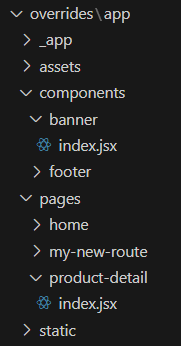
overrides/app/components 폴더에 banner라는 폴더를 만듭니다.banner 폴더에 index.jsx라는 파일을 만듭니다.overrides/app/pages에 product-detail이라는 폴더를 만듭니다.product-detail 폴더에 index.jsx라는 파일을 만듭니다.새 폴더와 파일의 구조는 다음과 같습니다.
overrides/app/routes.jsx의 경로 목록에 제품 세부 정보 경로를 추가합니다.
1const routes = [
2  {
3    path: "/",
4    component: Home,
5    exact: true,
6  },
7  {
8    path: "/my-new-route",
9    component: MyNewRoute,
10  },
11  // Add a product detail route.
12  {
13    path: "/product/:productId",
14    component: ProductDetail,
15  },
16  ..._routes,
17];overrides/app/components/banner/index.jsx에 다음 코드를 추가합니다.
1import React from "react";
2import { Box, Flex, Text } from "@chakra-ui/react";
3import Link from "@salesforce/retail-react-app/app/components/link";
4const BannerWithImage = () => {
5  return (
6    <Link to="/category/womens" bg="teal.200">
7      <Box py={4} maxH="150px" overflow="hidden">
8        <Flex
9          maxW="1200px"
10          mx="auto"
11          align="center"
12          justify="center"
13          position="relative"
14        >
15          <Text fontSize="2xl" fontWeight="bold" color="black">
16            Flash Sale on Women's Clothes. Up to 50% Off.
17          </Text>
18        </Flex>
19      </Box>
20    </Link>
21  );
22};
23
24export default BannerWithImage;아래의 코드를 overrides/app/pages/product-detail/index.jsx에 추가합니다.
여기서는 PDP의 현재 레이아웃을 유지하고 페이지에 구성요소만 추가하려고 합니다. 따라서 기본 템플릿의 코드를 새로 만든 index.jsx 파일에 복사하여 재사용합니다. 그런 다음 코드를 적절하게 맞춤화할 수 있습니다.
이 예에서:
BannerWithImage 구성요소를 가져옵니다.BannerWithImage 구성요소를 추가합니다.1import React, { Fragment, useCallback, useEffect, useState } from "react";
2import PropTypes from "prop-types";
3import { Helmet } from "react-helmet";
4import { FormattedMessage, useIntl } from "react-intl";
5// This is line 5. Import your banner.
6import BannerWithImage from "../../components/banner";
7
8// Components
9import {
10 Box,
11 Button,
12 Stack,
13} from "@salesforce/retail-react-app/app/components/shared/ui";
14import {
15 useProduct,
16 useCategory,
17 useShopperBasketsMutation,
18 useShopperCustomersMutation,
19 useCustomerId,
20} from "@salesforce/commerce-sdk-react";
21
22// Hooks
23import { useCurrentBasket } from "@salesforce/retail-react-app/app/hooks/use-current-basket";
24import { useVariant } from "@salesforce/retail-react-app/app/hooks";
25import useNavigation from "@salesforce/retail-react-app/app/hooks/use-navigation";
26import useEinstein from "@salesforce/retail-react-app/app/hooks/use-einstein";
27import useActiveData from "@salesforce/retail-react-app/app/hooks/use-active-data";
28import { useServerContext } from "@salesforce/pwa-kit-react-sdk/ssr/universal/hooks";
29// Project Components
30import RecommendedProducts from "@salesforce/retail-react-app/app/components/recommended-products";
31import ProductView from "@salesforce/retail-react-app/app/components/product-view";
32import InformationAccordion from "@salesforce/retail-react-app/app/pages/product-detail/partials/information-accordion";
33
34import {
35 HTTPNotFound,
36 HTTPError,
37} from "@salesforce/pwa-kit-react-sdk/ssr/universal/errors";
38
39// constant
40import {
41 API_ERROR_MESSAGE,
42 EINSTEIN_RECOMMENDERS,
43 MAX_CACHE_AGE,
44 TOAST_ACTION_VIEW_WISHLIST,
45 TOAST_MESSAGE_ADDED_TO_WISHLIST,
46 TOAST_MESSAGE_ALREADY_IN_WISHLIST,
47} from "@salesforce/retail-react-app/app/constants";
48import { rebuildPathWithParams } from "@salesforce/retail-react-app/app/utils/url";
49import { useHistory, useLocation, useParams } from "react-router-dom";
50import { useToast } from "@salesforce/retail-react-app/app/hooks/use-toast";
51import { useWishList } from "@salesforce/retail-react-app/app/hooks/use-wish-list";
52
53const ProductDetail = () => {
54 const { formatMessage } = useIntl();
55 const history = useHistory();
56 const location = useLocation();
57 const einstein = useEinstein();
58 const activeData = useActiveData();
59 const toast = useToast();
60 const navigate = useNavigation();
61 const [productSetSelection, setProductSetSelection] = useState({});
62 const childProductRefs = React.useRef({});
63 const customerId = useCustomerId();
64 /****************************** Basket *********************************/
65 const { data: basket } = useCurrentBasket();
66 const addItemToBasketMutation = useShopperBasketsMutation("addItemToBasket");
67 const { res } = useServerContext();
68 if (res) {
69 res.set("Cache-Control", `s-maxage=${MAX_CACHE_AGE}`);
70 }
71 const isBasketLoading = !basket?.basketId;
72
73 /*************************** Product Detail and Category ********************/
74 const { productId } = useParams();
75 const urlParams = new URLSearchParams(location.search);
76 const {
77 data: product,
78 isLoading: isProductLoading,
79 isError: isProductError,
80 error: productError,
81 } = useProduct(
82 {
83 parameters: {
84 id: urlParams.get("pid") || productId,
85 allImages: true,
86 },
87 },
88 {
89 // When shoppers select a different variant (and the app fetches the new data),
90 // the old data is still rendered (and not the skeletons).
91 keepPreviousData: true,
92 }
93 );
94
95 // Note: Since category needs id from product detail, it can't be server side rendered atm
96 // until we can do dependent query on server
97 const {
98 data: category,
99 isError: isCategoryError,
100 error: categoryError,
101 } = useCategory({
102 parameters: {
103 id: product?.primaryCategoryId,
104 levels: 1,
105 },
106 });
107
108 /**************** Error Handling ****************/
109
110 if (isProductError) {
111 const errorStatus = productError?.response?.status;
112 switch (errorStatus) {
113 case 404:
114 throw new HTTPNotFound("Product Not Found.");
115 default:
116 throw new HTTPError(`HTTP Error ${errorStatus} occurred.`);
117 }
118 }
119 if (isCategoryError) {
120 const errorStatus = categoryError?.response?.status;
121 switch (errorStatus) {
122 case 404:
123 throw new HTTPNotFound("Category Not Found.");
124 default:
125 throw new HTTPError(`HTTP Error ${errorStatus} occurred.`);
126 }
127 }
128
129 const isProductASet = product?.type.set;
130
131 const [primaryCategory, setPrimaryCategory] = useState(category);
132 const variant = useVariant(product);
133 // This page uses the `primaryCategoryId` to retrieve the category data. This attribute
134 // is only available on `master` products. Since a variation will be loaded once all the
135 // attributes are selected (to get the correct inventory values), the category information
136 // is overridden. This will allow us to keep the initial category around until a different
137 // master product is loaded.
138 useEffect(() => {
139 if (category) {
140 setPrimaryCategory(category);
141 }
142 }, [category]);
143
144 /**************** Product Variant ****************/
145 useEffect(() => {
146 if (!variant) {
147 return;
148 }
149 // update the variation attributes parameter on
150 // the url accordingly as the variant changes
151 const updatedUrl = rebuildPathWithParams(
152 `${location.pathname}${location.search}`,
153 {
154 pid: variant?.productId,
155 }
156 );
157 history.replace(updatedUrl);
158 }, [variant]);
159
160 /**************** Wishlist ****************/
161 const { data: wishlist, isLoading: isWishlistLoading } = useWishList();
162 const createCustomerProductListItem = useShopperCustomersMutation(
163 "createCustomerProductListItem"
164 );
165
166 const handleAddToWishlist = (product, variant, quantity) => {
167 const isItemInWishlist = wishlist?.customerProductListItems?.find(
168 (i) => i.productId === variant?.productId || i.productId === product?.id
169 );
170
171 if (!isItemInWishlist) {
172 createCustomerProductListItem.mutate(
173 {
174 parameters: {
175 listId: wishlist.id,
176 customerId,
177 },
178 body: {
179 // NOTE: APi does not respect quantity, it always adds 1
180 quantity,
181 productId: variant?.productId || product?.id,
182 public: false,
183 priority: 1,
184 type: "product",
185 },
186 },
187 {
188 onSuccess: () => {
189 toast({
190 title: formatMessage(TOAST_MESSAGE_ADDED_TO_WISHLIST, {
191 quantity: 1,
192 }),
193 status: "success",
194 action: (
195 // it would be better if we could use <Button as={Link}>
196 // but unfortunately the Link component is not compatible
197 // with Chakra Toast, since the ToastManager is rendered via portal
198 // and the toast doesn't have access to intl provider, which is a
199 // requirement of the Link component.
200 <Button
201 variant="link"
202 onClick={() => navigate("/account/wishlist")}
203 >
204 {formatMessage(TOAST_ACTION_VIEW_WISHLIST)}
205 </Button>
206 ),
207 });
208 },
209 onError: () => {
210 showError();
211 },
212 }
213 );
214 } else {
215 toast({
216 title: formatMessage(TOAST_MESSAGE_ALREADY_IN_WISHLIST),
217 status: "info",
218 action: (
219 <Button variant="link" onClick={() => navigate("/account/wishlist")}>
220 {formatMessage(TOAST_ACTION_VIEW_WISHLIST)}
221 </Button>
222 ),
223 });
224 }
225 };
226
227 /**************** Add To Cart ****************/
228 const showToast = useToast();
229 const showError = () => {
230 showToast({
231 title: formatMessage(API_ERROR_MESSAGE),
232 status: "error",
233 });
234 };
235
236 const handleAddToCart = async (productSelectionValues) => {
237 try {
238 const productItems = productSelectionValues.map(
239 ({ variant, quantity }) => ({
240 productId: variant.productId,
241 price: variant.price,
242 quantity,
243 })
244 );
245
246 await addItemToBasketMutation.mutateAsync({
247 parameters: { basketId: basket.basketId },
248 body: productItems,
249 });
250
251 einstein.sendAddToCart(productItems);
252
253 // If the items were successfully added, set the return value to be used
254 // by the add to cart modal.
255 return productSelectionValues;
256 } catch (error) {
257 showError(error);
258 }
259 };
260
261 /**************** Product Set Handlers ****************/
262 const handleProductSetValidation = useCallback(() => {
263 // Run validation for all child products. This will ensure the error
264 // messages are shown.
265 Object.values(childProductRefs.current).forEach(
266 ({ validateOrderability }) => {
267 validateOrderability({ scrollErrorIntoView: false });
268 }
269 );
270
271 // Using ot state for which child products are selected, scroll to the first
272 // one that isn't selected.
273 const selectedProductIds = Object.keys(productSetSelection);
274 const firstUnselectedProduct = product.setProducts.find(
275 ({ id }) => !selectedProductIds.includes(id)
276 );
277
278 if (firstUnselectedProduct) {
279 // Get the reference to the product view and scroll to it.
280 const { ref } = childProductRefs.current[firstUnselectedProduct.id];
281
282 if (ref.scrollIntoView) {
283 ref.scrollIntoView({
284 behavior: "smooth",
285 block: "end",
286 });
287 }
288
289 return false;
290 }
291
292 return true;
293 }, [product, productSetSelection]);
294
295 const handleProductSetAddToCart = () => {
296 // Get all the selected products, and pass them to the addToCart handler which
297 // accepts an array.
298 const productSelectionValues = Object.values(productSetSelection);
299 return handleAddToCart(productSelectionValues);
300 };
301
302 /**************** Einstein ****************/
303 useEffect(() => {
304 if (product && product.type.set) {
305 einstein.sendViewProduct(product);
306 const childrenProducts = product.setProducts;
307 childrenProducts.map((child) => {
308 try {
309 einstein.sendViewProduct(child);
310 } catch (err) {
311 console.error(err);
312 }
313 activeData.sendViewProduct(category, child, "detail");
314 });
315 } else if (product) {
316 try {
317 einstein.sendViewProduct(product);
318 } catch (err) {
319 console.error(err);
320 }
321 activeData.sendViewProduct(category, product, "detail");
322 }
323 }, [product]);
324
325 return (
326 <Box
327 className="sf-product-detail-page"
328 layerStyle="page"
329 data-testid="product-details-page"
330 >
331 <Helmet>
332 <title>{product?.pageTitle}</title>
333 <meta name="description" content={product?.pageDescription} />
334 </Helmet>
335
336 <Stack spacing={16}>
337 // This is line 333. Add the banner component to the page.
338 <BannerWithImage />
339 {isProductASet ? (
340 <Fragment>
341 {/* Product Set: parent product */}
342 <ProductView
343 product={product}
344 category={primaryCategory?.parentCategoryTree || []}
345 addToCart={handleProductSetAddToCart}
346 addToWishlist={handleAddToWishlist}
347 isProductLoading={isProductLoading}
348 isBasketLoading={isBasketLoading}
349 isWishlistLoading={isWishlistLoading}
350 validateOrderability={handleProductSetValidation}
351 />
352
353 <hr />
354
355 {/* TODO: consider `childProduct.belongsToSet` */}
356 {
357 // Product Set: render the child products
358 product.setProducts.map((childProduct) => (
359 <Box key={childProduct.id} data-testid="child-product">
360 <ProductView
361 // Do no use an arrow function as we are manipulating the functions scope.
362 ref={function (ref) {
363 // Assign the "set" scope of the ref, this is how we access the internal
364 // validation.
365 childProductRefs.current[childProduct.id] = {
366 ref,
367 validateOrderability: this.validateOrderability,
368 };
369 }}
370 product={childProduct}
371 isProductPartOfSet={true}
372 addToCart={(variant, quantity) =>
373 handleAddToCart([
374 { product: childProduct, variant, quantity },
375 ])
376 }
377 addToWishlist={handleAddToWishlist}
378 onVariantSelected={(product, variant, quantity) => {
379 if (quantity) {
380 setProductSetSelection((previousState) => ({
381 ...previousState,
382 [product.id]: {
383 product,
384 variant,
385 quantity,
386 },
387 }));
388 } else {
389 const selections = { ...productSetSelection };
390 delete selections[product.id];
391 setProductSetSelection(selections);
392 }
393 }}
394 isProductLoading={isProductLoading}
395 isBasketLoading={isBasketLoading}
396 isWishlistLoading={isWishlistLoading}
397 />
398 <InformationAccordion product={childProduct} />
399
400 <Box display={["none", "none", "none", "block"]}>
401 <hr />
402 </Box>
403 </Box>
404 ))
405 }
406 </Fragment>
407 ) : (
408 <Fragment>
409 <ProductView
410 product={product}
411 category={primaryCategory?.parentCategoryTree || []}
412 addToCart={(variant, quantity) =>
413 handleAddToCart([{ product, variant, quantity }])
414 }
415 addToWishlist={handleAddToWishlist}
416 isProductLoading={isProductLoading}
417 isBasketLoading={isBasketLoading}
418 isWishlistLoading={isWishlistLoading}
419 />
420 <InformationAccordion product={product} />
421 </Fragment>
422 )}
423 {/* Product Recommendations */}
424 <Stack spacing={16}>
425 {!isProductASet && (
426 <RecommendedProducts
427 title={
428 <FormattedMessage
429 defaultMessage="Complete the Set"
430 id="product_detail.recommended_products.title.complete_set"
431 />
432 }
433 recommender={EINSTEIN_RECOMMENDERS.PDP_COMPLETE_SET}
434 products={[product]}
435 mx={{ base: -4, md: -8, lg: 0 }}
436 shouldFetch={() => product?.id}
437 />
438 )}
439 <RecommendedProducts
440 title={
441 <FormattedMessage
442 defaultMessage="You might also like"
443 id="product_detail.recommended_products.title.might_also_like"
444 />
445 }
446 recommender={EINSTEIN_RECOMMENDERS.PDP_MIGHT_ALSO_LIKE}
447 products={[product]}
448 mx={{ base: -4, md: -8, lg: 0 }}
449 shouldFetch={() => product?.id}
450 />
451
452 <RecommendedProducts
453 // The Recently Viewed recommender doesn't use `products`, so instead we
454 // provide a key to update the recommendations on navigation.
455 key={location.key}
456 title={
457 <FormattedMessage
458 defaultMessage="Recently Viewed"
459 id="product_detail.recommended_products.title.recently_viewed"
460 />
461 }
462 recommender={EINSTEIN_RECOMMENDERS.PDP_RECENTLY_VIEWED}
463 mx={{ base: -4, md: -8, lg: 0 }}
464 />
465 </Stack>
466 </Stack>
467 </Box>
468 );
469};
470
471ProductDetail.getTemplateName = () => "product-detail";
472
473ProductDetail.propTypes = {
474 /**
475 * The current react router match object. (Provided internally)
476 */
477 match: PropTypes.object,
478};
479
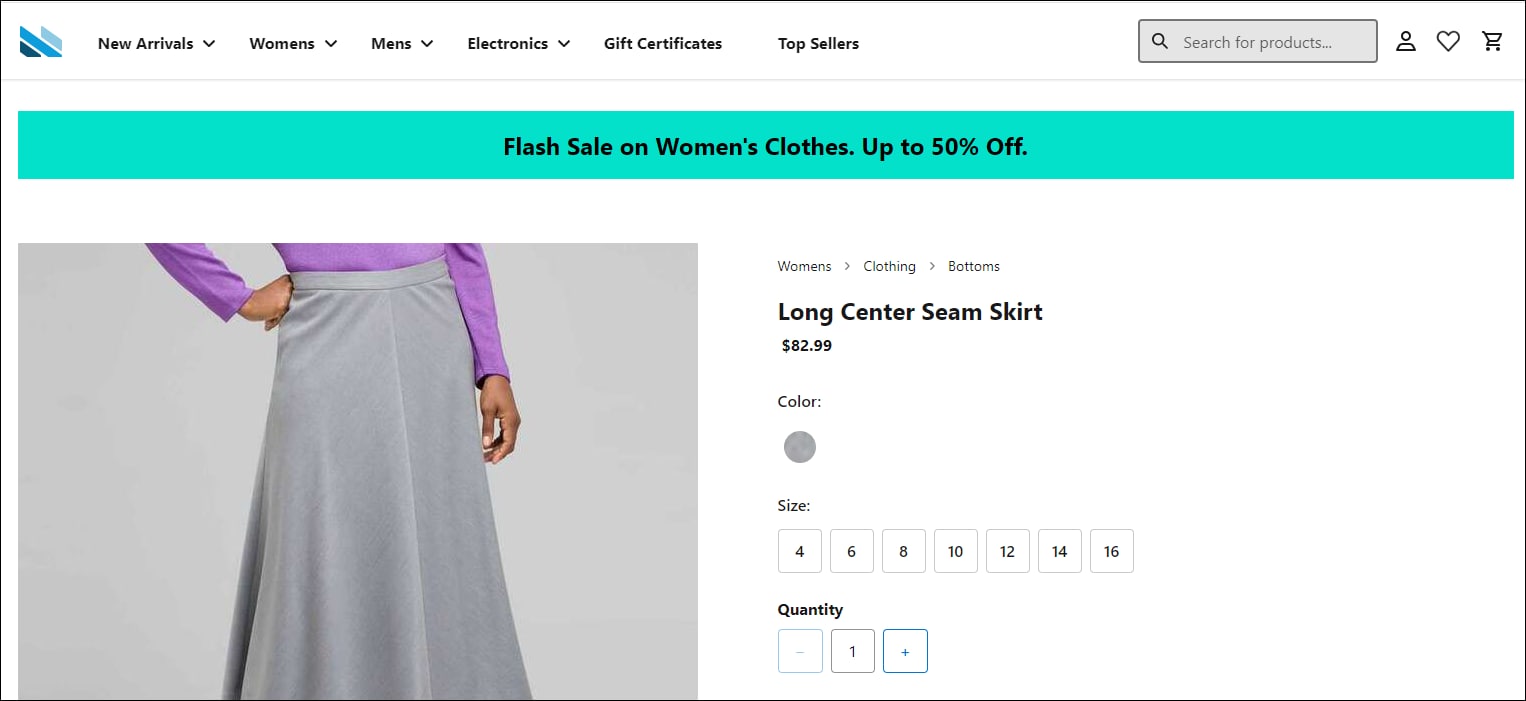
480export default ProductDetail;npm start를 실행합니다.모든 PDP는 아래의 예와 같이 고객 배너를 표시합니다. 이 시나리오에서는 배너를 클릭하면 여성용 제품 목록 페이지로 이동합니다.
overrides 폴더에 필수 프로젝트 파일이 포함되어 있는지 확인합니다.j