1import React, { Fragment, useCallback, useEffect, useState } from "react";
2import PropTypes from "prop-types";
3import { Helmet } from "react-helmet";
4import { FormattedMessage, useIntl } from "react-intl";
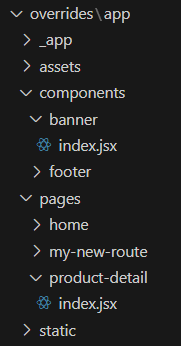
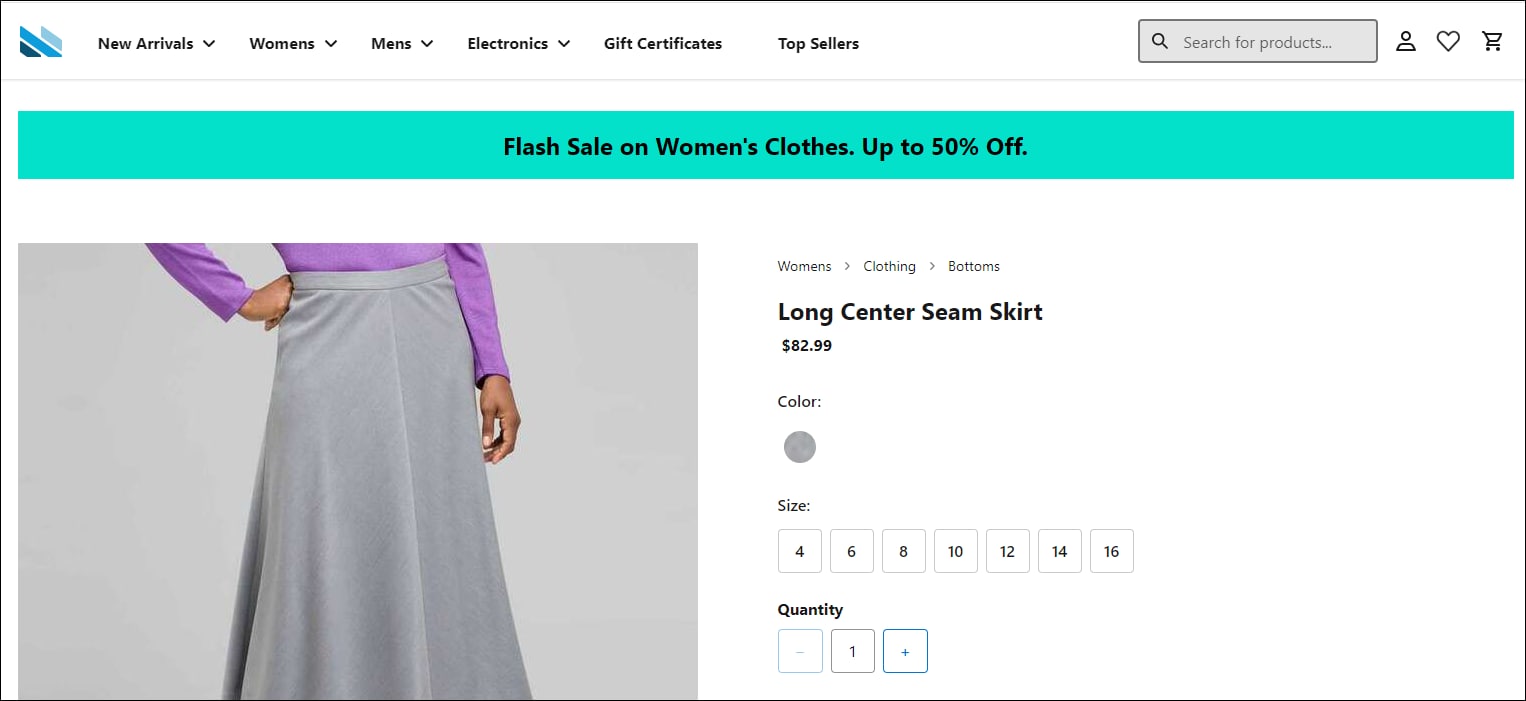
5// This is line 5. Import your banner.
6import BannerWithImage from "../../components/banner";
7
8// Components
9import {
10  Box,
11  Button,
12  Stack,
13} from "@salesforce/retail-react-app/app/components/shared/ui";
14import {
15  useProduct,
16  useCategory,
17  useShopperBasketsMutation,
18  useShopperCustomersMutation,
19  useCustomerId,
20} from "@salesforce/commerce-sdk-react";
21
22// Hooks
23import { useCurrentBasket } from "@salesforce/retail-react-app/app/hooks/use-current-basket";
24import { useVariant } from "@salesforce/retail-react-app/app/hooks";
25import useNavigation from "@salesforce/retail-react-app/app/hooks/use-navigation";
26import useEinstein from "@salesforce/retail-react-app/app/hooks/use-einstein";
27import useActiveData from "@salesforce/retail-react-app/app/hooks/use-active-data";
28import { useServerContext } from "@salesforce/pwa-kit-react-sdk/ssr/universal/hooks";
29// Project Components
30import RecommendedProducts from "@salesforce/retail-react-app/app/components/recommended-products";
31import ProductView from "@salesforce/retail-react-app/app/components/product-view";
32import InformationAccordion from "@salesforce/retail-react-app/app/pages/product-detail/partials/information-accordion";
33
34import {
35  HTTPNotFound,
36  HTTPError,
37} from "@salesforce/pwa-kit-react-sdk/ssr/universal/errors";
38
39// constant
40import {
41  API_ERROR_MESSAGE,
42  EINSTEIN_RECOMMENDERS,
43  MAX_CACHE_AGE,
44  TOAST_ACTION_VIEW_WISHLIST,
45  TOAST_MESSAGE_ADDED_TO_WISHLIST,
46  TOAST_MESSAGE_ALREADY_IN_WISHLIST,
47} from "@salesforce/retail-react-app/app/constants";
48import { rebuildPathWithParams } from "@salesforce/retail-react-app/app/utils/url";
49import { useHistory, useLocation, useParams } from "react-router-dom";
50import { useToast } from "@salesforce/retail-react-app/app/hooks/use-toast";
51import { useWishList } from "@salesforce/retail-react-app/app/hooks/use-wish-list";
52
53const ProductDetail = () => {
54  const { formatMessage } = useIntl();
55  const history = useHistory();
56  const location = useLocation();
57  const einstein = useEinstein();
58  const activeData = useActiveData();
59  const toast = useToast();
60  const navigate = useNavigation();
61  const [productSetSelection, setProductSetSelection] = useState({});
62  const childProductRefs = React.useRef({});
63  const customerId = useCustomerId();
64  /****************************** Basket *********************************/
65  const { data: basket } = useCurrentBasket();
66  const addItemToBasketMutation = useShopperBasketsMutation("addItemToBasket");
67  const { res } = useServerContext();
68  if (res) {
69    res.set("Cache-Control", `s-maxage=${MAX_CACHE_AGE}`);
70  }
71  const isBasketLoading = !basket?.basketId;
72
73  /*************************** Product Detail and Category ********************/
74  const { productId } = useParams();
75  const urlParams = new URLSearchParams(location.search);
76  const {
77    data: product,
78    isLoading: isProductLoading,
79    isError: isProductError,
80    error: productError,
81  } = useProduct(
82    {
83      parameters: {
84        id: urlParams.get("pid") || productId,
85        allImages: true,
86      },
87    },
88    {
89      // When shoppers select a different variant (and the app fetches the new data),
90      // the old data is still rendered (and not the skeletons).
91      keepPreviousData: true,
92    }
93  );
94
95  // Note: Since category needs id from product detail, it can't be server side rendered atm
96  // until we can do dependent query on server
97  const {
98    data: category,
99    isError: isCategoryError,
100    error: categoryError,
101  } = useCategory({
102    parameters: {
103      id: product?.primaryCategoryId,
104      levels: 1,
105    },
106  });
107
108  /**************** Error Handling ****************/
109
110  if (isProductError) {
111    const errorStatus = productError?.response?.status;
112    switch (errorStatus) {
113      case 404:
114        throw new HTTPNotFound("Product Not Found.");
115      default:
116        throw new HTTPError(`HTTP Error ${errorStatus} occurred.`);
117    }
118  }
119  if (isCategoryError) {
120    const errorStatus = categoryError?.response?.status;
121    switch (errorStatus) {
122      case 404:
123        throw new HTTPNotFound("Category Not Found.");
124      default:
125        throw new HTTPError(`HTTP Error ${errorStatus} occurred.`);
126    }
127  }
128
129  const isProductASet = product?.type.set;
130
131  const [primaryCategory, setPrimaryCategory] = useState(category);
132  const variant = useVariant(product);
133  // This page uses the `primaryCategoryId` to retrieve the category data. This attribute
134  // is only available on `master` products. Since a variation will be loaded once all the
135  // attributes are selected (to get the correct inventory values), the category information
136  // is overridden. This will allow us to keep the initial category around until a different
137  // master product is loaded.
138  useEffect(() => {
139    if (category) {
140      setPrimaryCategory(category);
141    }
142  }, [category]);
143
144  /**************** Product Variant ****************/
145  useEffect(() => {
146    if (!variant) {
147      return;
148    }
149    // update the variation attributes parameter on
150    // the url accordingly as the variant changes
151    const updatedUrl = rebuildPathWithParams(
152      `${location.pathname}${location.search}`,
153      {
154        pid: variant?.productId,
155      }
156    );
157    history.replace(updatedUrl);
158  }, [variant]);
159
160  /**************** Wishlist ****************/
161  const { data: wishlist, isLoading: isWishlistLoading } = useWishList();
162  const createCustomerProductListItem = useShopperCustomersMutation(
163    "createCustomerProductListItem"
164  );
165
166  const handleAddToWishlist = (product, variant, quantity) => {
167    const isItemInWishlist = wishlist?.customerProductListItems?.find(
168      (i) => i.productId === variant?.productId || i.productId === product?.id
169    );
170
171    if (!isItemInWishlist) {
172      createCustomerProductListItem.mutate(
173        {
174          parameters: {
175            listId: wishlist.id,
176            customerId,
177          },
178          body: {
179            // NOTE: APi does not respect quantity, it always adds 1
180            quantity,
181            productId: variant?.productId || product?.id,
182            public: false,
183            priority: 1,
184            type: "product",
185          },
186        },
187        {
188          onSuccess: () => {
189            toast({
190              title: formatMessage(TOAST_MESSAGE_ADDED_TO_WISHLIST, {
191                quantity: 1,
192              }),
193              status: "success",
194              action: (
195                // it would be better if we could use <Button as={Link}>
196                // but unfortunately the Link component is not compatible
197                // with Chakra Toast, since the ToastManager is rendered via portal
198                // and the toast doesn't have access to intl provider, which is a
199                // requirement of the Link component.
200                <Button
201                  variant="link"
202                  onClick={() => navigate("/account/wishlist")}
203                >
204                  {formatMessage(TOAST_ACTION_VIEW_WISHLIST)}
205                </Button>
206              ),
207            });
208          },
209          onError: () => {
210            showError();
211          },
212        }
213      );
214    } else {
215      toast({
216        title: formatMessage(TOAST_MESSAGE_ALREADY_IN_WISHLIST),
217        status: "info",
218        action: (
219          <Button variant="link" onClick={() => navigate("/account/wishlist")}>
220            {formatMessage(TOAST_ACTION_VIEW_WISHLIST)}
221          </Button>
222        ),
223      });
224    }
225  };
226
227  /**************** Add To Cart ****************/
228  const showToast = useToast();
229  const showError = () => {
230    showToast({
231      title: formatMessage(API_ERROR_MESSAGE),
232      status: "error",
233    });
234  };
235
236  const handleAddToCart = async (productSelectionValues) => {
237    try {
238      const productItems = productSelectionValues.map(
239        ({ variant, quantity }) => ({
240          productId: variant.productId,
241          price: variant.price,
242          quantity,
243        })
244      );
245
246      await addItemToBasketMutation.mutateAsync({
247        parameters: { basketId: basket.basketId },
248        body: productItems,
249      });
250
251      einstein.sendAddToCart(productItems);
252
253      // If the items were successfully added, set the return value to be used
254      // by the add to cart modal.
255      return productSelectionValues;
256    } catch (error) {
257      showError(error);
258    }
259  };
260
261  /**************** Product Set Handlers ****************/
262  const handleProductSetValidation = useCallback(() => {
263    // Run validation for all child products. This will ensure the error
264    // messages are shown.
265    Object.values(childProductRefs.current).forEach(
266      ({ validateOrderability }) => {
267        validateOrderability({ scrollErrorIntoView: false });
268      }
269    );
270
271    // Using ot state for which child products are selected, scroll to the first
272    // one that isn't selected.
273    const selectedProductIds = Object.keys(productSetSelection);
274    const firstUnselectedProduct = product.setProducts.find(
275      ({ id }) => !selectedProductIds.includes(id)
276    );
277
278    if (firstUnselectedProduct) {
279      // Get the reference to the product view and scroll to it.
280      const { ref } = childProductRefs.current[firstUnselectedProduct.id];
281
282      if (ref.scrollIntoView) {
283        ref.scrollIntoView({
284          behavior: "smooth",
285          block: "end",
286        });
287      }
288
289      return false;
290    }
291
292    return true;
293  }, [product, productSetSelection]);
294
295  const handleProductSetAddToCart = () => {
296    // Get all the selected products, and pass them to the addToCart handler which
297    // accepts an array.
298    const productSelectionValues = Object.values(productSetSelection);
299    return handleAddToCart(productSelectionValues);
300  };
301
302  /**************** Einstein ****************/
303  useEffect(() => {
304    if (product && product.type.set) {
305      einstein.sendViewProduct(product);
306      const childrenProducts = product.setProducts;
307      childrenProducts.map((child) => {
308        try {
309          einstein.sendViewProduct(child);
310        } catch (err) {
311          console.error(err);
312        }
313        activeData.sendViewProduct(category, child, "detail");
314      });
315    } else if (product) {
316      try {
317        einstein.sendViewProduct(product);
318      } catch (err) {
319        console.error(err);
320      }
321      activeData.sendViewProduct(category, product, "detail");
322    }
323  }, [product]);
324
325  return (
326    <Box
327      className="sf-product-detail-page"
328      layerStyle="page"
329      data-testid="product-details-page"
330    >
331      <Helmet>
332        <title>{product?.pageTitle}</title>
333        <meta name="description" content={product?.pageDescription} />
334      </Helmet>
335
336      <Stack spacing={16}>
337        // This is line 333. Add the banner component to the page.
338        <BannerWithImage />
339        {isProductASet ? (
340          <Fragment>
341            {/* Product Set: parent product */}
342            <ProductView
343              product={product}
344              category={primaryCategory?.parentCategoryTree || []}
345              addToCart={handleProductSetAddToCart}
346              addToWishlist={handleAddToWishlist}
347              isProductLoading={isProductLoading}
348              isBasketLoading={isBasketLoading}
349              isWishlistLoading={isWishlistLoading}
350              validateOrderability={handleProductSetValidation}
351            />
352
353            <hr />
354
355            {/* TODO: consider `childProduct.belongsToSet` */}
356            {
357              // Product Set: render the child products
358              product.setProducts.map((childProduct) => (
359                <Box key={childProduct.id} data-testid="child-product">
360                  <ProductView
361                    // Do no use an arrow function as we are manipulating the functions scope.
362                    ref={function (ref) {
363                      // Assign the "set" scope of the ref, this is how we access the internal
364                      // validation.
365                      childProductRefs.current[childProduct.id] = {
366                        ref,
367                        validateOrderability: this.validateOrderability,
368                      };
369                    }}
370                    product={childProduct}
371                    isProductPartOfSet={true}
372                    addToCart={(variant, quantity) =>
373                      handleAddToCart([
374                        { product: childProduct, variant, quantity },
375                      ])
376                    }
377                    addToWishlist={handleAddToWishlist}
378                    onVariantSelected={(product, variant, quantity) => {
379                      if (quantity) {
380                        setProductSetSelection((previousState) => ({
381                          ...previousState,
382                          [product.id]: {
383                            product,
384                            variant,
385                            quantity,
386                          },
387                        }));
388                      } else {
389                        const selections = { ...productSetSelection };
390                        delete selections[product.id];
391                        setProductSetSelection(selections);
392                      }
393                    }}
394                    isProductLoading={isProductLoading}
395                    isBasketLoading={isBasketLoading}
396                    isWishlistLoading={isWishlistLoading}
397                  />
398                  <InformationAccordion product={childProduct} />
399
400                  <Box display={["none", "none", "none", "block"]}>
401                    <hr />
402                  </Box>
403                </Box>
404              ))
405            }
406          </Fragment>
407        ) : (
408          <Fragment>
409            <ProductView
410              product={product}
411              category={primaryCategory?.parentCategoryTree || []}
412              addToCart={(variant, quantity) =>
413                handleAddToCart([{ product, variant, quantity }])
414              }
415              addToWishlist={handleAddToWishlist}
416              isProductLoading={isProductLoading}
417              isBasketLoading={isBasketLoading}
418              isWishlistLoading={isWishlistLoading}
419            />
420            <InformationAccordion product={product} />
421          </Fragment>
422        )}
423        {/* Product Recommendations */}
424        <Stack spacing={16}>
425          {!isProductASet && (
426            <RecommendedProducts
427              title={
428                <FormattedMessage
429                  defaultMessage="Complete the Set"
430                  id="product_detail.recommended_products.title.complete_set"
431                />
432              }
433              recommender={EINSTEIN_RECOMMENDERS.PDP_COMPLETE_SET}
434              products={[product]}
435              mx={{ base: -4, md: -8, lg: 0 }}
436              shouldFetch={() => product?.id}
437            />
438          )}
439          <RecommendedProducts
440            title={
441              <FormattedMessage
442                defaultMessage="You might also like"
443                id="product_detail.recommended_products.title.might_also_like"
444              />
445            }
446            recommender={EINSTEIN_RECOMMENDERS.PDP_MIGHT_ALSO_LIKE}
447            products={[product]}
448            mx={{ base: -4, md: -8, lg: 0 }}
449            shouldFetch={() => product?.id}
450          />
451
452          <RecommendedProducts
453            // The Recently Viewed recommender doesn't use `products`, so instead we
454            // provide a key to update the recommendations on navigation.
455            key={location.key}
456            title={
457              <FormattedMessage
458                defaultMessage="Recently Viewed"
459                id="product_detail.recommended_products.title.recently_viewed"
460              />
461            }
462            recommender={EINSTEIN_RECOMMENDERS.PDP_RECENTLY_VIEWED}
463            mx={{ base: -4, md: -8, lg: 0 }}
464          />
465        </Stack>
466      </Stack>
467    </Box>
468  );
469};
470
471ProductDetail.getTemplateName = () => "product-detail";
472
473ProductDetail.propTypes = {
474  /**
475   * The current react router match object. (Provided internally)
476   */
477  match: PropTypes.object,
478};
479
480export default ProductDetail;


 j
j