


 j
jOverview
Release Notes
Connect API
Org Limits
Monitor Transcription-Related Limit Errors
Monitor VoiceCall Limit Errors
Previous Versions
When your org exceeds the limit for the maximum number of concurrent calls, the system can’t create VoiceCall records. Track when your org hits the concurrent call limit or the phone calls initiated per second limit by checking output of the InvokeTelephonyIntegrationApi Lambda function.
The output of the InvokeTelephonyIntegrationApi Lambda function is stored in a contact attribute. If the contact attribute’s value is set to 429, it means that an error occurred. Go to AWS Cloudwatch to view the logs and search for error messages that contain the prefix SCV_LIMITS_ERROR. This prefix indicates a VoiceCall limit error.
You can address these errors in two ways. One way creates a fallback mechanism that times out after a certain number of attempts. The other way writes a value to a contact attribute so you can see when errors occur.
OPTION 1: Use a fallback mechanism that times out
This approach creates a fallback mechanism that you can add to the contact flow. In this approach, the system attempts to create the VoiceCall record for a certain number of times and then times out.
FALSE. For this use case, we name it “sf_voicecall_limit_error”. To learn more about contact attributes, see the Amazon Connect Administrator Guide on setting contact attributes.TRUE.TRUE. If so, you can put a loop block in the contact flow and play a prompt before trying to create a VoiceCall record. Track of the number of retries using another contact attribute. You can put a limit on the number of times the system tries to create the VoiceCall record. To learn more about contact attributes, see the Amazon Connect Administrator Guide on checking contact attributes.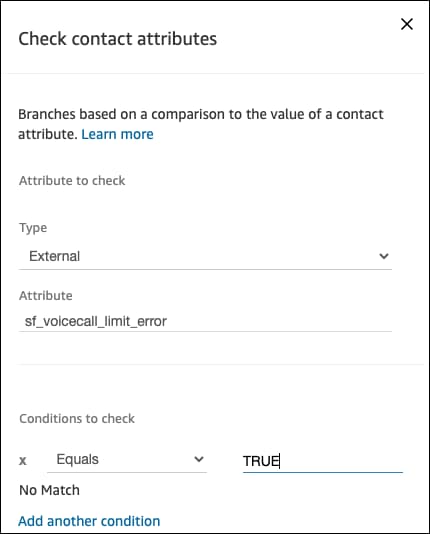
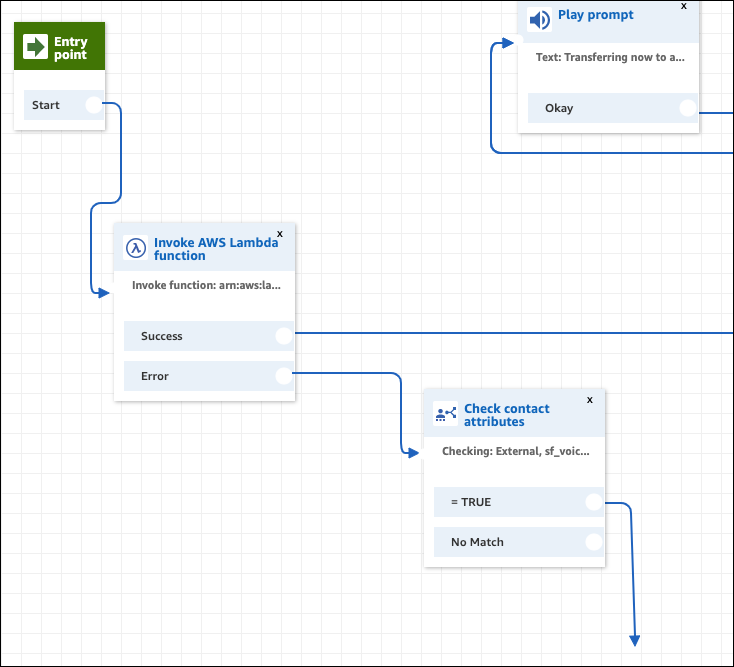
This approach uses a fallback mechanism when the per second limit is hit.
OPTION 2: See the number of failed calls
This approach shows you how many calls failed because of the limit error.
j