


 j
jデータガイドライン
Lightning データサービス
Apex メソッドのインポート
コンポーネントへの Apex メソッドの公開
コンポーネントへの Apex メソッドの結び付け
命令としての Apex メソッドのコール
Apex アクションの一括処理
クライアント側キャッシュ
オブジェクトと項目のインポート
Apex クラスの保護
Apex からの API のコール
Lightning Web コンポーネントでは、リアクティブなワイヤサービスを使用して Salesforce データを読み取ります。コンポーネントの JavaScript クラスで @wire を使用して、Apex メソッドを指定します。プロパティまたは関数を結び付ける (@wire) ことでデータを受信できます。返されたデータを操作するには、関数を @wire します。
@wire を使用して Apex メソッドをコールするには、Apex メソッドに @AuraEnabled(cacheable=true) アノテーションを付加します。ネットワークコールを発行してサーバの Apex メソッドを呼び出す前にクライアント側の Lightning データサービスキャッシュがチェックされます。Apex によってプロビジョニングされるデータは Lightning データサービスでは管理されないため、古いデータを更新するには refreshApex() をコールします。
Apex メソッドをインポートし、コンポーネントに結び付けるには次の構文を使用します。
1import apexMethodName from '@salesforce/apex/namespace.classname.apexMethodReference';
2@wire(apexMethodName, { apexMethodParams })
3propertyOrFunction;
apexMethodName — Apex メソッドを識別する記号。
apexMethodReference — インポートする Apex メソッドの名前。
classname — Apex クラスの名前。
namespace — Salesforce 組織の名前空間。組織がデフォルトの名前空間 (c) を使用していない場合は名前空間を指定します。使用している場合は名前空間を指定しないでください。
apexMethodParams — 必要に応じて apexMethod のパラメータと一致するプロパティを含むオブジェクト。パラメータ値が null の場合、メソッドがコールされます。パラメータ値が undefined の場合、メソッドはコールされません。Apex メソッドをオーバーロードしている場合、コールするメソッドの選択は非決定的 (実質的にランダム) であり、渡されたパラメータにより現在エラーが発生しているか、その後発生する可能性があります。@AuraEnabled Apex メソッドをオーバーロードしないでください。
Important
apexMethodParams はオブジェクトです。Apex メソッドにパラメータ値を渡すには、Apex メソッドのパラメータと一致するプロパティを持つオブジェクトを渡します。たとえば、Apex メソッドが文字列パラメータを取る場合、文字列を直接渡さず、値が文字列であるプロパティを含むオブジェクトを渡します。命令 Apex コールおよび結び付けられた Apex コールでは、対応付けの使用はサポートされていません。「Apex への値の受け渡し」を参照してください。
:::
propertyOrFunction — ワイヤサービスからデータのストリームを受信する非公開のプロパティまたは関数。プロパティが @wire でデコレートされている場合、結果はそのプロパティの data プロパティまたは error プロパティに返されます。関数が @wire でデコレートされている場合、結果は data プロパティまたは error プロパティを持つオブジェクトで返されます。
Note
data プロパティと error プロパティは、API のハードコードされた値です。これらの値を使用する必要があります。
:::
lwc-recipes リポジトリの apexWireMethodToProperty コンポーネントを見てみましょう。このコンポーネントは、Apex メソッドから返された取引先責任者のリストを出力します。
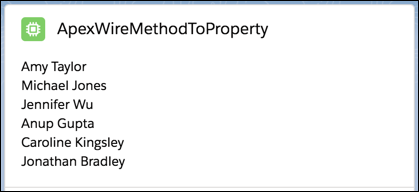
データを取得するためにコンポーネントは Apex メソッドを結び付けます。Apex メソッドは SOQL クエリを実行し、写真が含まれる取引先責任者のリストを返します。(このコンポーネントでは写真は表示されませんが、他のサンプルコンポーネントでは写真が表示されます)。前述のとおり、取引先責任者の簡単なリストを返すには、getListUi の使用が最適です。ただし、SOQL クエリを使用して特定のレコードを選択するには、Apex メソッドを使用する必要があります。
メソッドは、static で、かつ global または public である必要があります。メソッドは @AuraEnabled(cacheable=true) でデコレートされている必要があります。
1public with sharing class ContactController {
2    @AuraEnabled(cacheable=true)
3    public static List<Contact> getContactList() {
4        return [
5            SELECT Id, Name, Title, Phone, Email, Picture__c
6            FROM Contact
7            WHERE Picture__c != null
8            WITH SECURITY_ENFORCED
9            LIMIT 10
10        ];
11    }
12}
コンポーネントの JavaScript コードは、Apex メソッドをインポートし、ワイヤサービスを介してその Apex メソッドを呼び出します。ワイヤサービスは取引先責任者のリストを contacts.data プロパティにプロビジョニングするか、エラーを contacts.error プロパティに返します。
1// apexWireMethodToProperty.js
2import { LightningElement, wire } from "lwc";
3import getContactList from "@salesforce/apex/ContactController.getContactList";
4
5export default class ApexWireMethodToProperty extends LightningElement {
6  @wire(getContactList) contacts;
7}
テンプレートは lwc:if ディレクティブを使用して、contacts.data プロパティが truthy であるかどうかを確認します。truthy の場合、そのプロパティを反復処理して各取引先責任者の名前を表示します。contacts.error が truthy の場合、コンポーネントは <c-error-panel> を表示します。
1<!-- apexWireMethodToProperty.html -->
2<template>
3  <lightning-card title="ApexWireMethodToProperty" icon-name="custom:custom63">
4    <div class="slds-m-around_medium">
5      <template lwc:if={contacts.data}>
6        <template for:each={contacts.data} for:item="contact">
7          <p key={contact.Id}>{contact.Name}</p>
8        </template>
9      </template>
10      <template lwc:elseif={contacts.error}>
11        <c-error-panel errors={contacts.error}></c-error-panel>
12      </template>
13    </div>
14  </lightning-card>
15</template>ここでは、パラメータを使用する Apex メソッドを結び付けます。このコンポーネントは、lwc-recipes リポジトリにもあります。
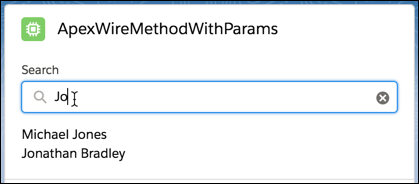
Apex メソッドは、searchKey という文字列パラメータを使用して、名前に文字列が含まれる取引先責任者のリストを返します。
1// ContactController.cls
2public with sharing class ContactController {
3    @AuraEnabled(cacheable=true)
4    public static List<Contact> findContacts(String searchKey) {
5        String key = '%' + searchKey + '%';
6        return [
7            SELECT Id, Name, Title, Phone, Email, Picture__c
8            FROM Contact
9            WHERE Name LIKE :key AND Picture__c != null
10            WITH SECURITY_ENFORCED
11            LIMIT 10
12        ];
13    }
14}
コンポーネントの JavaScript は、searchKey パラメータの値の前に $ を付けて、そのパラメータが動的かつリアクティブであることを示します。これはコンポーネントのインスタンスのプロパティを参照します。値が変更されると、テンプレートは再表示されます。
Apex メソッドにコンポーネントを @wire で結び付けるには、最初のパラメータは Apex メソッド名の文字列です。この場合は findContacts です。@wire の 2 つ目のパラメータは Apex メソッドに渡すパラメータを含むオブジェクトです。そのため、たとえば findContacts が文字列を取る場合でも、@wire の 2 つ目のパラメータとしては文字列を渡しません。代わりに、値が文字列 ({ searchKey: '$searchKey' }) であるプロパティを含むオブジェクトを渡します。(Apex メソッドが別のパラメータを取る場合は、オブジェクトにもう 1 つのプロパティを追加します。)
Important
1// apexWireMethodWithParams.js
2import { LightningElement, wire } from "lwc";
3import findContacts from "@salesforce/apex/ContactController.findContacts";
4
5/** The delay used when debouncing event handlers before invoking Apex. */
6const DELAY = 300;
7
8export default class ApexWireMethodWithParams extends LightningElement {
9  searchKey = "";
10
11  @wire(findContacts, { searchKey: "$searchKey" })
12  contacts;
13
14  handleKeyChange(event) {
15    // Debouncing this method: Do not update the reactive property as long as this function is
16    // being called within a delay of DELAY. This is to avoid a very large number of Apex method calls.
17    window.clearTimeout(this.delayTimeout);
18    const searchKey = event.target.value;
19    this.delayTimeout = setTimeout(() => {
20      this.searchKey = searchKey;
21    }, DELAY);
22  }
23}
テンプレートは searchKey を <lightning-input> 項目の value として使用します。
1<!-- apexWireMethodWithParams.html -->
2<template>
3  <lightning-card title="ApexWireMethodWithParams" icon-name="custom:custom63">
4    <div class="slds-m-around_medium">
5      <lightning-input
6        type="search"
7        onchange={handleKeyChange}
8        class="slds-m-bottom_small"
9        label="Search"
10        value={searchKey}
11      ></lightning-input>
12      <template lwc:if={contacts.data}>
13        <template for:each={contacts.data} for:item="contact">
14          <p key={contact.Id}>{contact.Name}</p>
15        </template>
16      </template>
17      <template lwc:elseif={contacts.error}>
18        <c-error-panel errors={contacts.error}></c-error-panel>
19      </template>
20    </div>
21  </lightning-card>
22</template>このサンプルコードのウォークスルーを視聴するには、Lightning Web コンポーネント動画ギャラリーの**「Wire an Apex Method to a Property (プロパティへの Apex メソッドの結び付け)」**をご覧ください。
Tip
次の例は、パラメータとしてオブジェクトを取る Apex メソッドをコールする方法を示しています。@wire 構文はすべての Apex メソッドで同じですが、この例はオブジェクトを構築して渡すパターンを示しています。
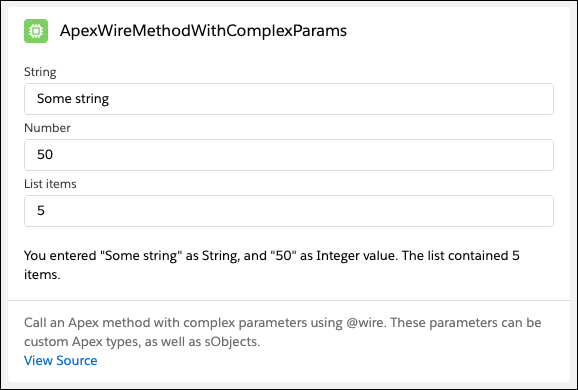
このコンポーネントには、リストを生成するために使用する 3 つの入力項目があり、それぞれ文字列、数値、リスト項目数を取ります。Apex メソッドは単純に連結し、値に基づく 1 つの文字列を返します。入力値が変更されると、@wire は Apex メソッドをコールして新しいデータをプロビジョニングします。
1<!-- apexWireMethodWithComplexParams.html -->
2<template>
3  <lightning-card title="ApexWireMethodWithComplexParams" icon-name="custom:custom63">
4    <div class="slds-var-m-around_medium">
5      <lightning-input
6        label="String"
7        type="string"
8        value={stringValue}
9        class="string-input"
10        onchange={handleStringChange}
11      ></lightning-input>
12      <lightning-input
13        label="Number"
14        type="number"
15        min="0"
16        max="100"
17        value={numberValue}
18        class="number-input"
19        onchange={handleNumberChange}
20      ></lightning-input>
21      <lightning-input
22        label="List items"
23        type="number"
24        min="0"
25        max="10"
26        value={listItemValue}
27        class="list-item-input"
28        onchange={handleListItemChange}
29      ></lightning-input>
30      <br />
31      <template lwc:if={apexResponse.data}>
32        <p>{apexResponse.data}</p>
33      </template>
34    </div>
35    <template lwc:elseif={apexResponse.error}>
36      <c-error-panel errors={error}></c-error-panel>
37    </template>
38  </lightning-card>
39</template>
Apex メソッドはオブジェクト CustomWrapper を取ります。
1public with sharing class ApexTypesController {
2    @AuraEnabled(cacheable=true)
3    public static String checkApexTypes(CustomWrapper wrapper) {
4        // The values are based on the data that is defined in the
5        // apexWireMethodWithComplexParams Lightning web component.
6        String response =
7            'You entered "' +
8            wrapper.someString +
9            '" as String, and "' +
10            wrapper.someInteger +
11            '" as Integer value. The list contained ' +
12            wrapper.someList.size() +
13            ' items.';
14        return response;
15    }
16}1public with sharing class CustomWrapper {
2 @TestVisible
3 class InnerWrapper {
4 @AuraEnabled
5 public Integer someInnerInteger { get; set; }
6 @AuraEnabled
7 public String someInnerString { get; set; }
8 }
9
10 @AuraEnabled
11 public Integer someInteger { get; set; }
12 @AuraEnabled
13 public String someString { get; set; }
14 @AuraEnabled
15 public List<InnerWrapper> someList { get; set; }
16}コンポーネントから Apex メソッドにパラメータ値を渡すにはオブジェクトを使用します。この例では、Apex メソッドはオブジェクト CustomWrapper を取るため、コンポーネントはそれに一致するオブジェクトを構築し、@wire 内で渡します。
1// apexWireMethodWithComplexParams.js
2import { LightningElement, wire } from "lwc";
3import checkApexTypes from "@salesforce/apex/ApexTypesController.checkApexTypes";
4
5export default class ApexWireMethodWithComplexParams extends LightningElement {
6  listItemValue = 0;
7  numberValue = 50;
8  stringValue = "Some string";
9
10  parameterObject = {
11    someString: this.stringValue,
12    someInteger: this.numberValue,
13    someList: [],
14  };
15
16  @wire(checkApexTypes, { wrapper: "$parameterObject" })
17  apexResponse;
18
19  handleStringChange(event) {
20    this.parameterObject = {
21      ...this.parameterObject,
22      someString: (this.stringValue = event.target.value),
23    };
24  }
25
26  handleNumberChange(event) {
27    this.parameterObject = {
28      ...this.parameterObject,
29      someInteger: (this.numberValue = parseInt(event.target.value, 10)),
30    };
31  }
32
33  handleListItemChange(event) {
34    const someList = [];
35    for (let i = 0; i < event.target.value; i++) {
36      someList.push({
37        someInnerString: this.stringValue,
38        someInnerInteger: this.numberValue,
39      });
40    }
41    this.parameterObject = {
42      ...this.parameterObject,
43      someList,
44    };
45  }
46}lwc-recipes リポジトリの apexWireMethodToFunction コンポーネントを見てみましょう。このコンポーネントは Apex メソッドコールを関数に結び付けます。結果が関数にプロビジョニングされるため、JavaScript は結果に対して操作を実行できます。また、テンプレートは、結果をプロパティにプロビジョニングする場合とは少し異なる方法でデータにアクセスします。
表示されるコンポーネントは apexWireMethodToProperty と同じです (ただし、ヘッダーを除く)。
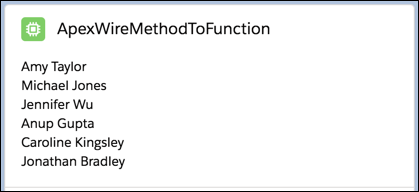
このコンポーネントは、apexWireMethodToProperty と同じ Apex メソッドをコールします。メソッドは、static で、かつ global または public である必要があります。メソッドは @AuraEnabled(cacheable=true) でデコレートされている必要があります。
1// ContactController.cls
2public with sharing class ContactController {
3    @AuraEnabled(cacheable=true)
4    public static List<Contact> getContactList() {
5        return [
6            SELECT Id, Name, Title, Phone, Email, Picture__c
7            FROM Contact
8            WHERE Picture__c != null
9            WITH SECURITY_ENFORCED
10            LIMIT 10
11        ];
12    }
13}
コンポーネントの JavaScript コードは、Apex メソッドをインポートし、ワイヤサービスを介してその Apex メソッドを呼び出します。ワイヤサービスは、error または data のいずれかのプロパティを含むオブジェクトを介して結果を wiredContacts() 関数にプロビジョニングします。ワイヤサービスでプロビジョニングされた data は this.contacts に割り当てられます。これはテンプレートで使用されます。プロビジョニングされた error は this.error に割り当てられます。これもテンプレートで使用されます。これらのプロパティの値が変更されると、テンプレートは再表示されます。
1// apexWireMethodToFunction.js
2import { LightningElement, wire } from "lwc";
3import getContactList from "@salesforce/apex/ContactController.getContactList";
4
5export default class ApexWireMethodToFunction extends LightningElement {
6  contacts;
7  error;
8
9  @wire(getContactList)
10  wiredContacts({ error, data }) {
11    if (data) {
12      this.contacts = data;
13      this.error = undefined;
14    } else if (error) {
15      this.error = error;
16      this.contacts = undefined;
17    }
18  }
19}
テンプレートは lwc:if ディレクティブを使用して、JavaScript contacts プロパティがあるかどうかを確認します。存在する場合、そのプロパティを反復処理して各取引先責任者の名前を表示します。error プロパティが存在する場合、コンポーネントは <c-error-panel> を表示します。
1<!-- apexWireMethodToFunction.html -->
2<template>
3  <lightning-card title="ApexWireMethodToFunction" icon-name="custom:custom63">
4    <div class="slds-m-around_medium">
5      <template lwc:if={contacts}>
6        <template for:each={contacts} for:item="contact">
7          <p key={contact.Id}>{contact.Name}</p>
8        </template>
9      </template>
10      <template lwc:elseif={error}>
11        <c-error-panel errors={error}></c-error-panel>
12      </template>
13    </div>
14  </lightning-card>
15</template>
関連トピック
The Japanese Summer '24 guide is now live
j