


 j
jデータガイドライン
Lightning データサービス
Apex メソッドのインポート
コンポーネントへの Apex メソッドの公開
コンポーネントへの Apex メソッドの結び付け
命令としての Apex メソッドのコール
Apex アクションの一括処理
クライアント側キャッシュ
オブジェクトと項目のインポート
Apex クラスの保護
Apex からの API のコール
実行時のパフォーマンスを改善するには、@AuraEnabled(cacheable=true) アノテーションを Apex メソッドに付加して、クライアントにメソッドの結果をキャッシュします。cacheable=true を設定するには、メソッドはデータの取得のみを行う必要があり、データを変更することはできません。
メソッドをキャッシュ可能としてマークすると、サーバとの往復を待たずにクライアント側ストレージのキャッシュデータをすばやく表示できるようになり、コンポーネントのパフォーマンスが向上します。キャッシュデータが古くなっている場合、フレームワークによってサーバから最新データが取得されます。特に、待ち時間の長い接続、低速の接続、信頼性の低い接続のユーザの場合には、キャッシュが役立ちます。キャッシュ可能なメソッドはパフォーマンスが高いため、可能な場合は使用するようにしてください。
@wire を使用して Apex メソッドをコールするには、cacheable=true を設定する必要があります。
Apex メソッドを命令としてコールするには、cacheable=true を設定するように選択できます。
キャッシュ更新時間は、ストレージのエントリが更新されるまでの期間 (秒数) です。Lightning Experience と Salesforce モバイルアプリケーションでは、更新時間は自動的に設定されます。
デフォルトのキャッシュ期間は、プラットフォームの最適化で変更される可能性があります。Lightning Web コンポーネントを設計するときに、キャッシュ期間を想定しないでください。コンポーネントは、(基になるデータが変更された場合などに) キャッシュ値が無効になったことを認識すると、@salesforce/apex の refreshApex() を使用して、サーバに更新されたデータがあるかどうかを照会してキャッシュを更新できます。
lwc-recipes リポジトリの ldsDeleteRecord コンポーネントは refreshApex() をコールします。
Tip
古い Apex データを更新するには、Apex メソッドを呼び出してから notifyRecordUpdateAvailable(recordIds) をコールし、Lightning データサービス (LDS) キャッシュを更新します。命令 Apex コールによってプロビジョニングされるデータは Lightning データサービスでは管理されません。Apex メソッドを呼び出した後に notifyRecordUpdateAvailable(recordIds) をコールして、一部のレコードが古いことを Lightning データサービスに通知し、キャッシュ内のそれらのレコードを更新します。
1import { LightningElement, wire } from 'lwc';
2import { getRecord, notifyRecordUpdateAvailable } from 'lightning/uiRecordApi';
3import apexUpdateRecord from '@salesforce/apex/Controller.apexUpdateRecord';
4
5export default class Example extends LightningElement {
6    @api recordId;
7
8    // Wire a record
9    @wire(getRecord, { recordId: '$recordId', fields: ... })
10    record;
11
12    async handler() {
13      // Do something before the record is updated
14      showSpinner();
15
16      // Update the record via Apex
17      await apexUpdateRecord(this.recordId);
18
19      // Notify LDS that you've changed the record outside its mechanisms
20      // Await the Promise object returned by notifyRecordUpdateAvailable()
21      await notifyRecordUpdateAvailable([{recordId: this.recordId}]);
22      hideSpinner();
23    }
24}Apex @wire を介してプロビジョニングされた Apex データを更新するには、refreshApex() をコールします。この関数は、@wire にバインドされた設定を使用してデータをプロビジョニングし、キャッシュを更新します。
refreshApex() で更新するパラメータは、以前に Apex @wire によって生成されたオブジェクトである必要があります。
Note
場合によって、キャッシュは古くなることがあります。キャッシュが古くなっている場合、コンポーネントには最新データが必要です。サーバに更新されたデータがあるかどうかを照会してキャッシュを更新するには、refreshApex() 関数をインポートしてコールします。refreshApex() は、サーバを照会するためのネットワークの往復処理が発生するため、必要な場合にのみ呼び出します。
refreshApex() 関数は Promise を返します。Promise が解決されると、ワイヤのデータが更新されます。Apex メソッドからの戻り値は、@wire でのみ使用できます。@wire のデータは Promise が解決されると最新になりますが、Promise で解決される実際の値は無意味です。then() ブロックを使用して、更新されたデータの操作 (ページのプロパティの設定など) を行います。
1import { refreshApex } from "@salesforce/apex";
2refreshApex(valueProvisionedByApexWireService);
valueProvisionedByApexWireService が、Apex @wire が付加されたプロパティまたは結び付けられた関数で受け取る引数 (関数にアノテーションを付加した場合) の場合。
1// Example of refreshing data for a wired property
2// after you update data via an LDS-managed module (lightning/uiRecordApi).
3
4import { updateRecord } from 'lightning/uiRecordApi';
5import { refreshApex } from '@salesforce/apex';
6import getOpptyOverAmount from '@salesforce/apex/OpptyController.getOpptyOverAmount;
7
8@wire(getOpptyOverAmount, { amount: '$amount' })
9opptiesOverAmount;
10
11// Update the record using updateRecord(recordInput)
12// Refresh Apex data that the wire service provisioned
13handler() {
14  updateRecord(recordInput).then(() => {
15    refreshApex(this.opptiesOverAmount);
16  });
17}1// Example of refreshing data for a wired property
2// after you update data via imperative Apex.
3
4import { refreshApex } from '@salesforce/apex';
5import { notifyRecordUpdateAvailable } from 'lightning/uiRecordApi';
6import getOpptyOverAmount from '@salesforce/apex/OpptyController.getOpptyOverAmount;
7
8@wire(getOpptyOverAmount, { amount: '$amount' })
9opptiesOverAmount;
10
11// Update the record in Apex, such as via a button click
12// Refresh Apex data that the wire service provisioned
13handler() {
14 updateRecordApexMethod()
15 .then(() => {
16 refreshApex(this.opptiesOverAmount);
17 notifyRecordUpdateAvailable(recordIds); // Refresh the Lightning Data Service cache
18 });
19}1//Example of refreshing data for a wired function
2
3import { refreshApex } from '@salesforce/apex';
4import getActivityHistory from '@salesforce/apex/ActivityController.getActivityHistory;
5
6
7@wire(getActivityHistory, { accountId: '$recordId', max: '500' })
8wiredGetActivityHistory(value) {
9 // Hold on to the provisioned value so we can refresh it later.
10 this.wiredActivities = value;
11 // Destructure the provisioned value
12 const { data, error } = value;
13 if (data) { ... }
14 else if (error) { ... }
15 ...
16}
17handler() {
18 refreshApex(this.wiredActivities);
19}例を見てみましょう。このコンポーネントには、指定された金額を超える商談のリストが表示されます。ユーザはクリックすることで、すべての商談を「成立」としてマークすることができます。商談が更新されると、キャッシュデータは古くなります。そのため、コードは商談を更新した後、refreshApex() をコールし、サーバに更新されたデータがないかどうかを照会してキャッシュを更新します。
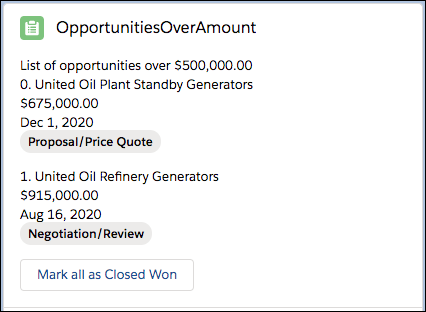
1<!-- opportunitiesOverAmount.html -->
2<template>
3  <!-- Display a list of opportunities -->
4  <p>
5    List of opportunities over
6    <lightning-formatted-number
7      value={amount}
8      format-style="currency"
9    ></lightning-formatted-number>
10  </p>
11  <template lwc:if={opptiesOverAmount.data}>
12    <template for:each={opptiesOverAmount.data} for:item="oppty" for:index="idx">
13      <div key={oppty.Id} class="slds-m-bottom_medium">
14        <p>{idx}. {oppty.Name}</p>
15        <p>
16          <lightning-formatted-number
17            value={oppty.Amount}
18            format-style="currency"
19          ></lightning-formatted-number>
20        </p>
21        <p>
22          <lightning-formatted-date-time value={oppty.CloseDate}></lightning-formatted-date-time>
23        </p>
24        <p><lightning-badge label={oppty.StageName}></lightning-badge></p>
25      </div>
26    </template>
27    <!-- Click the button to change the opportunities. Requires the data to be refetched
28             and rerendered -->
29    <lightning-button label="Mark all as Closed Won" onclick={handleClick}></lightning-button>
30  </template>
31</template>
<c-opportunities-over-amount> コンポーネントの JavaScript コードを見てみましょう。まず、refreshApex と Apex メソッドを @salesforce/apex からインポートします。
次に、動的値 (amount) を使用して Apex メソッド getOpptyOverAmount をコールします。データは、this.amount が変更されるたびに再要求されます。システムはクライアント側のキャッシュまたはサーバからデータを提供します。
1// opportunitiesOverAmount.js
2import { LightningElement, api, wire } from "lwc";
3import { refreshApex } from "@salesforce/apex";
4import getOpptyOverAmount from "@salesforce/apex/OpptiesOverAmountApex.getOpptyOverAmount";
5import updateOpptyStage from "@salesforce/apex/OpptiesOverAmountApex.updateOpptyStage";
6
7export default class OpportunitiesOverAmount extends LightningElement {
8  @api amount = 500000;
9
10  @wire(getOpptyOverAmount, { amount: "$amount" })
11  opptiesOverAmount;
12
13  handleClick(e) {
14    updateOpptyStage({
15      amount: this.amount,
16      stage: "Closed Won",
17    })
18      .then(() => {
19        refreshApex(this.opptiesOverAmount).then(() => {
20          // do something with the refreshed data in this.opptiesOverAmount
21        });
22      })
23      .catch((error) => {
24        this.message =
25          "Error received: code" + error.errorCode + ", " + "message " + error.body.message;
26      });
27  }
28}
コードは handleClick メソッドで refreshApex() をコールします。stage を [Closed Won (商談成立)] に変更すると、CloseDate 項目に影響します。つまり、@wire データが古くなります。今後、完了予定日が得られたときに [完了予定日] 項目が今日の日付に変更されます。
データが古いことをシステムに伝えるには、refreshApex() をコールします。ワイヤアダプタはそのキャッシュを古いとしてマークし、更新済みデータをサーバに要求し、キャッシュを更新してから、その登録者に通知します。これが実行されると、コンポーネントの this.opptiesOverAmount プロパティが更新され、新しいデータでの再表示がトリガされます。これで、完了予定日は July 18, 2019 (今日の日付) になり、商談フェーズが [Closed Won (商談成立)] になりました。
![[Closed Won (商談成立)] としてマークされた商談のリストが表示されます。](https://a.sfdcstatic.com/developer-website/sfdocs/lwc/media/apex_refresh_result.png)
OpptiesOverAmountApex クラスには、指定された金額を超える商談のリストを取得する getOpptyOverAmount メソッドが含まれます。また、updateOpptyStage メソッドも含まれます。これは、update DML 操作を使用して、指定された金額を超える商談の商談フェーズを「Closed Won (商談成立)」に更新します。
1public with sharing class OpptiesOverAmountApex {
2    @AuraEnabled(cacheable=true)
3    public static List<Opportunity> getOpptyOverAmount(Decimal amount) {
4        return [SELECT Id, Name, Amount, StageName, CloseDate FROM Opportunity WHERE Amount > :amount];
5    }
6
7    @AuraEnabled
8    public static void updateOpptyStage(Decimal amount, String stage) {
9        for (List<Opportunity> oppts:
10            [SELECT Id, Name, Amount, StageName, CloseDate FROM Opportunity WHERE Amount > :amount]) {
11                for(Opportunity o : oppts) {
12                    o.StageName = stage;
13                }
14                update oppts;
15            }
16            return;
17    }
18}結び付けられた関数を更新するには、結び付けられた関数が受け取る引数 (結び付けられた値) を refreshApex() に渡します。このサンプルコードでは、結び付けられた関数は wiredGetActivityHistory(value) です。ワイヤサービスによりプロビジョニングされた値を保持して refreshApex() に渡します。
新しい関数を使用して、refreshApex() を命令としてコールします。プロビジョニングされた値を追跡するには、新しいプロパティ wiredActivities を定義し、そのプロパティを wiredGetActivityHistory(value) で使用します。プロビジョニングされた値を分解し、data および error オブジェクトを容易に抽出します。
1import { LightningElement, api, wire } from 'lwc';
2import { refreshApex } from '@salesforce/apex';
3import getActivityHistory from '@salesforce/apex/GalleryApexController.getActivityHistory';
4
5export default class GalleryApexMaster extends LightningElement {
6    @api recordId;
7    wiredActivities;
8
9    @wire(getActivityHistory, { accountId: '$recordId', max: '500' })
10    wiredGetActivityHistory(value) {
11        // Hold on to the provisioned value so we can refresh it later.
12        this.wiredActivities = value; // track the provisioned value
13        const { data, error } = value; // destructure the provisioned value
14        if (data) { ... }
15        else if (error) { ... }
16        ...
17    }
18
19    handleLogACall() {
20        // Use the value to refresh wiredGetActivityHistory().
21        return refreshApex(this.wiredActivities);
22    }
23}
関連トピック
The Japanese Summer '24 guide is now live
j