


 j
jConfigure WebSockets
REST Wrappers for SFAP APIs
Using Key-Value Stores for Secure Data Storage
Dark Mode and Dark Theme Settings
Beginning in Mobile SDK 8.2, encrypted key-value stores offer an alternative to SmartStore for secure data storage on mobile devices. Key-value stores aren’t a replacement for SmartStore. They’re designed for simpler storage scenarios that don’t demand the full power of a relational database. An example is a response cache that requires your app to fetch data quickly from an opaque pool of values, unaware of data relationships or structure.
Key-value stores use AES-256 encryption and are stored on the device file system, each in its own directory. For each store, you provide a name that becomes the file name prefix. Store names can contain only letters, digits, and underscores, and can’t exceed 96 characters. An app can create as many stores as the device’s free space allows. Like SmartStore instances, key-value stores can be either user-based or global, depending on your use case.
Key-value stores are data-type agnostic and can contain different shapes and formats. For example, one value can be a JavaScript file, while the next is HTML, and the next a PNG image. A store doesn’t recognize or require relationships between its values.
To store binary data securely, the key-value store API provides special methods. Use these methods instead of legacy techniques such as creating a JSON envelope in SmartStore, or creating a file using the Mobile SDK file encryption APIs.
For larger data sets on Android, you can buffer data and stream the values into the key-value store. For example, you can build a REST response cache and then import it by passing restResponse.asInputStream() to the saveStream() method. The key-value store reads buffers in a loop from the data source and writes them to the store file. Similar streaming isn’t supported on Mobile SDK for iOS.
Consider using a key-value store when:
SmartStore remains a better choice if:
select {soup:some_indexfield} from {soup}.Mobile SDK 8.2, 8.3, and 9.0 use version 1 of the key-value store. Mobile SDK 9.1 introduces version 2. These versions implement the same basic functionality, but version 2 adds a public accessor that returns a list of all keys in a given store. Invoking this accessor on version 1 stores returns nil on iOS and throws an exception on Android.
Mobile SDK 9.1 supports both store versions but creates only version 2 stores. Because Mobile SDK knows only a one-way hash of your keys but not the keys themselves, automatic migrations aren’t possible. To convert version 1 stores to version 2:
Key-value store factory methods let you create, list, and remove stores. On iOS, these methods are part of the KeyValueEncryptedFileStore class. On Android, import these methods from SmartStoreSDKManager:
import com.salesforce.androidsdk.smartstore.app.SmartStoreSDKManagerStore management methods for iOS and Android are in their respective KeyValueEncryptedFileStore classes. Use these methods to save, access, and remove values, or to count or remove key-value pairs.
KeyValueEncryptedFileStore.swift (included in SalesforceSDKCore)KeyValueEncryptedFileStore.java (com.salesforce.androidsdk.smartstore.store package)KeyValueEncryptedFileStore is a native Swift API. To access it in Objective-C, add the following line to your imports:
1#import <SalesforceSDKCore/SalesforceSDKCore-Swift.h>Note
Construct an instance of KeyValueEncryptedFileStore.
This constructor creates a store for the current user.
1let kv = KeyValueEncryptedFileStore.shared(withName: "<SOME NAME>")1KeyValueEncryptedFileStore kv = SmartStoreSDKManager.getKeyValueStore("<SOME NAME>")Add static key-value pairs.
1kv.saveValue(value, forKey: key)1kv.saveValue(key, value)Or add values as input streams.
Not supported
1kv.saveStream(key, stream)For managing binary data in a key-value store, Mobile SDK 10.0 introduces new iOS methods and reuses existing Android methods. Use these methods instead of the Mobile SDK file encryption APIs or a JSON envelope in SmartStore.
1/// Saving binary data to a key value store
2/// Updates the data stored for the given key or adds a new entry
3/// if the key does not exist.
4/// - Parameters:
5/// - data: Data to add to the store.
6/// - key: Key associated with the data.
7/// - Returns: True on success, false on failure.
8@objc @discardableResult
9public func saveData(_ data: Data, forKey key: String) → Bool
10
11/// Accesses the data associated with the given key.
12@objc public func readData(key: String) → Data?1// Saving binary data to key value store
2let sampleData = ...
3store.saveData(sampleData, forKey:"key")
4
5// Retrieving binary data back from key value store
6let savedData = store.readData(key: "key")1/**
2* Save value given as an input stream for the given key.
3* Note: This method does not close the provided input stream
4*
5* @param key Unique identifier.
6* @param stream Stream to be persisted.
7* @return True - if successful, False - otherwise.
8*/
9public boolean saveStream(String key, InputStream stream) throws IOException;
10
11* Retrieving binary data from a key value store.
12
13/**
14* Returns stream for value of given key.
15*
16* @param key Unique identifier.
17* @return stream to value for given key or null if key not found.
18*/
19public InputStream getStream(String key);1// Saving binary data to key value store
2//
3
4byte[] arrayToWrite = ...;
5
6// In real life, you probably would start from a stream
7// (e.g. from a network call's response)
8InputStream streamToWrite =
9 new ByteArrayInputStream(arrayToWrite);
10keyValueStore.saveStream("key", streamToWrite);
11
12//
13// Retrieving binary data back from key value store
14//
15
16InputStream streamToRead = keyValueStore.getStream("key");
17byte[] arrayRead = Encryptor.
18 getByteArrayStreamFromStream(streamToRead).toByteArray();These methods return all keys in the given store.
1/// All keys in the store
2/// - Returns: all keys of stored values in a v2 store, nil if it's a v1 store
3@objc public func allKeys() -> [String]?1/**
2 * Get all keys.
3 * NB: will throw UnsupportedOperationException for a v1 store
4 */
5public Set<String> keySet()These APIs let you determine a store’s version at runtime.
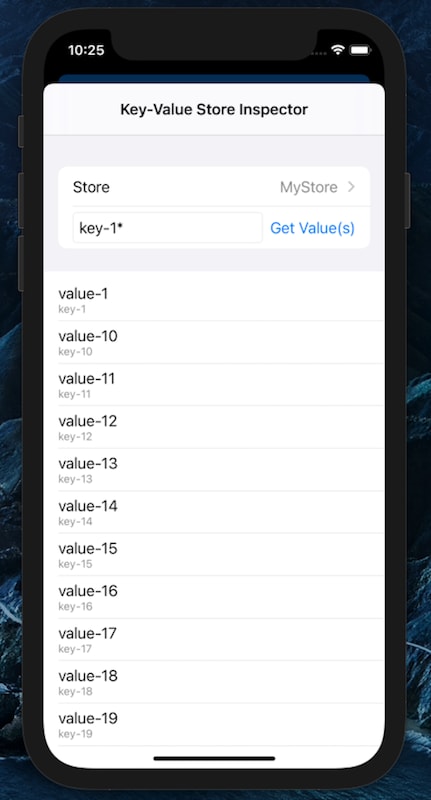
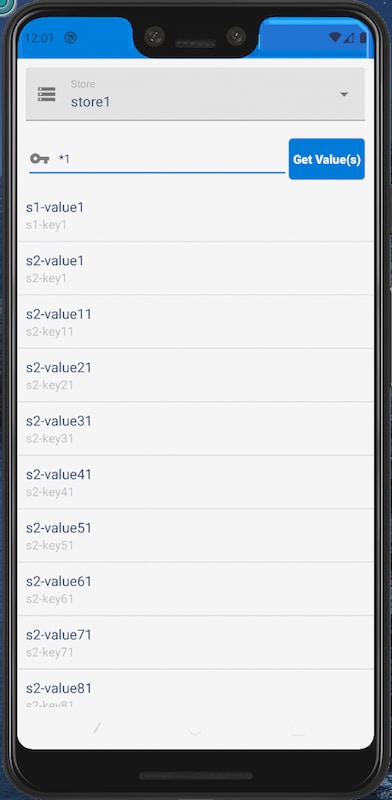
1@objc public private(set) var storeVersion: Int1public int getStoreVersion()To view a list of keys and values, select Inspect Key-Value Store in the Dev Support menu. This tool lets you search a store for all or part of a key name, returning all matching values.
Here’s an iOS Swift example:
1...
2writeToKv(value: "Joe", key: "Trader")
3...
4
5func writeToKv(value: String, key: String) {
6    if let kv = KeyValueEncryptedFileStore.shared(
7                    withName: "testShared") {
8        if kv.saveValue(value, forKey: key) {
9            let numEntries = kv.count()
10            SalesforceLogger.d(RootViewController.self,
11                message:"\nValue added: \(value), " +
12                    "Number of entries: \(numEntries)")
13        }
14    }
15}
See Also
We've Moved
j