To enable full control over “in-flight” sync operations, Mobile SDK 7.1 adds a new status that indicates that the operation has been stopped.
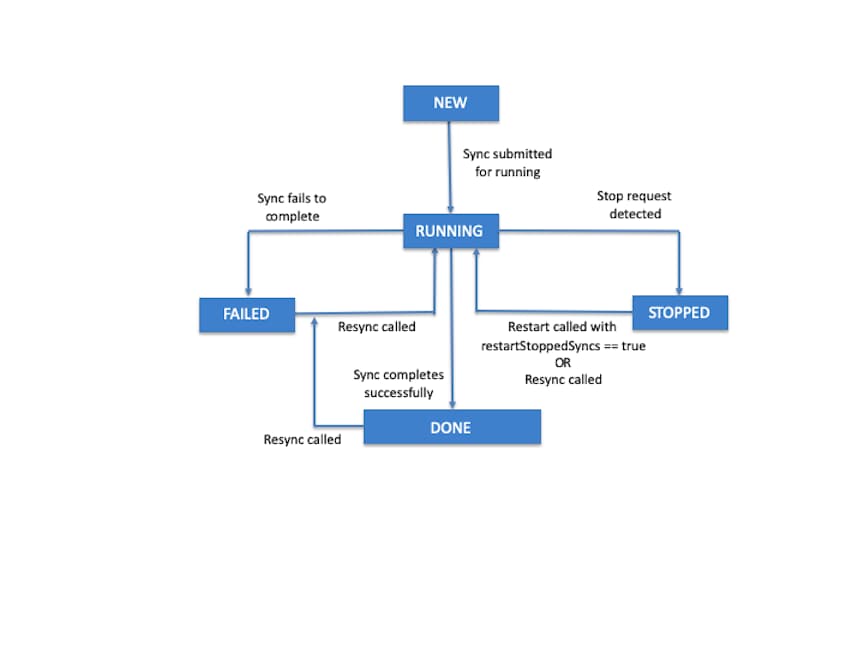
Before Mobile SDK 7.1, each sync operation progressed through a cycle of statuses: new, running, and either failed or done. Mobile SDK 7.1 adds a stopped status to the final step, changing the cycle as follows:
new
running
stopped | failed | done
When key events occur, sync statuses are updated as follows.
Event
Previous Status
Reported Status
App creates a sync object
—
new
Sync object is submitted for running by a call to a sync down or sync up method, or by a first call to reSync
new
running
Sync operation completes successfully
running
done
Sync operation fails to complete
running
failed
A sync manager stop request is detected
running
stopped
Sync manager restarts with the restartStoppedSyncs parameter set to true
stopped
running
reSync is called
stopped/failed/done
running
Any call to a reSync method on a currently running sync operation fails.
Any call to a reSync, syncDown, syncUp, or cleanResyncGhosts method fails if the sync manager state is not in the accepting_syncs state.
If any sync operations are running when the sync manager is first initialized—for example, if the app recently crashed shortly after starting syncs—the sync manager sets their statuses to stopped.
Note
Getting Sync Objects by Status
Beginning with Mobile SDK 7.1, sync manager objects support a getSyncsWithStatus method that returns all sync state objects whose status matches a given value. You can use this method, for example, to iterate through all stopped syncs and restart them manually.
To assume manual restart control over stopped syncs, call the sync manager’s restart method with restartStoppedSyncs set to false.
Note
iOS
Swift
1open class func getSyncsWithStatus(_ store: ,2 status: SyncStatus) -> [SyncState]


 j
j