Model objects support optional conflict detection to prevent unwanted data loss when the object is saved to the server. You can use conflict detection with any save operation, regardless of whether the device is returning from an offline state.
To support conflict detection, you specify a secondary cache to contain the original values fetched from the server. Mobile Sync keeps this cache for later reference. When you save or delete, you specify a merge mode. The following table summarizes the supported modes. To understand the mode descriptions, consider “theirs” to be the current server record, “yours” the current local record, and “base” the record that was originally fetched from the server.
Mode Constant
Description
Force.MERGE_MODE.OVERWRITE
Write “yours” to the server, without comparing to “theirs” or “base”. (This is the same as not using conflict detection.)
Force.MERGE_MODE.MERGE_ACCEPT_YOURS
Merge “theirs” and “yours”. If the same field is changed both locally and remotely, the local value is kept.
Force.MERGE_MODE.MERGE_FAIL_IF_CONFLICT
Merge “theirs” and “yours”. If the same field is changed both locally and remotely, the operation fails.
Force.MERGE_MODE.MERGE_FAIL_IF_CHANGED
Merge “theirs” and “yours”. If any field is changed remotely, the operation fails.
If a save or delete operation fails, you receive a report object with the following fields:
Field Name
Contains
base
Originally fetched attributes
theirs
Latest server attributes
yours
Locally modified attributes
remoteChanges
List of fields changed between base and theirs
localChanges
List of fields changed between base and yours
conflictingChanges
List of fields changed both in theirs and yours, with different values
Diagrams can help clarify how merge modes operate.
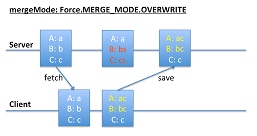
MERGE_MODE.OVERWRITE
In the MERGE_MODE.OVERWRITE diagram, the client changes A and B, and the server changes B and C. Changes to B conflict, whereas changes to A and C do not. However, the save operation blindly writes all the client’s values to the server, overwriting any changes on the server.
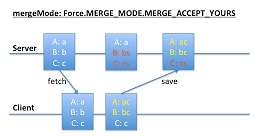
MERGE_ACCEPT_YOURS
In the MERGE_MODE.MERGE_ACCEPT_YOURS diagram, the client changes A and B, and the server changes B and C. Client changes (A and B) overwrites corresponding fields on the server, regardless of whether conflicts exist. However, fields that the client leaves unchanged (C) do not overwrite corresponding server values.
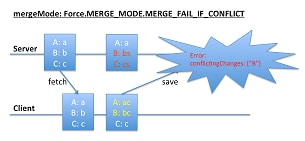
MERGE_FAIL_IF_CONFLICT (Fails)
In the first MERGE_MODE.MERGE_FAIL_IF_CONFLICT diagram, both the client and the server change B. These conflicting changes cause the save operation to fail.
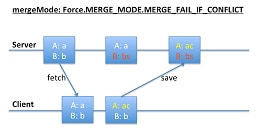
MERGE_FAIL_IF_CONFLICT (Succeeds)
In the second MERGE_MODE.MERGE_FAIL_IF_CONFLICT diagram, the client changed A, and the server changed B. These changes don’t conflict, so the save operation succeeds.
We've Moved
Welcome to the new home of the Mobile SDK Developer Guide! For now, the Japanese guide can be found in PDF form.


 j
j