If a field’s value changes, and the field is used in a template or in a getter of a property that’s used in a template, the component rerenders and displays the new value. If a field is assigned an object or an array, the framework observes some changes to the internals of the object or array, such as when you assign a new value.
When a component rerenders, the expressions used in the template are reevaluated and the renderedCallback() lifecycle hook executes.
Reactivity for Primitives and Complex Types
Primitive fields—like booleans, numbers, and strings—are reactive. LWC tracks field value changes in a shallow fashion. Changes are detected when a new value is assigned to the field by comparing the value identity using ===.
When manipulating complex types like objects and arrays, you must create a new object and assign it to the field for the change to be detected.
1import{LightningElement}from "lwc";23export default class ReactivityExample extends LightningElement{4 bool = true;5 number = 42;6 obj = {name: "John"};78 checkMutation(){9 this.bool = false; // Mutation detected1011 this.number = 42; // No mutation detected: previous value is equal to the newly assigned value12 this.number = 43; // Mutation detected1314 this.obj.name = "Bob"; // No mutation detect: `obj` field value is not reassigned15 this.obj = {name: "John"}; // Mutation detected - redefining the object with the same value creates a new object16 this.obj = { ...this.obj, title: "CEO"}; // Mutation detected17}18}
To deeply track mutations made to the field value for a complex object, use the @track decorator.
Track Changes Inside Objects and Arrays
To observe changes to the properties of an object or to the elements of an array, decorate the field with @track.
When a field is decorated with @track, Lightning Web Components tracks changes to the internal values of:
Plain objects created with {}
Arrays created with []
The framework observes mutations made to plain objects and arrays in a recursive fashion, including nested objects, nested arrays, and a mix of objects and arrays. Cyclic references are also handled.
However, the framework doesn’t observe mutations made to complex objects, such as objects inheriting from Object, class instances, Date, Set, or Map.
@track Decorator
Observe an Object’s Properties
To tell the framework to observe changes to the properties of an object, decorate the field with @track.
As discussed earlier, without using @track, the framework observes changes that assign a new value to the field. If the new value is not === to the previous value, the component rerenders.
Note
For example, let’s change the code a bit to declare the fullName field, which contains an object with two properties, firstName and lastName. The framework observes changes that assign a new value to fullName.
1fullName = {firstName: "", lastName: ""};
This code assigns a new value to the fullName field, so the component rerenders.
The framework observes changes that assign a new value to the fullName field. This code doesn’t do that, instead it assigns a new value to the firstName property of the fullName object.
To tell the framework to observe changes to the object’s properties, decorate the fullName field with @track. Now if we change either property, the component rerenders.
If a property contains an object, to track changes on the object’s properties, annotate the property with @track. To understand, let’s modify our example. Our example initializes firstName and lastName to empty strings, which are primitive values, so the component rerenders when they change.
Rerender an Object with New Properties
A component rerenders only if a property accessed during the previous rendering cycle is updated, even when the object is annotated with @track. This prevents the component from rerendering excessively,
Consider this tracked object and a getter that prints the object’s properties.
During the first render cycle, the framework records that obj.value1 is accessed. Any mutation to obj that doesn’t affect value1 is ignored since it doesn’t impact the rendered content. Therefore, a change to value1 triggers a rerendering, but adding a new property to obj or a change to value2 doesn’t trigger a rerendering.
To tell the framework to observe changes to the array’s elements, decorate the arr field with @track Additionally, the framework doesn’t automatically convert the array to a string for updates to the array’s elements. To return the updated string, use a getter to convert the elements of the array to a string using join().
Let’s look at a component with a field, x, of type Date. The template has a few buttons that change the internal state of x. This example highlights that new Date() creates an object, as it is not a plain JavaScript object internal state mutation will not be observed by the LWC engine, even though the code uses @track.
1// trackDate.js2import{LightningElement, track}from "lwc";3export default class TrackDate extends LightningElement{4 @track x = new Date();56 initDate(){7 this.x = new Date();8}910 updateDate(){11 this.x.setHours(7); // No mutation detected12}13}
Similarly to our previous example, the template has a few buttons that change the internal state of x.
When you click the Init button, the change is observed and the template is rerendered. Lightning Web Components observes that x is pointing to a new Date object. However, when you click Update, the template isn’t rerendered. Lightning Web Components doesn’t observe changes to the value of the Date object.
To ensure that the template is rerendered when the value changes, clone the existing date and update its value.
1updateDate(){2 const cloned = new Date(this.x.getTime());3 cloned.setHours(7);45 // Assign the new date instance to rerender the component.6 this.x = cloned;7}
When you set a property to a value that can’t be tracked, a warning is logged. If you’re trying to debug a scenario where the component isn’t rerendering on change, look in your browser console. For our example, the browser console logs this helpful warning:
Property "x" of [object:vm TrackDate] is set to a non-trackable object, which means changes into that object cannot be observed.
Note
Example: Reactive Strings for User Input
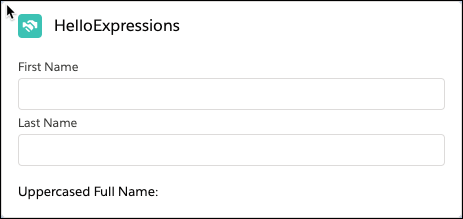
When you enter a value in the First Name or Last Name field, the component converts it to uppercase and displays it.
The component’s class defines the firstName and lastName fields. Because they’re used in the getter of a property that’s used in the template (uppercasedFullName), the component rerenders when their values change.
This release is in preview. Features described here don't become generally available until the latest general availability date that Salesforce announces for this release. Before then, and where features are noted as beta, pilot, or developer preview, we can't guarantee general availability within any particular time frame or at all. Make your purchase decisions only on the basis of generally available products and features.


 j
j