


 j
jCreate Custom Record Components
Use Apex and SOQL for Search
Use Expressions to Add Dynamic Data to LWR Sites
Create a Logout Link Component
Experience Delivery (Beta)
Previous Versions
With expressions, you can make calculations and access property values and other data from Salesforce or content from Salesforce CMS to pass into a component’s attributes. Use expressions for dynamic output or for passing values into components by assigning them to attributes.
An expression is any set of literal values, variables, subexpressions, or operators that can be resolved to a single value. Method calls aren’t allowed in expressions.
The expression syntax is: {!expression} where expression is a placeholder.
Use these expressions to bind data from Salesforce or content from Salesforce CMS to your LWR site and dynamically populate content. The expressions work in the following instances.
{!cmsMedia.contentKey})Here’s an example of an HTML Editor component where we want to show an image in the banner.
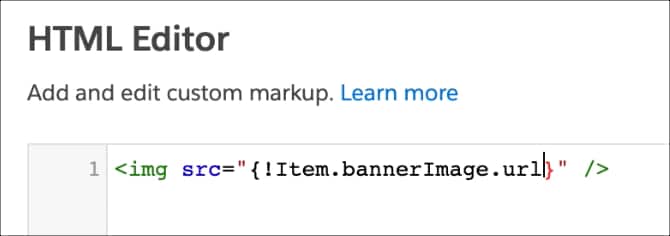
When the page loads on the live site, the relevant value replaces the expression.
| Expression | Description | Supported Pages and Components |
|---|---|---|
{!Item.field} | Gets the data for the field on the current bound data. | Component properties that can be bound to data from Salesforce or to content from Salesforce CMS |
{!Item.field._rawValue} | Gets the raw value for the data field. | Component properties that can be bound to data from Salesforce |
{!Item.field._displayValue} | Gets the formatted and localized value for the data field. | Component properties that can be bound to data from Salesforce |
{!Item._detailURL} | Gets the URL of a Salesforce CMS data item. | Component properties that can be bound to content from Salesforce CMS, including a CMS content page |
{!Label.namespace.name} | Defines the label’s localized value when you specify labels in Experience Builder. | First, create a translated custom label in Salesforce Setup. For more information, see Translate Custom Labels. Then, use the label expression in any Experience Builder component that has a text field to see the localized label. |
{!cmsMedia.contentKey} | Gets the URL of a Salesforce CMS image. | The HTML Editor component on any page in an enhanced LWR site. Unsupported in non-enhanced LWR sites. |
Use other expressions to query parameters, resolve the correct basePath for a site, or to leverage user fields in expressions.
| Expression | Description | Supported Pages and Components |
|---|---|---|
{!Route.param} | Gets a query parameter from the URL. |
|
{!param} | Gets a parameter value from a URL where : precedes the parameter. For example, gets {!term} from the /global-search/:term URL. |
|
{!Site.basePath} | Resolves to the basePath of the LWR site. |
|
{!User.userId} | Resolves to the Salesforce ID of the user. |
|
{!User.isGuest} | Returns TRUE or FALSE based on whether the user is a guest user. |
|
{!User.Record.<User sObject Field>} | Resolves to the value of a Salesforce User Object’s field. |
|
{!param} or {!Route.param} expression in the HTML Editor or Rich Content Editor components, some HTML special characters are escaped, or replaced with different values, for security purposes. These characters include <, >, and &.{!CurrentUser.{!User.Record.<User sObject Field>} expression. You can also use the {!User.Commerce.<Commerce Field>} expression to access user data related to Commerce in sites built using the Commerce templates. For more information, see Expressions in Commerce Components.See Also
j