


 j
jCreate Custom Content Type Sample
Edit Custom Content Type Sample
Delete Custom Content Type Sample
Display Salesforce CMS Content
Display CMS Content in Experience Builder Sites
Add new fields or change the properties of existing fields in custom content types using Metadata API or Tooling API. This sample adds a registration URL node to an event custom content type.
This sample is for use with Tooling API. Tooling API and Metadata API ensure that changes to custom content types are backward compatible to prevent breaking existing content. To edit custom content types with a graphical user interface, use the CMS Content Type Manager app from AppExchange.
Note
This sample ManagedContentType JSON object defines an event custom content type.
1{
2"Metadata" : {
3    "description" : "Information about upcoming events",
4    "developerName" : "demoMct",
5    "managedContentNodeTypes" : [ {
6      "helpText" : "The title of this event.",
7      "isLocalizable" : true,
8      "isRequired" : true,
9      "nodeLabel" : "Event Name",
10      "nodeName" : "title",
11      "nodeType" : "NAMEFIELD",
12      "placeholderText" : "Enter Event Name Here"
13    }, {
14      "helpText" : "Event Image",
15      "isLocalizable" : false,
16      "isRequired" : false,
17      "nodeLabel" : "Event Image",
18      "nodeName" : "bannerImage1",
19      "nodeType" : "IMG",
20      "placeholderText" : "Upload a Image here"
21    }, {
22      "helpText" : "Time at which the event starts.",
23      "isLocalizable" : false,
24      "isRequired" : false,
25      "nodeLabel" : "Event Start Time",
26      "nodeName" : "startTime",
27      "nodeType" : "DATETIME",
28      "placeholderText" : null
29    }, {
30      "helpText" : "Time at which the event ends.",
31      "isLocalizable" : false,
32      "isRequired" : false,
33      "nodeLabel" : "Event End Time",
34      "nodeName" : "endTime",
35      "nodeType" : "DATETIME",
36      "placeholderText" : null
37    }, {
38      "helpText" : "Venue of the Event",
39      "isLocalizable" : true,
40      "isRequired" : false,
41      "nodeLabel" : "Event Venue",
42      "nodeName" : "address",
43      "nodeType" : "MTEXT",
44      "placeholderText" : "Enter Venue address here."
45    }, {
46      "helpText" : null,
47      "isLocalizable" : true,
48      "isRequired" : false,
49      "nodeLabel" : "Additional Details  and Contact Information",
50      "nodeName" : "details",
51      "nodeType" : "RTE",
52      "placeholderText" : "Enter any additional details here."
53    }],
54    "masterLabel" : "Event",
55    "urls" : null
56  }
57}This sample ManagedContentType JSON object adds a registration URL node to enhance the event custom content type.
1{
2"Metadata" : {
3    "description" : "Information about upcoming events",
4    "developerName" : "demoMct",
5    "managedContentNodeTypes" : [ {
6      "helpText" : "The title of this event.",
7      "isLocalizable" : true,
8      "isRequired" : true,
9      "nodeLabel" : "Event Name",
10      "nodeName" : "title",
11      "nodeType" : "NAMEFIELD",
12      "placeholderText" : "Enter Event Name Here"
13    }, {
14      "helpText" : "Event Image",
15      "isLocalizable" : false,
16      "isRequired" : false,
17      "nodeLabel" : "Event Image",
18      "nodeName" : "bannerImage1",
19      "nodeType" : "IMG",
20      "placeholderText" : "Upload a Image here"
21    }, {
22      "helpText" : "Time at which the event starts.",
23      "isLocalizable" : false,
24      "isRequired" : false,
25      "nodeLabel" : "Event Start Time",
26      "nodeName" : "startTime",
27      "nodeType" : "DATETIME",
28      "placeholderText" : null
29    }, {
30      "helpText" : "Time at which the event ends.",
31      "isLocalizable" : false,
32      "isRequired" : false,
33      "nodeLabel" : "Event End Time",
34      "nodeName" : "endTime",
35      "nodeType" : "DATETIME",
36      "placeholderText" : null
37    }, {
38      "helpText" : "Venue of the Event",
39      "isLocalizable" : true,
40      "isRequired" : false,
41      "nodeLabel" : "Event Venue",
42      "nodeName" : "address",
43      "nodeType" : "MTEXT",
44      "placeholderText" : "Enter Venue address here."
45    }, {
46      "helpText" : null,
47      "isLocalizable" : true,
48      "isRequired" : false,
49      "nodeLabel" : "Additional Details  and Contact Information",
50      "nodeName" : "details",
51      "nodeType" : "RTE",
52      "placeholderText" : "Enter any additional details here."
53    }, **{
54      "helpText" : "Registration URL of the Event",
55      "isLocalizable" : false,
56      "isRequired" : false,
57      "nodeLabel" : "Registration URL",
58      "nodeName" : "regUrl",
59      "nodeType" : "URL",
60      "placeholderText" : "Enter registration URL here."
61    } **],
62    "masterLabel" : "Event",
63    "urls" : null
64  }
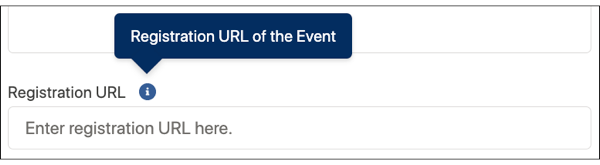
65}In the Salesforce CMS workspace, the edited event custom content type shows the new field.
When editing a custom content type, these changes aren’t allowed.
isRequired property is set to trueisRequired property from false to trueisRequired set to truenodeType or nodeName propertyj