


 j
jCreate Custom Content Type Sample
Edit Custom Content Type Sample
Delete Custom Content Type Sample
Display Salesforce CMS Content
Display CMS Content in Experience Builder Sites
This sample custom content type creates a blog that includes dedicated fields for marketing and presentation information.
This sample is for use with Metadata API or Tooling API. To create custom content types with a graphical user interface, use the CMS Content Type Manager app from AppExchange.
Note
This custom content type includes these fields with their respective attributes and values.
Data type: Text. The display name for the content type.
Attributes:
Enter an SEO friendly titleTitle to be shown in the blog posttrueData type: Image
Attributes:
Main image that’s shown at the top of the blog postData type: Rich text
Attributes:
Blog’s main bodytrueData type: Text
Data type: Text
Attributes:
Shown as tag text when a preview is renderedtrueData type: Text
Data type: Text
Attributes:
Enter human readable datefalseData type: Rich text
Attributes:
Blog’s footertrueThe content creation page for this sample custom content type looks like this after you add it to CMS.
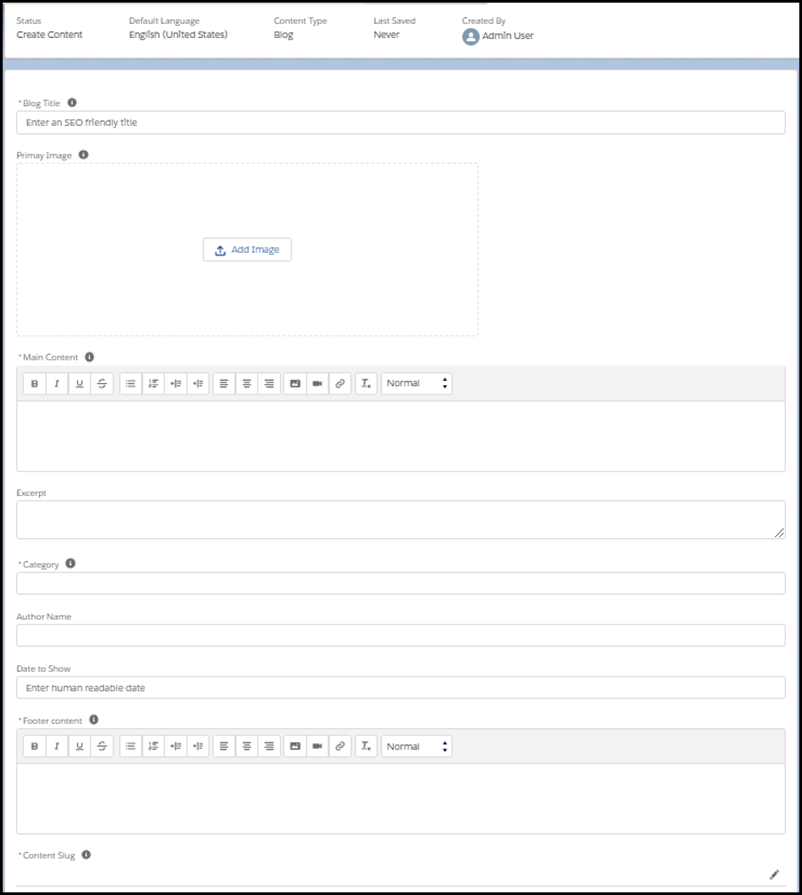
You can add this sample ManagedContentType XML component to CMS with Metadata API.
1<?xml version="1.0" encoding="UTF-8"?>
2<ManagedContentType xmlns="http://soap.sforce.com/2006/04/metadata">
3   <description>Engineering blogs published on salesforce.com/devblog</description>
4   <developerName>engBlog</developerName>
5   <managedContentNodeTypes>
6       <helpText>Title to be shown in the blog post</helpText>
7       <isLocalizable>true</isLocalizable>
8       <isRequired>true</isRequired>
9       <nodeLabel>Blog Title</nodeLabel>
10       <nodeName>title</nodeName>
11       <nodeType>NAMEFIELD</nodeType>
12       <placeholderText>Enter an SEO friendly title</placeholderText>
13   </managedContentNodeTypes>
14   <managedContentNodeTypes>
15       <helpText>Main image that's shown at the top of the blog post</helpText>
16       <isLocalizable>false</isLocalizable>
17       <isRequired>false</isRequired>
18       <nodeLabel>Primary Image</nodeLabel>
19       <nodeName>primaryImage</nodeName>
20       <nodeType>IMG</nodeType>
21   </managedContentNodeTypes>
22   <managedContentNodeTypes>
23       <helpText>Blog's main body</helpText>
24       <isLocalizable>true</isLocalizable>
25       <isRequired>true</isRequired>
26       <nodeLabel>Main Content</nodeLabel>
27       <nodeName>body</nodeName>
28       <nodeType>RTE</nodeType>
29   </managedContentNodeTypes>
30   <managedContentNodeTypes>
31       <isLocalizable>true</isLocalizable>
32       <isRequired>false</isRequired>
33       <nodeLabel>Excerpt</nodeLabel>
34       <nodeName>excerpt</nodeName>
35       <nodeType>MTEXT</nodeType>
36   </managedContentNodeTypes>
37   <managedContentNodeTypes>
38       <helpText>Shown as a tag text when a preview is rendered</helpText>
39       <isLocalizable>true</isLocalizable>
40       <isRequired>true</isRequired>
41       <nodeLabel>Category</nodeLabel>
42       <nodeName>category</nodeName>
43       <nodeType>TEXT</nodeType>
44   </managedContentNodeTypes>
45   <managedContentNodeTypes>
46       <isLocalizable>true</isLocalizable>
47       <isRequired>false</isRequired>
48       <nodeLabel>Author Name</nodeLabel>
49       <nodeName>authorName</nodeName>
50       <nodeType>TEXT</nodeType>
51   </managedContentNodeTypes>
52   <managedContentNodeTypes>
53       <isLocalizable>true</isLocalizable>
54       <isRequired>false</isRequired>
55       <nodeLabel>Date to Show</nodeLabel>
56       <nodeName>date</nodeName>
57       <nodeType>TEXT</nodeType>
58       <placeholderText>Enter human readable date</placeholderText>
59   </managedContentNodeTypes>
60   <managedContentNodeTypes>
61       <helpText>Blog's footer</helpText>
62       <isLocalizable>true</isLocalizable>
63       <isRequired>true</isRequired>
64       <nodeLabel>Footer content</nodeLabel>
65       <nodeName>footer</nodeName>
66       <nodeType>RTE</nodeType>
67   </managedContentNodeTypes>
68   <masterLabel>Blog</masterLabel>
69</ManagedContentType>You can add this sample ManagedContentType JSON object to CMS with Tooling API.
1{
2  "Metadata" : {
3    "description" : "Engineering blogs published on salesforce.com/devblog",
4    "developerName" : "EngBlog",
5    "managedContentNodeTypes" : [ {
6      "helpText" : "Title to be shown in the blog post",
7      "isLocalizable" : true,
8      "isRequired" : true,
9      "nodeLabel" : "Blog Title",
10      "nodeName" : "title",
11      "nodeType" : "NAMEFIELD",
12      "placeholderText" : "Enter an SEO friendly title"
13    }, {
14      "helpText" : "Main image that's shown at the top of the blog post",
15      "isLocalizable" : false,
16      "isRequired" : false,
17      "nodeLabel" : "Primary Image",
18      "nodeName" : "primaryImage",
19      "nodeType" : "IMG"
20    }, {
21      "helpText" : "Blog's main body",
22      "isLocalizable" : true,
23      "isRequired" : true,
24      "nodeLabel" : "Main Content",
25      "nodeName" : "body",
26      "nodeType" : "RTE"
27    }, {
28      "isLocalizable" : true,
29      "isRequired" : false,
30      "nodeLabel" : "Excerpt",
31      "nodeName" : "excerpt",
32      "nodeType" : "MTEXT"
33    }, {
34      "helpText" : "Shown as a tag text when a preview is rendered",
35      "isLocalizable" : true,
36      "isRequired" : true,
37      "nodeLabel" : "Category",
38      "nodeName" : "category",
39      "nodeType" : "TEXT"
40      }, {
41      "isLocalizable" : true,
42      "isRequired" : false,
43      "nodeLabel" : "Author Name",
44      "nodeName" : "authorName",
45      "nodeType" : "TEXT"
46    }, {
47      "isLocalizable" : true,
48      "isRequired" : false,
49      "nodeLabel" : "Date to Show",
50      "nodeName" : "date",
51      "nodeType" : "TEXT",
52      "placeholderText" : "Enter human readable date"
53    },{
54      "isLocalizable" : true,
55      "isRequired" : true,
56      "nodeLabel" : "Footer content",
57      "nodeName" : "footer",
58      "nodeType" : "RTE",
59      "helpText" : "Blog's footer"
60    } ],
61    "masterLabel" : "Blog"
62  },
63  "FullName" : "Blog"
64}