


Customizing the Email Action
The Email action in Case Feed lets support agents connect with customers via email. With the apex:emailPublisher component, you can:
- Customize the dimensions of the Email action.
- Define defaults and visibility for fields.
- Define the visibility and label of the send button.
- Define onSubmit functionality.
- Support email templates and attachments in the action.
The apex:emailPublisher component closes a task in Open Activities created by Email-to-Case inbound email.
Note
apex:emailPublisher Attributes
| Attribute Name | Attribute Type | Description | Required? | API Version | Access |
|---|---|---|---|---|---|
autoCollapseBody | Boolean | A Boolean value that specifies whether the email body collapses to a small height when it is empty. | 25.0 | ||
bccVisibility | String | The visibility of the BCC field can be ‘editable’, ‘editableWithLookup’, ‘readOnly’, or ‘hidden’. | 25.0 | ||
ccVisibility | String | The visibility of the CC field can be ‘editable’, ‘editableWithLookup’, ‘readOnly’, or ‘hidden’. | 25.0 | ||
emailBody | String | The default text value of the email body. | 25.0 | ||
emailBodyFormat | String | The format of the email body can be ‘text’, ‘HTML’, or ‘textAndHTML’. | 25.0 | ||
emailBodyHeight | String | The height of the email body in em. | 25.0 | ||
enableQuickText | Boolean | A Boolean value that specifies whether the Quick Text autocomplete functionality is available in the action. | 25.0 | ||
entityId | id | Entity ID of the record for which to display the Email action. In the current version, only Case record ids are supported. | Yes | 25.0 | |
expandableHeader | Boolean | A Boolean value that specifies whether the header is expandable or fixed. | 25.0 | ||
fromAddresses | String | A restricted set of from addresses. | 25.0 | ||
fromVisibility | String | The visibility of the From field can be ‘selectable’ or ‘hidden’. | 25.0 | ||
id | String | An identifier that allows the component to be referenced by other components on the page. | 25.0 | Global | |
onSubmitFailure | String | The JavaScript invoked if the email is not successfully sent. | 25.0 | ||
onSubmitSuccess | String | The JavaScript invoked if the email is successfully sent. | 25.0 | ||
rendered | Boolean | A Boolean value that specifies whether the component is rendered on the page. If not specified, this value defaults to true. | 25.0 | Global | |
reRender | Object | The ID of one or more components that are redrawn when the email is successfully sent. This value can be a single ID, a comma-separated list of IDs, or a merge field expression for a list or collection of IDs. | 25.0 | ||
sendButtonName | String | The name of the send button in the Email action. | 25.0 | ||
showAdditionalFields | Boolean | A Boolean value that specifies whether the additional fields defined in the action layout are displayed. | 25.0 | ||
showAttachments | Boolean | A Boolean value that specifies whether the attachment selector is displayed. | 25.0 | ||
showSendButton | Boolean | A Boolean value that specifies whether the send button is displayed. | 25.0 | ||
showTemplates | Boolean | A Boolean value that specifies whether the template selector is displayed. | 25.0 | ||
subject | String | The default value of the Subject. | 25.0 | ||
subjectVisibility | String | The visibility of the Subject field can be ‘editable’, ‘readOnly’, or ‘hidden’. | 25.0 | ||
submitFunctionName | String | The name of a function that can be called from JavaScript to send the email. | 25.0 | ||
title | String | The title displayed in the Email action header. | 25.0 | ||
toAddresses | String | The default value of the To field. | 25.0 | ||
toVisibility | String | The visibility of the To field can be ‘editable’, ‘editableWithLookup’, ‘readOnly’, or ‘hidden’. | 25.0 | ||
width | String | The width of the action in pixels (px) or percentage (%). | 25.0 |
Use Case
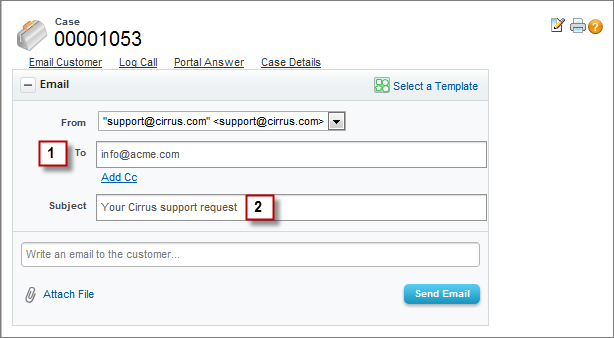
Cirrus Computers, a multinational hardware company with technical support agents in 10 support centers throughout the world, wanted to customize the Email action to increase standardization in outgoing messages and to limit the fields agents could edit.
Cirrus used the apex:emailPublisher component to create an Email action that:
- Has read-only To and Subject fields.
- Pre-populates those fields, ensuring consistency and increasing agents’ efficiency when writing email messages.
Code Sample
1<apex:page standardController="Case" >
2 <apex:emailPublisher entityId="{!case.id}"
3 fromVisibility="selectable"
4 subjectVisibility="readOnly"
5 subject="Your Cirrus support request"
6 toVisibility="readOnly"
7 toAddresses="{!case.contact.email}"
8 emailBody=""/>
9</apex:page> j
j