


Customizing the Articles Tool
The Articles tool lets support agents browse Salesforce Knowledge articles, see whether articles are attached to a case, and share relevant articles with customers. With the support:caseArticles component, you can:
- Customize the appearance and dimensions of the Articles tool.
- Define how the tool’s search function works, including which article types and keywords are used by default and whether advanced search is available.
- Specify whether agents can attach articles to emails.
support:caseArticles Attributes
| Attribute Name | Attribute Type | Description | Required? | API Version | Access |
|---|---|---|---|---|---|
articleTypes | String | Article types to be used to filter the search. Multiple article types can be defined, separated by commas. | 25.0 | ||
attachToEmailEnabled | Boolean | A Boolean value that specifies whether articles can be attached to emails. | 25.0 | ||
bodyHeight | String | The height of the body in pixels (px) or ‘auto’ to automatically adjust to the height of the currently displayed list of articles. | 25.0 | ||
caseId | id | Case ID of the record for which to display the case articles. | Yes | 25.0 | |
categories | String | Data categories to be used to filter the search. The format of this value should be: ‘CatgeoryGroup1:Category1’ where CategoryGroup1 and Category1 are the names of a Category Group and a Category respectively. Multiple category filters can be specified separated by commas but only one per category group. | 25.0 | ||
defaultKeywords | String | The keywords to be used when the defaultSearchType attribute is ‘keyword’. If no keywords are specified, the Case subject is used as a default. | 25.0 | ||
defaultSearchType | String | Specifies the default query of the article search form when it is first displayed. The value can be ‘keyword’, ‘mostViewed’, or ‘lastPublished’. | 25.0 | ||
id | String | An identifier that allows the component to be referenced by other components on the page. | 25.0 | Global | |
language | String | The language used for filtering the search if multilingual Salesforce Knowledge is enabled. | 25.0 | ||
logSearch | Boolean | A Boolean value that specifies whether keyword searches should be logged. | 25.0 | ||
mode | String | Specifies whether the component displays articles currently attached to the case, an article search form, or both. The value can be ‘attached’, ‘search’, ‘attachedAndSearch’, or ‘searchAndAttached’. | 25.0 | ||
onSearchComplete | String | The JavaScript invoked after an article search has completed. | 25.0 | ||
rendered | Boolean | A Boolean value that specifies whether the component is rendered on the page. If not specified, this value defaults to true. | 25.0 | Global | |
reRender | Object | The ID of one or more components that are redrawn when the result of the action method returns to the client. This value can be a single ID, a comma-separated list of IDs, or a merge field expression for a list or collection of IDs. | 25.0 | ||
searchButtonName | String | The display name of the search button. | 25.0 | ||
searchFieldWidth | String | The width of the keyword search field in pixels (px). | 25.0 | ||
searchFunctionName | String | The name of a function that can be called from JavaScript to search for articles if the widget is currently in search mode. | 25.0 | ||
showAdvancedSearch | Boolean | A Boolean value that specifies whether the advanced search link should be displayed. | 25.0 | ||
title | String | The title displayed in the component’s header. | 25.0 | ||
titlebarStyle | String | The style of the title bar can be ‘expanded’, ‘collapsed’, ‘fixed’, or ‘none’. | 25.0 | ||
width | String | The width of the component in pixels (px) or percentage (%). | 25.0 |
Use Case
Cirrus Computers wanted to customize the Case Feed articles tool so agents could more easily find articles to help resolve customers’ issues.
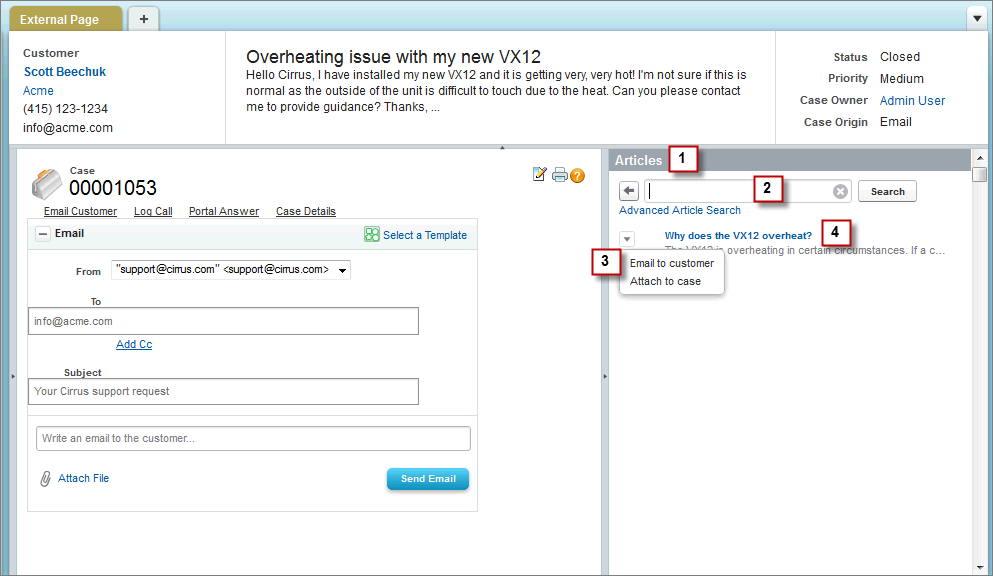
Cirrus used the support:caseArticles component to create an articles tool that:
- Appears in the right sidebar of the page and is open by default on all case pages.
- Uses search-as-you-type functionality to show suggested articles quickly.
- Lets agents attach articles to messages they write with the email action.
- Displays the most recently published articles when no articles are attached to a case.
Code Sample
1<apex:page standardController="Case">
2 <div style="margin-left:-10px;margin-right:-10px;">
3 <div style="background-color: #99A3AC;color:#FFFFFF;font-size:1.1em;font-weight:
4 bold;padding:3px 6px 3px 6px;">Articles</div>
5 <support:caseArticles caseId="{!case.id}"
6 bodyHeight="auto"
7 titlebarStyle="none"
8 searchButtonName="Search"
9 searchFieldWidth="200px"
10 defaultSearchType="lastPublished"
11 />
12 </div>
13</apex:page> j
j