After you install and configure the MobilePush SDK React Native plugin, configure the plugin to enable push support for the iOS platform.
Prerequisites
Before you configure the MobilePush SDK React Native plugin for iOS apps, make sure that the plugin is installed and configured for your app. See Marketing Cloud React Native Plugin.
Enable Push Notifications In Your iOS App
To enable push notifications in your iOS app, follow these steps.
After you’ve installed the React Native plugin using npm or Yarn, navigate to the ios directory and install the MobilePush SDK pod.
pod
1// In your App, go to ios directory after installing plugin via npm or yarn.2cd ios3pod install
Enable and Configure Push Notifications
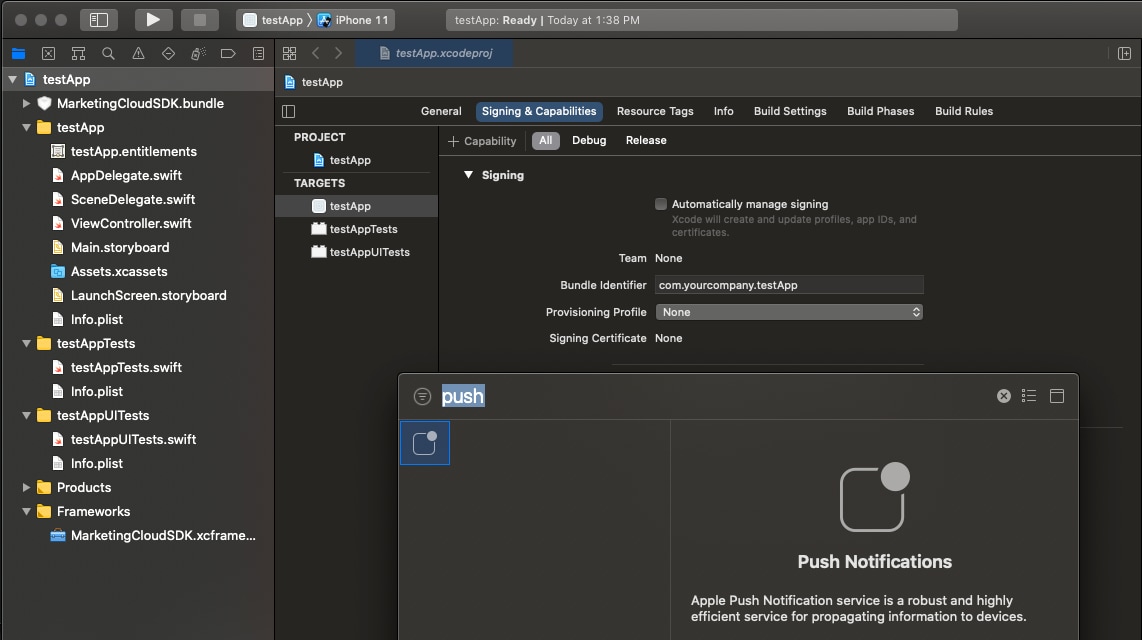
Enable push notifications in your target’s Capabilities settings in Xcode by clicking + Capability and then selecting Push Notifications.
Set your AppDelegate class to adhere to the UNUserNotificationCenterDelegate and SFMCSdkURLHandlingDelegate protocols.
AppDelegate.h
1// Other imports...2#import <UserNotifications/UserNotifications.h>3#import <MarketingCloudSDK/MarketingCloudSDK.h>4#import <SFMCSDK/SFMCSDK.h>56@interface AppDelegate : RCTAppDelegate<UNUserNotificationCenterDelegate, SFMCSdkURLHandlingDelegate>
Set up push notifications by updating AppDelegate.
AppDelegate.m
1@implementation AppDelegate23- (BOOL)application:(UIApplication *)application4 didFinishLaunchingWithOptions:(NSDictionary *)launchOptions {56 //RN setup7 self.moduleName = @"example";8 // You can add your custom initial props in the dictionary below.9 // They will be passed down to the ViewController used by React Native.10 self.initialProps = @{};1112 // Configure the SFMC sdk ...13 PushConfigBuilder *pushConfigBuilder = [[PushConfigBuilder alloc] initWithAppId:@"{MC_APP_ID}"];14 [pushConfigBuilder setAccessToken:@"{MC_ACCESS_TOKEN}"];15 [pushConfigBuilder setMarketingCloudServerUrl:[NSURL URLWithString:@"{MC_APP_SERVER_URL}"]];16 [pushConfigBuilder setMid:@"MC_MID"];17 [pushConfigBuilder setAnalyticsEnabled:YES];1819 [SFMCSdk initializeSdk:[[[SFMCSdkConfigBuilder new] setPushWithConfig:[pushConfigBuilder build] onCompletion:^(SFMCSdkOperationResult result) {20 if (result == SFMCSdkOperationResultSuccess) {21 [self pushSetup];22 } else {23 // SFMC sdk configuration failed.24 NSLog(@"SFMC sdk configuration failed.");25 }26 }] build]];2728 // ... The rest of the didFinishLaunchingWithOptions method29 return [super application:application didFinishLaunchingWithOptions:launchOptions];30}3132- (void)pushSetup {33 // AppDelegate adheres to the SFMCSdkURLHandlingDelegate protocol34 // and handles URLs passed back from the SDK in `sfmc_handleURL`.35 // For more information, see https://salesforce-marketingcloud.github.io/MarketingCloudSDK-iOS/sdk-implementation/implementation-urlhandling.html36 [SFMCSdk requestPushSdk:^(id<PushInterface> _Nonnull mp) {37 [mp setURLHandlingDelegate:self];38 }];3940 dispatch_async(dispatch_get_main_queue(), ^{4142 // set the UNUserNotificationCenter delegate - the delegate must be set here in43 // didFinishLaunchingWithOptions44 [UNUserNotificationCenter currentNotificationCenter].delegate = self;45 [[UIApplication sharedApplication] registerForRemoteNotifications];4647 [[UNUserNotificationCenter currentNotificationCenter]48 requestAuthorizationWithOptions:UNAuthorizationOptionAlert |49 UNAuthorizationOptionSound |50 UNAuthorizationOptionBadge51 completionHandler:^(BOOL granted, NSError *_Nullable error) {52 if (error == nil) {53 if (granted == YES) {54 NSLog(@"User granted permission");55 }56 }57 }];58 });59}6061- (void)application:(UIApplication *)application62 didRegisterForRemoteNotificationsWithDeviceToken:(NSData *)deviceToken {63 [SFMCSdk requestPushSdk:^(id<PushInterface> _Nonnull mp) {64 [mp setDeviceToken:deviceToken];65 }];66}6768- (void)application:(UIApplication *)application69 didFailToRegisterForRemoteNotificationsWithError:(NSError *)error {70 os_log_debug(OS_LOG_DEFAULT, "didFailToRegisterForRemoteNotificationsWithError = %@", error);71}7273// The method will be called on the delegate when the user responded to the notification by opening74// the application, dismissing the notification or choosing a UNNotificationAction. The delegate75// must be set before the application returns from applicationDidFinishLaunching:.76- (void)userNotificationCenter:(UNUserNotificationCenter *)center77 didReceiveNotificationResponse:(UNNotificationResponse *)response78 withCompletionHandler:(void (^)(void))completionHandler {79 // tell the MarketingCloudSDK about the notification80 [SFMCSdk requestPushSdk:^(id<PushInterface> _Nonnull mp) {81 [mp setNotificationResponse:response];82 }];83 if (completionHandler != nil) {84 completionHandler();85 }86}8788- (void)userNotificationCenter:(UNUserNotificationCenter *)center89 willPresentNotification:(UNNotification *)notification90 withCompletionHandler:91 (void (^)(UNNotificationPresentationOptions options))completionHandler {9293 NSLog(@"User Info : %@", notification.request.content.userInfo);94 completionHandler(UNAuthorizationOptionSound | UNAuthorizationOptionAlert |95 UNAuthorizationOptionBadge);96}9798// This method is REQUIRED for correct functionality of the SDK.99// This method will be called on the delegate when the application receives a silent push100101- (void)application:(UIApplication *)application102 didReceiveRemoteNotification:(NSDictionary *)userInfo103 fetchCompletionHandler:(void (^)(UIBackgroundFetchResult))completionHandler {104105 [SFMCSdk requestPushSdk:^(id<PushInterface> _Nonnull mp) {106 [mp setNotificationUserInfo:userInfo];107 }];108 completionHandler(UIBackgroundFetchResultNewData);109}110111//URL Handling112- (void)sfmc_handleURL:(NSURL * _Nonnull)url type:(NSString * _Nonnull)type {113if ([[UIApplication sharedApplication] canOpenURL:url]) {114 [[UIApplication sharedApplication] openURL:url options:@{} completionHandler:^(BOOL success) {115 if (success) {116 NSLog(@"url %@ opened successfully", url);117 } else {118 NSLog(@"url %@ could not be opened", url);119 }120 }];121 }122}123124@end
Enable Rich Notifications
Rich notifications include images, videos, titles and subtitles, and mutable content. Mutable content can include personalization in the title, subtitle, or body of your message. To enable rich notifications, create a notification service extension.
The SDK doesn’t automatically present URLs from these sources.
CloudPages URLs from push notifications.
OpenDirect URLs from push notifications.
Action URLs from in-app messages.
To handle URLs from push notifications in Android apps, use the code in this example.
MainApplication.java
1@Override2public void onCreate(){3 super.onCreate();45 SFMCSdk.configure((Context)this, SFMCSdkModuleConfig.build(builder ->{6 builder.setPushModuleConfig(MarketingCloudConfig.builder()7 .setApplicationId("{MC_APP_ID}")8 .setAccessToken("{MC_ACCESS_TOKEN}")9 .setSenderId("{FCM_SENDER_ID_FOR_MC_APP}")10 .setMarketingCloudServerUrl("{MC_APP_SERVER_URL}")11 .setNotificationCustomizationOptions(NotificationCustomizationOptions.create(R.drawable.ic_notification))12 .setAnalyticsEnabled(true)13 // Here we set the URL handler to present URLs from CloudPages, OpenDirect, and In-App Messages14 .setUrlHandler((context, s, s1)-> PendingIntent.getActivity(15 context,16 new Random().nextInt(),17 new Intent(Intent.ACTION_VIEW, Uri.parse(s)),18 PendingIntent.FLAG_UPDATE_CURRENT19)).build(this));2021 return null;22}), initializationStatus ->{23 Log.e("TAG", "STATUS "+initializationStatus);24 if(initializationStatus.getStatus() == 1){25 Log.e("TAG", "STATUS SUCCESS");26}27 return null;28});2930 // The rest of the onCreate method31}
To handle URLs from push notifications in iOS apps, use the code in this example.
AppDelegate
1// AppDelegate.h ----23#import <MarketingCloudSDK/MarketingCloudSDK.h>4#import <SFMCSDK/SFMCSDK.h>56...78// Implement the SFMCSdkURLHandlingDelegate delegate9@interface AppDelegate : RCTAppDelegate<UNUserNotificationCenterDelegate, SFMCSdkURLHandlingDelegate>1011// AppDelegate.mm ----1213// This method is called after successfully initializing the SFMCSdk14- (void)pushSetup {15 dispatch_async(dispatch_get_main_queue(), ^{16 // Here we set the URL Handling delegate to present URLs from CloudPages, OpenDirect, and In-App Messages17 [[SFMCSdk mp] setURLHandlingDelegate:self];1819 // Set UNUserNotificationCenter delegate, register for remote notifications, etc...20 });21}2223// ...2425// Implement the required delegate method to handle URLs26- (void)sfmc_handleURL:(NSURL * _Nonnull)url type:(NSString * _Nonnull)type {27 if ([[UIApplication sharedApplication] canOpenURL:url]) {28 [[UIApplication sharedApplication] openURL:url options:@{} completionHandler:^(BOOL success) {29 if (success) {30 NSLog(@"url %@ opened successfully", url);31 } else {32 NSLog(@"url %@ could not be opened", url);33 }34 }];35 }36}


 j
j