Follow best practices for the Shopper Login and API Access Service (SLAS) to maximize security and performance. Recommended steps include using Strict Client Auth for private clients, offering passwordless login when your storefront supports it, and rotating a guest shopper’s session after they place an order.
Strict Client Auth
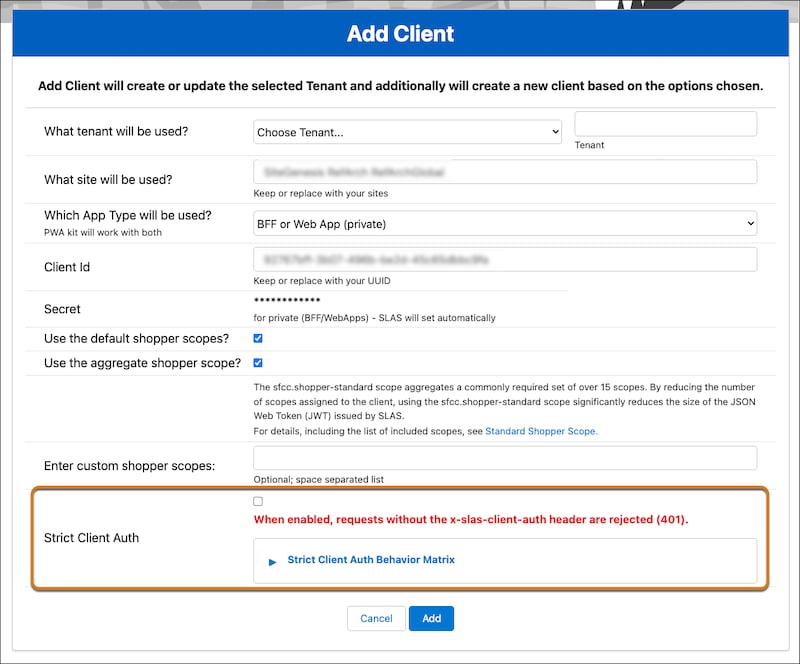
Strict Client Auth is a highly recommended setting for private clients, which requires all /login and /authorize requests to pass their credentials directly in the x-slas-client-auth header. This feature is part of a broader set of protections to help keep authentication endpoints secure and resilient against automated threats. Public clients don’t support Strict Client Auth and ignore the x-slas-client-auth header if present.
Follow these steps to use Strict Client Auth.
From the SLAS Admin UI, create a new private client or edit an existing one.
Turn on Strict Client Auth. To review how Strict Client Auth interacts with the x-slas-client-auth header, expand the Strict Client Auth Behavior Matrix dropdown.
Save the private client.
Include a valid x-slas-client-auth header on requests to /login and /authorize endpoints. Requests that don’t include the header or include an invalid header return a 401 Unauthorized error. The header value must be a Base64-encoded string in the format client_id:client_secret.
The decoded value must follow client_id:client_secret format with both values present.
The client_id in the header must match the client_id query parameter.
The client_secret must match the provisioned secret for the client.
SLAS validates the x-slas-client-auth header whenever it’s included in the request, regardless of whether the client has Strict Client Auth turned on.
Note
Passwordless Login
Prefer passwordless login for shopper authentication when your storefront supports it. Passwordless login verifies a shopper’s identity without a password and offers protection against cyberattacks such as phishing and brute-force password cracking. SLAS supports one-time passwords (OTPs) and passkeys. For current storefront support, see Passwordless Login Feature Support.
Leaked Credentials on SLAS Login
Leaked Credentials Detection applies to POST /shopper/auth/v1/organizations/{organizationId}/oauth2/login because SLAS submits shopper credentials as HTTP Basic in the Authorization header. For a leaked-credentials match, use a SCAPI-zone rate-limiting rule with the block action (HTTP 429). Start the rule with the log action, review the matches, and then switch to block. Don’t use a managed_challenge, js_challenge, or legacy_captcha action. For storefront form login and rule examples, see Bot Management. For leaked-credentials detection and SCAPI-zone availability controls, see Security.
Refresh Token Service Protection
To protect against refresh-token replay abuse, SLAS limits how frequently a single refresh token can be exchanged at /oauth2/token.
A refresh token can be exchanged up to 3 times within 60 seconds.
Additional attempts return an HTTP 429 (Too Many Requests) response with a Retry-After header.
Repeated use of a revoked, expired, or unknown token can also return an HTTP 429 response.
To avoid hitting these limits, review your integration to make sure it doesn’t reuse or concurrently exchange the same refresh token, and make sure your application correctly handles HTTP 429 responses.
Delete Shopper Rate Limiting
The SLAS Admin Delete Shopper endpoint is rate limited to 100 requests per minute per tenant by default.
Requests that exceed this limit return an HTTP 429 (Too Many Requests) response.
When you receive a 429 response, wait before retrying. A 429 response blocks further requests until a 10-minute time-to-live (TTL) period expires. Requests sent before the TTL expires don’t return a valid response, so wait for the TTL to expire before retrying.
SCAPI Zone Rate Limiting
The SLAS limits in Refresh Token Service Protection and Delete Shopper Rate Limiting stay in place. A refresh token can be exchanged up to 3 times in 60 seconds, and Delete Shopper is limited to 100 requests per minute per tenant. Add rate-limiting rules on the SCAPI zone in Production Business Manager, in front of those limits. A rule applies to Development, Staging, and Production unless you scope it by the org ID in the URL path. See SCAPI Zone Support for B2C Commerce.
Custom Header Forwarding
SLAS forwards c_* custom headers to ECOM on the /login endpoint. Use this to pass per-request context to third-party security and bot mitigation solutions integrated with your storefront.
To take advantage of this, prefix any custom header you want forwarded with c_.
Preserve OAuth State in Trusted Agent On Behalf Flows
The OAuth state parameter is preserved end-to-end through the Trusted Agent On Behalf (TAOB) flow, providing consistent state handling across the authorization and token requests. For details on passing the state parameter in a TAOB flow, see Specify TAOB Parameters for Guest Shoppers.
Handle the Audience (aud) Claim
As a best practice, don’t validate or hardcode the specific value of the aud claim in your applications, as its format may change over time. Applications should rely on standard OAuth/OIDC token validation and use the aud claim only to verify that the token is intended for the receiving service, rather than matching a specific expected value.
Mitigate Guest Token Reuse
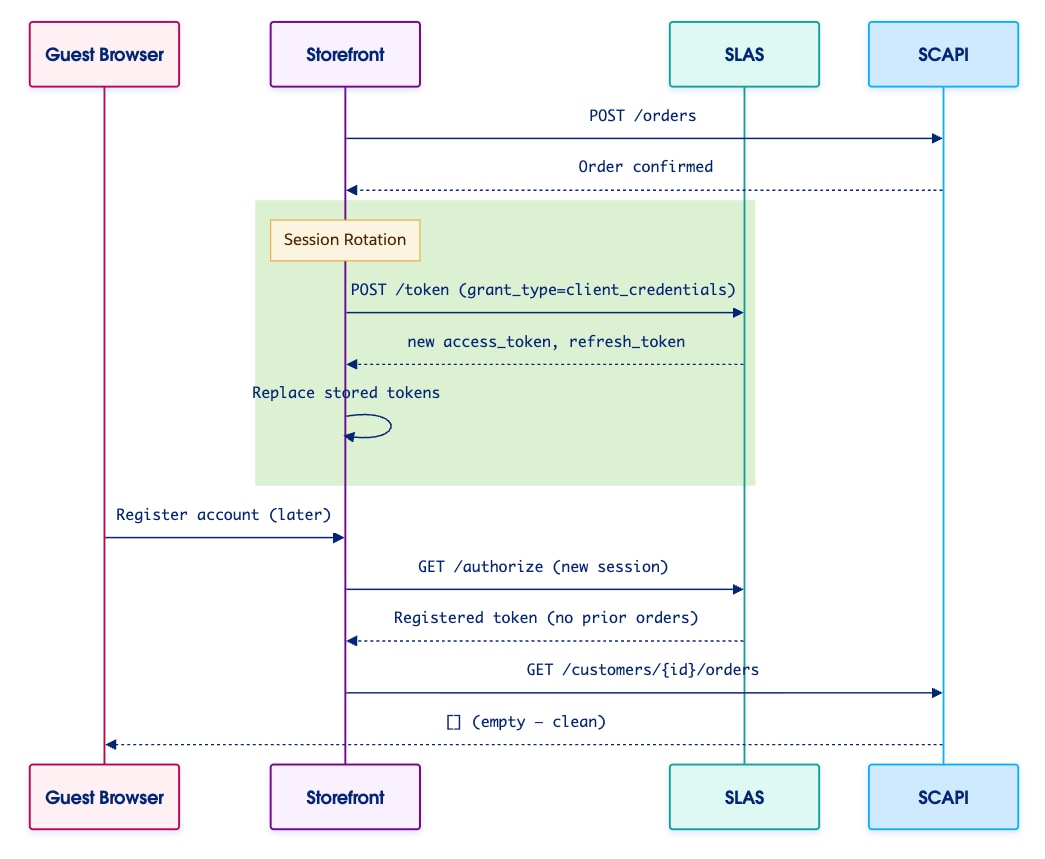
Prevent guest order data from appearing in a shopper’s registered account by rotating the guest session immediately after receiving a guest order. Treat every completed guest order as a session boundary. In the recommended flow, after order confirmation, request a fresh guest token from SLAS using grant_type=client_credentials. Then, replace the currently stored access token and refresh token with the new ones.
If a guest later registers on the same device, the registered profile has no association with prior guest orders. By isolating guest sessions, you enable privacy-first guest shopping on retail kiosks, public computers, and shared devices where multiple guest shoppers browse and checkout sequentially.
Recommended Guest Token Flow
The recommended flow triggers upon order confirmation, when a POST /orders request succeeds (1).
Ideally, make order confirmation the trigger for session rotation. This step marks the strongest boundary for guest shopper activity.
Alternatively, use these trigger points, in order of preference:
After payment completion, if using a multi-step checkout with deferred order creation.
On logout. SLAS already handles this via /logout. However, this trigger doesn’t help if the guest never explicitly logs out before registering.
Note
Session Rotation Step 1: Get a Fresh Guest Token
Send a POST request to /token with grant_type set to client_credentials (2). Passing the client credentials allows the client application to get access and refresh tokens for guest user through a trusted server. For more information, see getAccessToken.
The response includes a new access_token and refresh_token.
Session Rotation Step 2: Swap Tokens in the Storefront
Replace the stored access_token and refresh_token with the values returned in Step 1 (3). All subsequent B2C Commerce API calls use the new session.
Result: Empty Order List Following Account Registration
The benefit of session rotation shows up if the guest shopper subsequently registers an account (4). The previous guest order data doesn’t appear in the registered account profile.
To demonstrate this result, the sequence diagram shows that after registering an account and authorizing a new session, calling getCustomerOrders returns an empty order list.
Edge Cases to Consider
When implementing a session rotation flow for guest tokens, keep these edge cases in mind.
Scenario
Recommendation
Guest places multiple orders in one session
Rotate after each order, or at minimum after the last order before the session ends.
Guest refreshes page between revoke and new token
Treat revoke+new-token as an atomic operation (no user-visible gap).
Guest has items in cart when session rotates
Transfer the basket to the new session if needed, or perform the rotation only after checkout completes (cart is empty). Cart is managed by the Shopper Baskets API, keyed by customer_id.
Public client without client_secret
Use token_type_hint=refresh_token with the refresh token in the revoke call; for the new guest token, use client_credentials with Proof Key for Code Exchange (PKCE) if required by the client configuration.
Session Bridge (SESB/hybrid) flows
Rotate before the session bridge, not after. SESB flows intentionally preserve guest context across the bridge.


 j
j