


 j
jCreating Basic Maps
Adding Location Markers to a Map
Using Custom Marker Icons
Adding Info Windows to Markers
Example of Building Map Data in Apex
Previous Versions
A basic map without markers requires only an <apex:map> component. This component defines the map’s basic canvas, including its dimensions, location, and initial zoom level.
The center attribute defines the point around which the map is centered. You can provide center values in several formats.
latitude and longitude attributes that specify location coordinates. For example, “{latitude: 37.794, longitude: -122.395}”.Map<String, Double>, with latitude and longitude keys to specify location coordinates.If <apex:map> doesn’t have child <apex:mapMarker> tags, the center attribute is required.
This simple street map displays the neighborhood around Salesforce’s San Francisco headquarters.
1<apex:page >
2
3    <h1>Salesforce in San Francisco</h1>
4
5    <!-- Display the address on a map -->
6    <apex:map width="600px" height="400px" mapType="roadmap" zoomLevel="16"
7        center="One Market Street, San Francisco, CA">
8    </apex:map>
9
10</apex:page>
This code produces the following map.
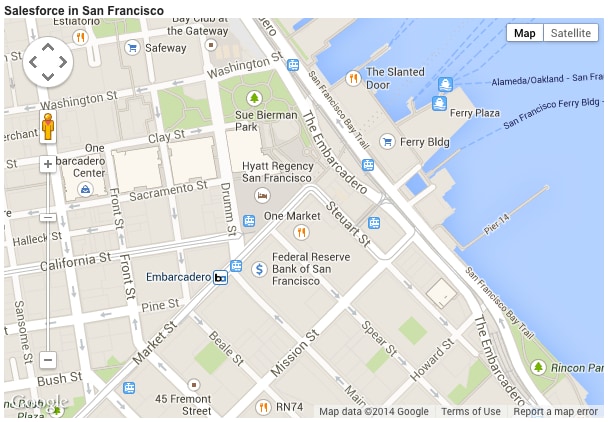
Notice the following in this example.
<apex:map> component doesn’t, by itself, display map markers, even for the center point. To display up to 100 markers, add child <apex:mapMarker> components.center location value is provided as a street address, not a geolocation. The mapping service looks up the latitude and longitude for the address. This process is called geocoding. You can include up to 10 geocoded addresses to a map, either as center attributes or as markers added with <apex:mapMarker> components.mapType value is “roadmap”, a standard street map. Other options are “satellite” and “hybrid”.j