To fully transition to 2GP package development, you retrieve the source files for your package’s latest converted version. Then, you confirm in Setup for your packaging org that you’re ready to develop and distribute your package solely using 2GP packaging.
Before You Begin
Before you complete your move to 2GP package development, it’s critical that you thoroughly test package conversions and subscriber migrations first. See Test Converted Packages and Subscriber Migrations.
Important
To retrieve the source files for your package’s latest converted version, run the sf package version retrieve CLI command. This example retrieves the package metadata for a converted subscriber package version ID into my-folder/ within a Salesforce DX project directory:
1sf package version retrieve --package 04tXXX --output-dir my-folder –-target-dev-hub devhub@example.com
Open the new sfdx-project.json file and update the versionName, versionNumber, and ancestorVersion.
From Setup in the packaging org, enter Package Manager in the Quick Find box, and then select Package Manager.
Click the package that you want to move to 2GP development.
On the package’s detail page, click Move to 2GP.
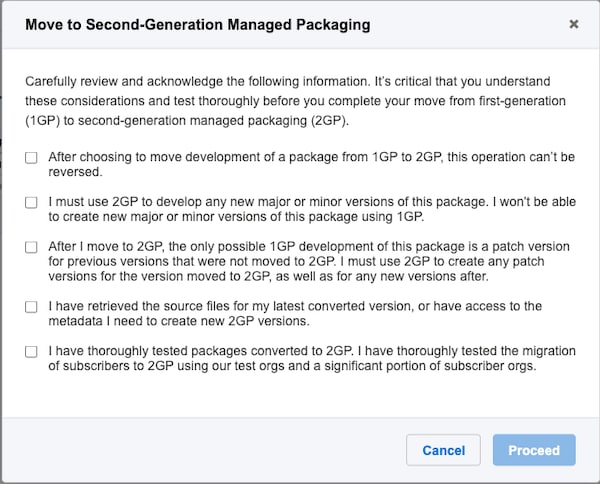
Carefully review and acknowledge the statements in the Move to Second-Generation Managed Packaging window, then click Proceed.
Next Steps
After you click Proceed, you can no longer create new major or minor versions in the packaging org. To innovate on the package using 2GP, you create new package versions using the sf package version create CLI command.
You can continue to create 1GP patch versions for versions prior to moving to 2GP development. For example, if you moved package version 6.0.0 to 2GP development, you can create patch version 5.0.1 or 4.1.1 using 1GP, but you can’t create patch version 6.0.1 or later using 1GP.
If a subscriber has installed the version that was moved to 2GP, the subscriber must be migrated to the 2GP version of the package. You create all future patch versions and fixes on 2GP.



 j
j