Delete Components from Managed Packages
After you’ve released a managed package, you may decide to refactor the package and delete a component. It’s your responsibility to educate your customers about the potential impact from any components you delete. In the Release Notes for your upgraded package, list all custom components you’ve deleted and notify customers of any necessary actions.
To enable component deletion in your packaging org, log a case in the Partner Community.
To delete a component from a managed package:
-
From Setup, enter Lightning Components in the Quick Find box.
-
Select Lightning Components.
-
Click Del for the component that you want to delete.
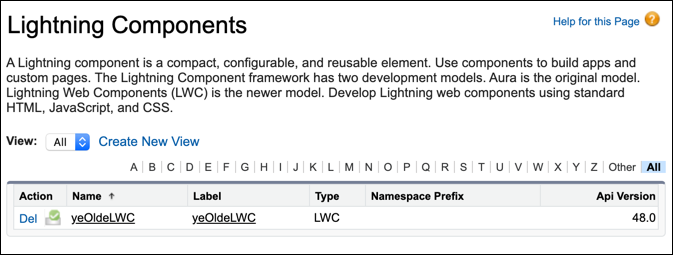
When you remove a Lightning web component from a package, the component remains in a subscriber’s org after they install the upgraded package. The administrator of the subscriber’s org can delete the component, if desired.
AppExchange partners have two types of managed packaging to choose from, second-generation managed packaging (2GP) and first-generation managed packaging (1GP). We recommend using 2GP for all new managed packages. To delete components from your managed package, follow these guidelines.
This release is in preview. Features described here don't become generally available until the latest general availability date that Salesforce announces for this release. Before then, and where features are noted as beta, pilot, or developer preview, we can't guarantee general availability within any particular time frame or at all. Make your purchase decisions only on the basis of generally available products and features.


 j
j