Call Apex Methods Imperatively

To control when the method invocation occurs (for example, in response to clicking a button), call the method imperatively. When you call a method imperatively, you receive only a single response. Compare this behavior with @wire, which delegates control to the framework and results in a stream of values being provisioned.

In the following scenarios, you must call an Apex method imperatively as opposed to using @wire.

  • To call a method that isn’t annotated with cacheable=true, which includes any method that inserts, updates, or deletes data.
  • To control when the invocation occurs.
  • To work with objects that aren’t supported by User Interface API, like Task and Event.
  • To call a method from an ES6 module that doesn’t extend LightningElement

If an Apex method is marked with @AuraEnabled(cacheable=true), a client-side Lightning Data Service cache is checked before issuing the network call to invoke the Apex method on the server. However, Lightning Data Service doesn’t manage data provisioned by Apex. Therefore, to refresh stale data, invoke the Apex method and then call notifyRecordUpdateAvailable(recordIds) to update the Lightning Data Service cache.

Call an Apex Method 

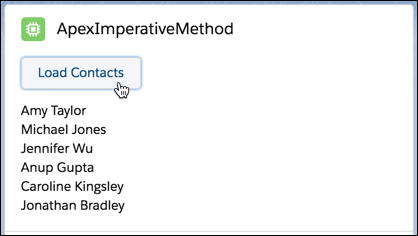
Let’s look at the apexImperativeMethod component from the lwc-recipes repo that uses the same getContactList class as our previous examples. Instead of wiring it, when a user clicks a button, the component calls getContactList().

A Load Contacts button with a list of contacts underneath.

The imported function returns a promise. This code provides a one-time resolution given a set of parameters, whereas @wire(apexMethod) provides a stream of values and supports dynamic parameters.

apexImperativeMethod.js
1import { LightningElement } from 'lwc';
2import getContactList from '@salesforce/apex/ContactController.getContactList';
3
4export default class ApexImperativeMethod extends LightningElement {
5    contacts;
6    error;
7
8    async handleLoad() {
9        try {
10            this.contacts = await getContactList();
11            this.error = undefined;
12        } catch (error) {
13            this.contacts = undefined;
14            this.error = error;
15        }
16    }
17}
ContactController.cls
1public with sharing class ContactController {
2    @AuraEnabled(cacheable=true)
3    public static List<Contact> getContactList() {
4        return [
5            SELECT Id, Name, Title, Phone, Email, Picture__c
6            FROM Contact
7            WHERE Picture__c != NULL
8            WITH USER_MODE
9            LIMIT 10
10        ];
11    }
12}

The template uses lwc:if to render the list of contacts. It also uses for:each to iterate over the contacts.

apexImperativeMethod.html
1<template>
2  <lightning-card title="ApexImperativeMethod" icon-name="custom:custom63">
3    <div class="slds-m-around_medium">
4      <p class="slds-m-bottom_small">
5        <lightning-button label="Load Contacts" onclick={handleLoad}></lightning-button>
6      </p>
7      <template lwc:if={contacts}>
8        <template for:each={contacts} for:item="contact">
9          <p key={contact.Id}>{contact.Name}</p>
10        </template>
11      </template>
12      <template lwc:elseif={error}>
13        <c-error-panel errors={error}></c-error-panel>
14      </template>
15    </div>
16  </lightning-card>
17</template>

Call an Apex Method with Parameters 

Pass parameters values to an Apex method in an object whose properties match the parameters of the Apex method. For example, if the Apex method takes a string parameter, don’t pass a string directly. Instead, pass an object that contains a property whose value is a string.

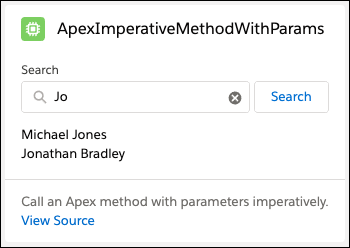
Enter characters in a seach field and click Search to return a list of contacts.

apexImperativeMethodWithParams.js
1import { LightningElement } from 'lwc';
2import findContacts from '@salesforce/apex/ContactController.findContacts';
3
4export default class ApexImperativeMethodWithParams extends LightningElement {
5    searchKey = '';
6    contacts;
7    error;
8
9    handleKeyChange(event) {
10        this.searchKey = event.target.value;
11    }
12
13    async handleSearch() {
14        try {
15            this.contacts = await findContacts({ searchKey: this.searchKey });
16            this.error = undefined;
17        } catch (error) {
18            this.error = error;
19            this.contacts = undefined;
20        }
21    }
22}
ContactController.cls
1public with sharing class ContactController {
2    @AuraEnabled(cacheable=true)
3    public static List<Contact> findContacts(String searchKey) {
4        String key = '%' + searchKey + '%';
5        return [
6            SELECT Id, Name, Title, Phone, Email, Picture__c
7            FROM Contact
8            WHERE Name LIKE :key AND Picture__c != NULL
9            WITH USER_MODE
10            LIMIT 10
11        ];
12    }
13}

To call a method with an object parameter, check out the apexImperativeMethodWithComplexParams component in the lwc-recipes repo.

Tip

Pass Values to Apex 

When you pass values such as record data from LWC to Apex, use JavaScript objects or arrays. Map values are not serialized when passed to Apex methods.

Using maps isn’t supported for both imperative and wired Apex calls. The improper use of maps, such as with map[key] = val, allowed the data to be passed with Lightning Web Security (LWS) disabled. However, this usage no longer works when LWS is enabled. Furthermore, map.set(key, val) isn’t supported for passing values to Apex.

1//Don’t do this
2Map map = new Map();
3map.set(key, val);
4apexMethod({map});

You can use a JavaScript object like this.

1import { LightningElement, wire } from "lwc";
2import apexMethod from "@salesforce/apex/ReadValues.apexMethod";
3
4export default class ApexValueExample extends LightningElement {
5  objVal = {};
6
7  val;
8
9  connectedCallback() {
10    this.objVal["one"] = "two";
11    this.loadValue();
12  }
13
14  async loadValue() {
15    this.val = await apexMethod({ theValues: this.objVal });
16  }
17
18  @wire(apexMethod, { theValues: "$objVal" })
19  propertyOrFunction;
20}

Handle Errors in Imperative Apex Calls 

When you call Apex imperatively, use the try/catch block to handle errors.

1async handleApexMethod() {
2  try {
3    this.records = await getApexMethod();
4    this.error = undefined;
5  } catch (error) {
6    this.records = undefined;
7    this.error = error;
8  }
9}

Alternatively, you can also use the syntax of a promise like this.

1getContactList()
2  .then((result) => {
3    // handle result
4  })
5  .catch((error) => {
6    // handle errors
7  });

The Apex method calls the then or catch block depending if there’s an error. Calling the then and catch blocks happens asynchronously, so you can’t put the whole getContactList() method within a try-catch block.

In this case, the catch block handle errors from both the Apex method and the then block. If the getContactList() Apex method throws an exception, you can handle it in the catch block. If the Apex method runs successfully, your code in the then runs next. And if there’s an error in the then block, you can also handle it in the catch block. See Handle Errors from Apex.

See Also