Look Up Distortion Details in Lightning Web Security Distortion Viewer
To help prevent insecure behavior, Lightning Web Security (LWS) applies distortions to code running in a JavaScript sandbox. LWS Distortion Viewer describes the distortion by explaining the vulnerability of the affected API, and the distorted behavior that mitigates the vulnerability. Then you can modify your JavaScript code so that any unwanted distortions that affect your components are avoided.
LWS Distortion Viewer shows the JavaScript APIs that LWS blocks or modifies. If an API isn’t listed here, LWS allows the API’s native behavior. For more information about distortions, see How Lightning Web Security Works.
LWS Distortion Viewer is available in the Tools area of the DX Developer Center and the LWC Developer Center.
Here’s a direct link to the tool: https://developer.salesforce.com/tools/lws-distortion-viewer.
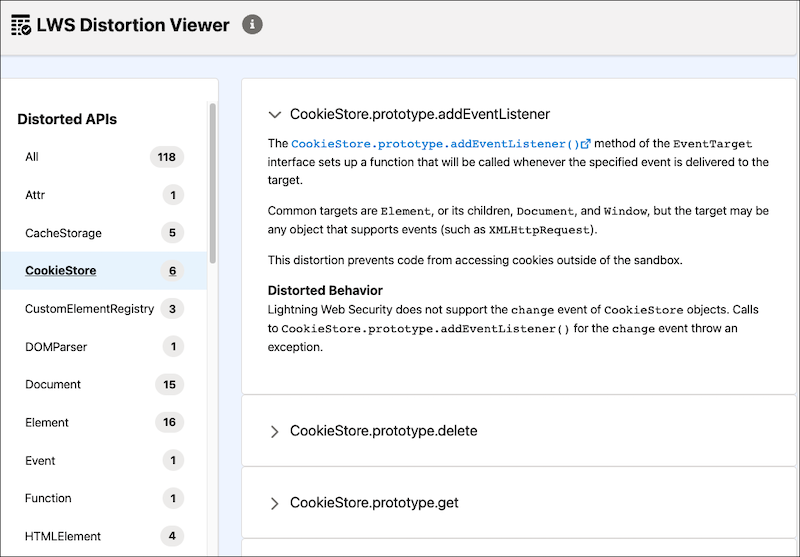
LWS Distortion Viewer lists the distortions for JavaScript APIs alphabetically by object name, along with a number that indicates the number of APIs that are distorted for the object. Select an object, and then click an API to view information about the API distortion.
For information about solving some issues with your code after LWS distortions are applied, see Troubleshoot Issues Related to Lightning Web Security.
This release is in preview. Features described here don't become generally available until the latest general availability date that Salesforce announces for this release. Before then, and where features are noted as beta, pilot, or developer preview, we can't guarantee general availability within any particular time frame or at all. Make your purchase decisions only on the basis of generally available products and features.


 j
j