To switch Lightning Web Security (LWS) distortions off and on for certain APIs while you debug, use commands in your browser’s developer console. It can be helpful to observe how your component’s behavior changes when you disable distortions on a particular API and then enable them again.
Before you can disable distortions, you must enable debug mode for your username in the org. Then you can set flags in the browser’s developer console to disable and enable distortions on APIs.
The distortion flags are most useful if you set them when the execution is paused, such as when you hit a breakpoint. We recommend using this workflow:
Identify a point in your code that you want to debug and set a breakpoint.
Refresh the browser page and walk through the steps needed to reach that breakpoint.
When execution pauses at the breakpoint, go to the console and disable distortions that you suspect are affecting your code.
Allow the code execution to continue and observe if the behavior of your code changes with the distortions disabled.
Disable and Enable Distortions While Debugging
To disable and enable distortions for a given API, use $LWS.namespaces commands in the browser’s developer console to set the values of corresponding distortion flags.
You can work with multiple namespaces that are present in your org. The commands target distortions in the namespace you specify.
The command syntax is:
$LWS.namespaces.ns.distortions.flag
where ns represents the namespace and flag represents a distortion flag name.
List the Distortion Flags
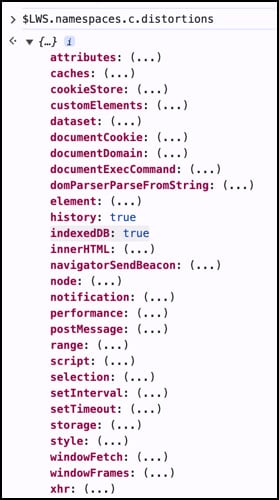
To list the distortion flags in the c default namespace, enter this command in the browser’s developer console and press Enter.
1$LWS.namespaces.c.distortions
The list of distortion flags is collapsed initially. Click the expander icon to reveal the distortion flag names.
Don’t use these deprecated flags. Disabling the distortions associated with these flags can cause your code to break in the debugger.
dataset
history
indexedDB
notification
performance
postMessage
style
Note
Disable a Distortion
To disable distortions for an API using one of the listed distortion flags, set the flag to false. For example, to disable distortions for the XMLHttpRequest API, type this command and press Enter.
1$LWS.namespaces.c.distortions.xhr = false
In the developer tools’ Sources view, use the debugger panel to observe the component running with the specified LWS distortions disabled.
Enable a Distortion
To enable the distortion again in the current session, set the property to true.
1$LWS.namespaces.c.distortions.xhr = true
When you reload the page all the properties reset to true.
Tip
List the Namespaces in Your Org
You can view which namespaces support disabling and enabling distortion flags in your org. The command reveals only custom namespaces. You can’t see the namespaces that Salesforce owns, for example.
Enter this command in the console:
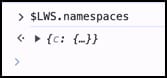
1$LWS.namespaces
The console displays a list of available namespaces. If you’re only using the default namespace, you see the c namespace.
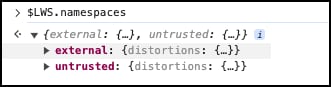
To see the distortion flags for a namespace, click the expander icon by the namespace.
In this example, the command shows the namespaces external and untrusted in a test org.
All namespaces support the same flags. You can set the values separately in different namespaces, whichever is appropriate for the component you’re debugging.
You can also enter a command to display the distortion flags of a namespace. This example uses the command to display distortion properties in the external namespace.
1$LWS.namespaces.external.distortions
Check the Value of a Distortion Flag
To check the current value of a distortion flag, enter a command specifying the flag name.
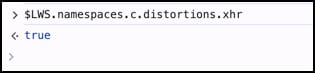
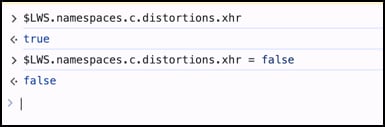
For example, use this command to determine if all XMLHttpRequest distortions are enabled in the c namespace.
1$LWS.namespaces.c.distortions.xhr
The flags are all set to true by default.
To disable all XMLHttpRequest distortions in the debugging session, set the xhr flag to false.
Setting xhr to false turns off all of the security-based API distortions for XMLHttpRequest.
LWS Distortion Flags for Debug Sessions
Here’s a list of the distortion flags and the corresponding distortions that are disabled when you set the flag to false.
Flag
What it controls
attributes
All distortions related to getAttribute, setAttribute, hasAttribute, toggleAttribute for attributes described in LWS Distortion Viewer


 j
j