Benchmark Lightning Locker Effect on JavaScript Code
Benchmark your JavaScript code with and without Lightning Locker and view relative performance metrics.
Benchmarking enables you to see the performance difference with Lightning Locker enabled and disabled, without requiring you to create an app to test your component.
Example
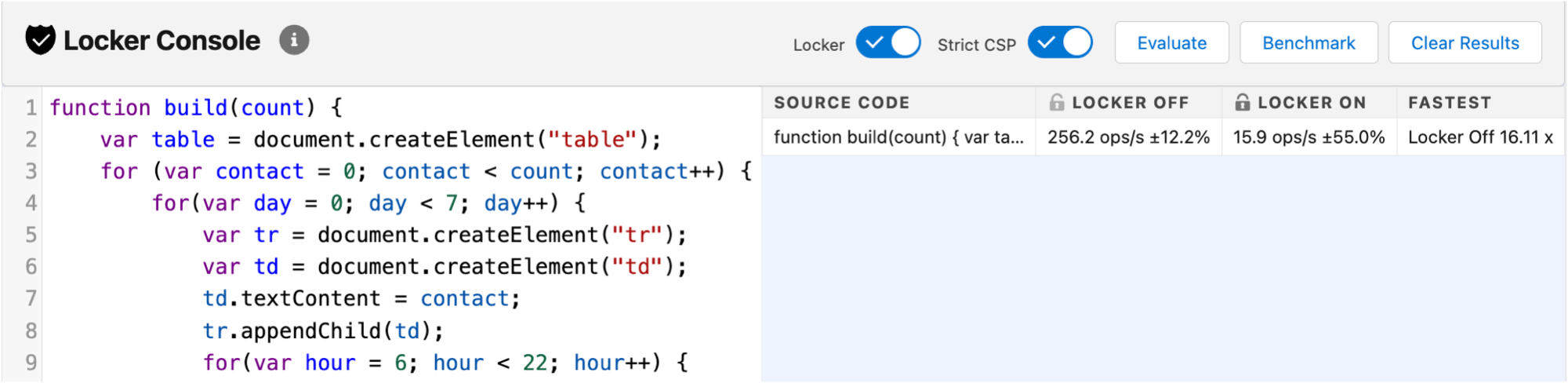
Let’s look at an example where you study the performance of a series of nested loops.
The FASTEST column in the results window shows that the code runs 16.11 times faster when Lightning Locker is disabled. This difference in speed is the cost of security, and whether the performance loss is acceptable depends on each specific case.
The benchmark action allows you to tweak your code and see how the change affects running time. This rapid iterative process is useful when you’re optimizing computationally intensive sections of the code.
Example with Improved Performance
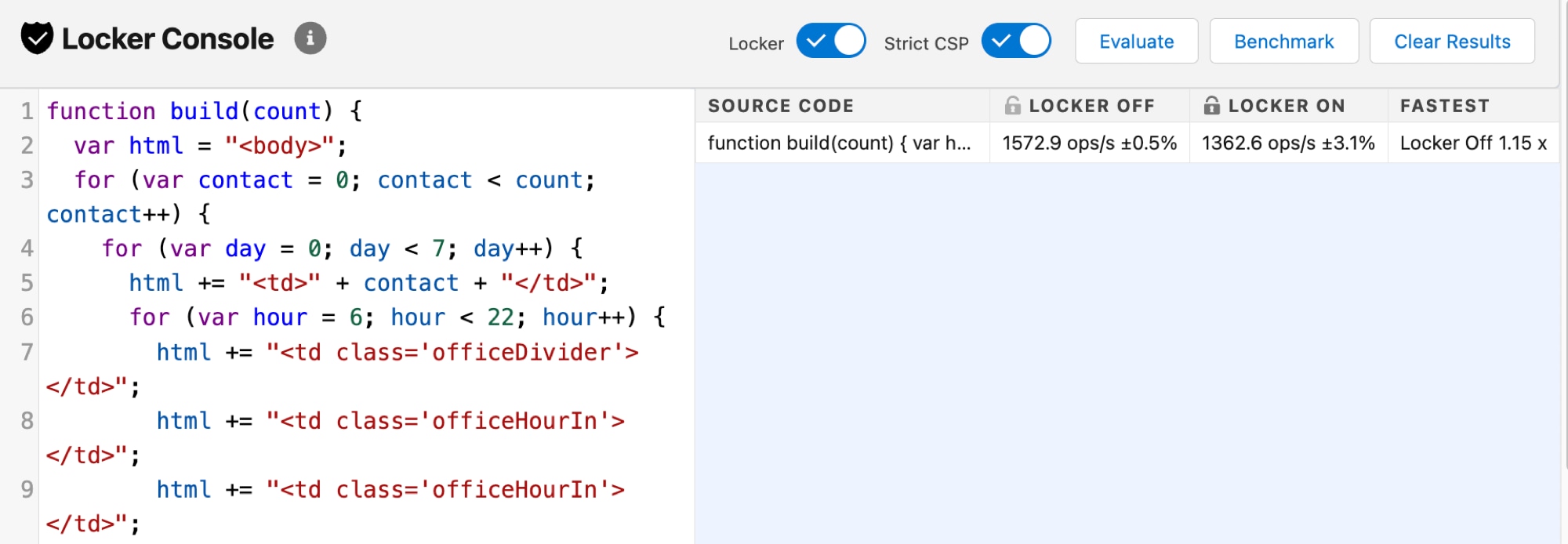
To show how to reduce the overhead of Lightning Locker, let’s build the same table using a string of HTML and benchmark to evaluate the difference.
Paste this code into the code console.
1function build(count){2 var html = "<body>";3 for(var contact = 0; contact<count; contact++){4 for(var day = 0; day<7; day++){5 html += "<td>" + contact + "</td>";6 for(var hour = 6; hour<22; hour++){7 html += "<td class='officeDivider'></td>";8 html += "<td class='officeHourIn'></td>";9 html += "<td class='officeHourIn'></td>";10 html += "<td class='officeHourIn'></td>";11 html += "<td class='officeHourIn'></td>";12}13}14}15 html += "</body>";16 return html;17}1819var div = document.createElement("div");20div.innerHTML = build(10);
Click Benchmark.
Because there are no DOM API calls, such as document.createElement(), inside the loops in this example, the performance of the build() function is similar whether Locker is on or off. The code runs 1.15 times faster when Lightning Locker is disabled, as opposed to 16.11 times faster in the previous example that had multiple DOM API calls.
Plain JavaScript is generally much faster than the DOM API, and the more often a section of code connects to the DOM, the slower the code runs. The DOM API causes most of the Locker overhead. Here, we accelerate the code by reducing the number of times we touch the DOM, which also greatly reduces the overall Locker overhead.


 j
j