カスタムデータ型の作成
lightning-datatable コンポーネントは、列に指定したデータ型に基づいてデータを書式設定します。
独自のデータ型を作成する前に、標準のデータ型をチェックして要件を満たしているかどうか確認してください。データ型の属性を使用して、多数のデータ型の出力をカスタマイズできます。標準のデータ型は次のとおりです。
actionbooleanbuttonbutton-iconcurrencydatedate-localemaillocationnumberpercentphonetext (デフォルト)url
標準のデータ型とそのデータの属性についての詳細は、lightning-datatable リファレンスドキュメント
また、独自のデータ型を作成する前に、SLDS スタイル設定フック を検討してください。SLDS スタイル設定フックは、Shadow DOM 全体でサポートされるデータ型をカスタマイズするのに役立ちます。たとえば、SLDS スタイル設定フックを使用して、button データ型に異なる色を適用できます。
カスタムデータ型では、カスタムイベントのディスパッチはサポートされていません。
LightningDatatable の拡張によるカスタムデータ型の定義
独自のデータ型を作成して、行の削除ボタンや画像、さらにはカスタムテキストや数値表示などのカスタムセルを実装します。カスタムデータ型の各行にカスタムクラスを適用することもできます。
カスタムデータ型を定義して使用するには、新しいコンポーネントで lightning-datatable コンポーネントの LightningDatatable クラスを拡張します。
LightningDatatable のみから拡張して、カスタムデータ型のデータテーブルを作成できます。他のすべてのクラスでは、LightningElement 以外のクラスを拡張した Lightning Web コンポーネントの作成はサポートされていません。
Lightning Web コンポーネントを作成し、コンポーネントフォルダの HTML テンプレートで各自のデータ型を定義します。テンプレートには、JavaScript を必要としない単純なデータ型の完全な UI を含めることができます。また、別のフォルダで定義したコンポーネントをテンプレートに組み込むこともできます。たとえば、表示内容を決定するロジックを含める場合、個別のコンポーネントを使用します。
2 つのカスタムデータ型を定義するコンポーネント myCustomTypeDatatable のフォルダ構造を見てみましょう。
1 myCustomTypeDatatable 2 ├──customName.html 3 ├──customNumber.html 4 ├──myCustomTypeDatatable.js 5 └──myCustomTypeDatatable.js-meta.xml JavaScript ファイル myCustomTypeDatatable.js で、LightningDatatable クラスを拡張し、データ型の名前とテンプレートファイルを指定します。この例では、customName.html および customNumber.html テンプレートを使用して、カスタム名のデータ型とカスタム数値のデータ型を作成します。
データ型とテンプレートの名前は一致しなくても問題ありません。この例では、データ型とテンプレートファイルの名前に customName を使用します。データ型の名前とテンプレートの名前を指定する場所が明確になるように、別の名前でテンプレートをインポートすることをお勧めします。
1 //myCustomTypeDatatable.js 2 import LightningDatatable from "lightning/datatable" ; 3 import customNameTemplate from "./customName.html" ; 4 import customNumberTemplate from "./customNumber.html" ; 5 6 export default class MyCustomTypeDatatable extends LightningDatatable { 7 static customTypes = { 8 customName: { 9 template: customNameTemplate , 10 standardCellLayout: true , 11 typeAttributes: [ "accountName" ] , 12 } , 13 customNumber: { 14 template: customNumberTemplate , 15 standardCellLayout: false , 16 typeAttributes: [ "status" ] , 17 } , 18 // Other types here 19 } ; 20 } LightningDatatable のみから拡張してカスタムデータ型を作成できます。
次のプロパティを customTypes オブジェクトに渡します。
カスタムデータ型プロパティ 型 説明 templatestring データ型のインポートされる HTML テンプレートの名前。 typeAttributesarray カスタムデータテンプレートに渡す属性のカンマ区切りリスト。typeAttributes.attributeName 構文を使用してデータにアクセスします。 standardCellLayoutboolean 標準レイアウトが使用されるかどうかを指定します。デフォルトは false です。標準レイアウトは、すべての標準データ型で使用されます。カスタムデータ型のデフォルトのレイアウトは、ベアレイアウトです。「データ型のレイアウトとスタイルのカスタマイズ」 を参照してください。standardCellLayout を使用してカスタムデータ型のセルをスタイル設定し、標準データ型に似せることができます。standardCellLayout では、アクセシビリティとキーボードナビゲーションもサポートされています。
カスタムデータテンプレートの作成
カスタムデータテンプレート customName.html で、データ型のマークアップを追加します。この例では、lightning-badge コンポーネントを使用してテキスト表示ラベルをレンダリングするカスタムデータ型を作成します。
1 2 <template> 3 <lightning-badge label = {typeAttributes.accountName} icon-name = "standard:account" > 4 </lightning-badge> 5 </template> myCustomTypeDatatable.js によって customNumber の standardCellLayout: false が設定されるため、customNumber.html テンプレートはデフォルトのベアレイアウトを使用します。独自のスタイル設定を作成できます。次の例では、セルの周囲に小さいパディングを追加し、数値を右に寄せます。数値がデータ定義で指定された条件に一致する場合、アイコンが表示されます。
1 2 <template> 3 <div class = "slds-p-around_x-small" > 4 <lightning-formatted-number 5 value = {value} 6 class = "slds-float_right" 7 ></lightning-formatted-number> 8 <lightning-icon 9 icon-name = {typeAttributes.status} 10 alternative-text = "Employer Status" 11 ></lightning-icon> 12 </div> 13 </template> これらのサンプルカスタムデータ型は、単純なデータ型であるため、HTML のみで表現できます。カスタムデータ型が複雑な場合、JavaScript、HTML テンプレート、XML 設定ファイルを使用して個別のコンポーネントを作成します。コンポーネントのコンテナとしてカスタムデータ HTML テンプレートを使用します。個別のコンポーネントは、「カスタムデータ型のテンプレートの編集の例」 で使用されます。
カスタムデータ型を使用したデータテーブルの実装
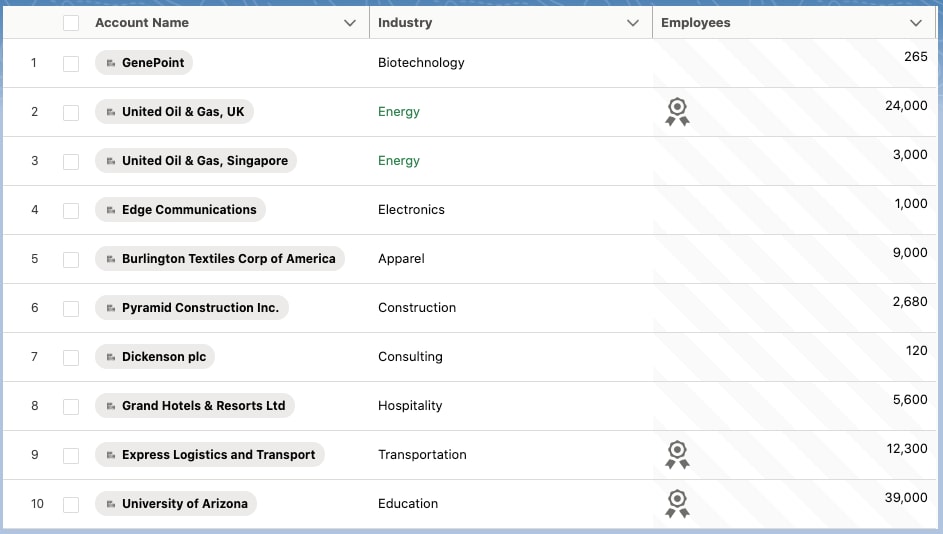
カスタムデータ型を使用するデータテーブルを実装しましょう。最初の列には、前のセクションで作成したカスタムデータ型を使用した取引先名が表示されています。fieldName プロパティは、取引先オブジェクトの Name 項目に一致します。
Apex コントローラを使用して、データテーブルに 10 個の取引先レコードを表示します。
1 public with sharing class AccountController { 2 @AuraEnabled ( cacheable = true ) 3 public static List < Account > getAccountList ( ) { 4 return [ SELECT Id , Name , Industry , NumberOfEmployees FROM Account WITH SECURITY_ENFORCED LIMIT 10 ] ; 5 } 6 } カスタムデータ型のデータテーブルを実装するには、拡張データテーブルコンポーネントを格納するラッパーコンポーネントを作成し、データテーブルの列を定義して、データを取得します。ここでは、ラッパーとして myDatatable を使用します。
列を定義するときに、cellAttributes プロパティを使用して SLDS ユーティリティクラスまたは独自のクラスを渡すことができます。
1 /* myDatatable.js */ 2 import { LightningElement , wire , track } from "lwc" ; 3 import getAccountList from "@salesforce/apex/AccountController.getAccountList" ; 4 5 const COLS = [ 6 { 7 label: "Account Name" , 8 type: "customName" , 9 typeAttributes: { 10 accountName: { fieldName: "Name" } , 11 } , 12 } , 13 { 14 label: "Industry" , 15 fieldName: "Industry" , 16 cellAttributes: { 17 class: { fieldName: "industryColor" } , 18 } , 19 } , 20 { 21 label: "Employees" , 22 type: "customNumber" , 23 fieldName: "NumberOfEmployees" , 24 typeAttributes: { 25 status: { fieldName: "status" } , 26 } , 27 cellAttributes: { 28 class: "slds-theme_alert-texture" , 29 } , 30 } , 31 ] ; 32 33 export default class MyDatatable extends LightningElement { 34 columns = COLS ; 35 @ track accounts = [ ] ; 36 37 @ wire ( getAccountList ) 38 wiredAccounts ( { error , data } ) { 39 if ( error ) { 40 // Handle error 41 } else if ( data ) { 42 // Process record data 43 this . accounts = data . map ( ( record ) = > { 44 let industryColor = record . Industry === "Energy" ? "slds-text-color_success" : "" ; 45 let status = record . NumberOfEmployees > 10000 ? "utility:ribbon" : "" ; 46 return { ... record , industryColor: industryColor , status: status } ; 47 } ) ; 48 } 49 } 50 } myDatatable.js には、カスタムセルにスタイル設定を適用するいくつかの方法が表示されています。Industry 列は、項目値が Energy に一致する場合にのみ slds-text-color_success クラスを使用します。NumberOfEmployees 列は、列のすべての行で slds-theme_alert-texture クラスを使用します。さらに、NumberOfEmployees 列に使用される customNumber 型には、customNumber.html マークアップに直接実装されたレイアウトクラスとパディングクラスが含まれています。
次に、getAccountList Apex コントローラによって返されたデータをカスタムデータ型のデータテーブルコンポーネントの data 属性に渡します。
1 2 <template> 3 <c-my-custom-type-datatable 4 key-field = "Id" 5 data = {accounts} 6 columns = {columns} 7 show-row-number-column 8 > 9 </c-my-custom-type-datatable> 10 </template> lwc-recipes リポジトリの datatableCustomDataType コンポーネントは、lightning-datatable のカスタムデータ型を作成します。


 j
j