


 j
jBefore You Begin
Trailhead: Explore Lightning Aura Components Resources
Load the Contacts
Fire the Events
Developing Secure Code
Testing Components
Previous PDF Versions
Explore how to create a custom UI that loads contact data and interacts with Lightning Experience and the Salesforce mobile app.
This tutorial walks you through creating a component that:
force:showToast event when all contacts are loaded successfully.lightning:select component (3) when a lead source (referral or social media) is selected.lightning:card component (4).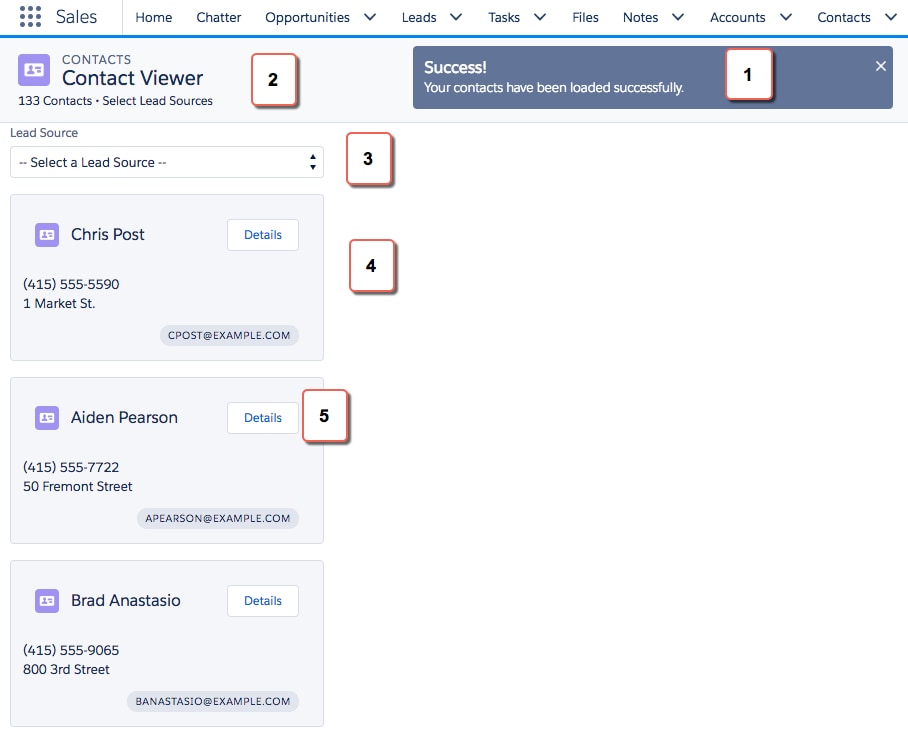
Here’s how the component looks in the Salesforce mobile app. You’re creating two components, contactList and contacts, where contactList is a container component that iterates over and displays contacts components. All contacts are displayed in contactList, but you can select different lead sources to view a subset of contacts associated with the lead source.
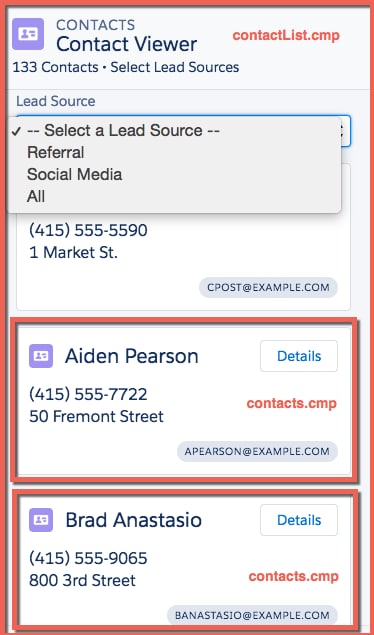
In the next few topics, you create the following resources.
| Resource | Description |
|---|---|
| Contacts Bundle | |
contacts.cmp | The component that displays individual contacts |
contactsController.js | The client-side controller action that navigates to a contact record using the force:navigateToSObject event |
| contactList Bundle | |
contactList.cmp | The component that loads the list of contacts |
contactListController.js | The client-side controller actions that call the helper resource to load contact data and handles the lead source selection |
contactListHelper.js | The helper function that retrieves contact data, displays a toast message on successful loading of contact data, displays contact data based on lead source, and update the total number of contacts |
| Apex Controller | |
ContactController.apxc | The Apex controller that queries all contact records and those records based on different lead sources |
j