


 j
jHow Bulk API Works
How Bulk Queries Are Processed
Use Bulk Query
PK Chunking
Walk Through a Bulk Query Sample
Walk Through a Bulk Query Sample Using PK Chunking
Limits
Map Data Fields
Bulk API End-of-Life Policy
Previous PDF Versions
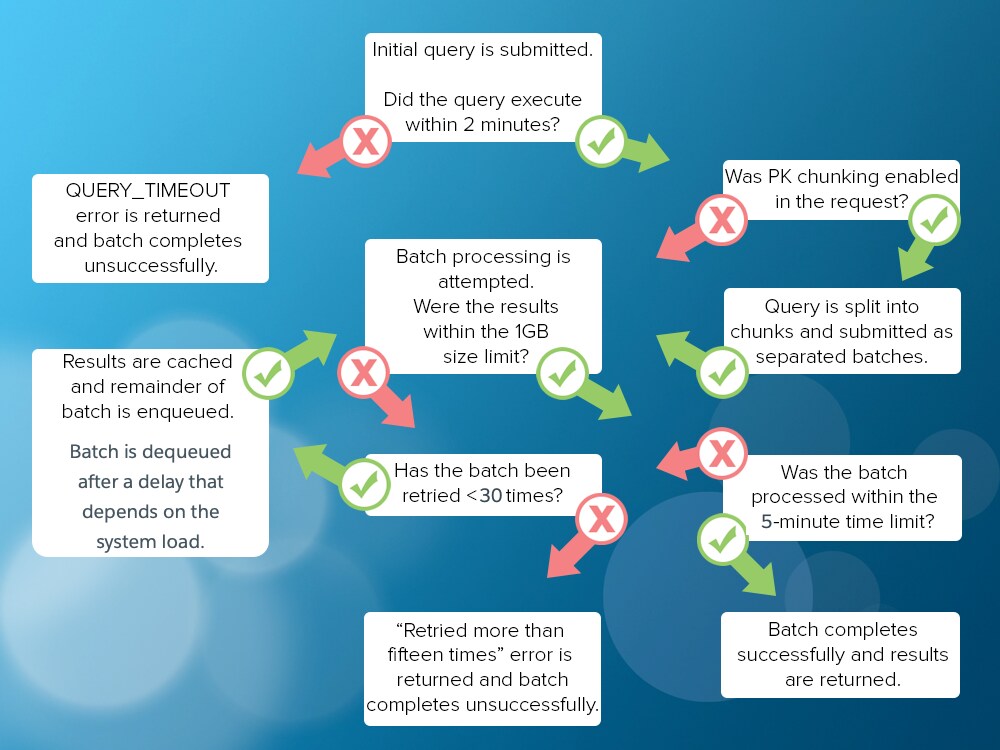
The bulk query workflow begins when you create a bulk query job and add one or more batches to the query job. When a bulk query is processed, Salesforce attempts to execute the query. If the query doesn’t execute within the standard 2-minute timeout limit, the job fails and a QUERY_TIMEOUT error is returned. In this case, rewrite a simpler query, and resubmit the batch.
If the query succeeds, Salesforce attempts to retrieve the results. If the results exceed the 1GB file size limit or take longer than 5 minutes to retrieve, the completed results are cached and another attempt is made. After 30 attempts, the job fails and the error message “Retried more than thirty times” is returned. In this case, consider using the PK Chunking header to split the query results into smaller chunks. If the attempts succeed, the results are returned and stored for 7 days.
This flowchart depicts how bulk queries are processed.
See Also
j