Creating a Triggered Email Campaign Workflow

This page contains conceptual and procedural information about creating a triggered send email campaign using SOAP API.

Why Create a Triggered Send Email Campaign 

A triggered send email campaign takes a previously created email message and sends that message out in response to an outside request, such as a subscriber opting in to receive the message.

How To Create a Triggered Send Email Campaign 

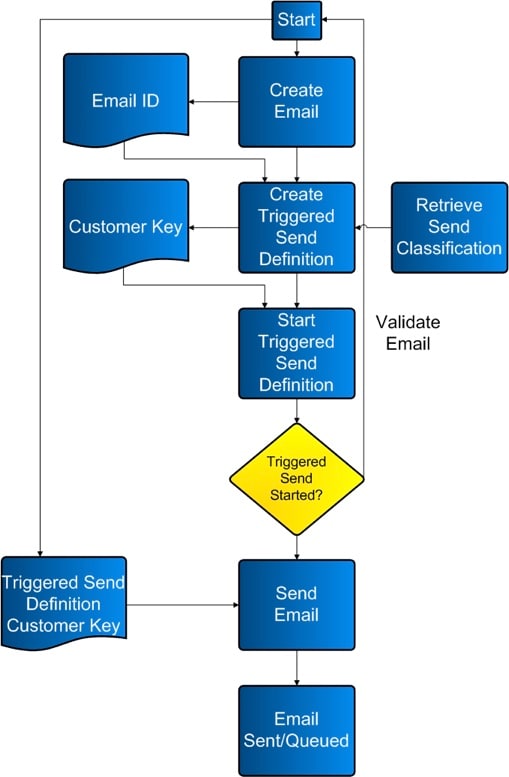
Use the flow chart and sample code as an example of how to create and order the processes necessary for the triggered email send campaign.

Triggered Send Email Campaign Workflow Process 

triggeredsendemailcampaign.jpg

Sample Code 

This section contains sample code you can use to conduct your triggered sends.

Sample .NET Code 

1using System;
2using System.Configuration;
3using System.Data;
4using System.Linq;
5using System.Web;
6using System.Web.Security;
7using System.Web.UI;
8using System.Web.UI.HtmlControls;
9using System.Web.UI.WebControls;
10using System.Web.UI.WebControls.WebParts;
11using System.Xml.Linq;
12using etAPI;
13public partial class ETTriggeredSend : System.Web.UI.Page
14{
15    //Global Variables
16    private SoapClient client = new SoapClient();
17    protected void Page_Load(object sender, EventArgs e)
18    {
19        //Authenticate
20        client.ClientCredentials.UserName.UserName = System.Configuration.ConfigurationSettings.AppSettings["wsUserName"];
21        client.ClientCredentials.UserName.Password = System.Configuration.ConfigurationSettings.AppSettings["wsPassword"];
22        if (!IsPostBack)
23        {
24        }
25    }
26    protected void btnSubmit_Click(object sender, EventArgs e)
27    {
28        try
29        {
30            //Create a GUID for ESD to ensure a unique name and customer key
31            string strGUID = System.Guid.NewGuid().ToString();
32            //Create TriggeredSendDefinition object [Messages > Email > Triggered]
33            TriggeredSendDefinition tsd = new TriggeredSendDefinition();
34            tsd.Name = "TSD_Name_" + strGUID;//required
35            tsd.CustomerKey = strGUID;//recommended or the application assigns a number
36            tsd.Description = "TSD_Description_" + strGUID;//recommended or the Description defaults to the Name
37            //Set to delivery both Text and HTML versions.
38            tsd.IsMultipart = true;//recommended as a best practice
39            tsd.IsMultipartSpecified = true;//required
40            //Set to track the links found in the email
41            tsd.IsWrapped = true; //Enables tracking
42            tsd.IsWrappedSpecified = true;//required
43            //Create Email object to refer to pre-create Email
44            Email em = new Email();
45            em.ID = 620046; //required -- can be found at Content > My Emails > Properties
46            em.IDSpecified = true;//required
47            //Apply Email object to the TriggeredSendDefinition object
48            tsd.Email = em;//required
49            //Create SendClassification
50            tsd.SendClassification = new SendClassification();
51            tsd.SendClassification.CustomerKey = "4201";//required -- can be found at Setup > Send Management > Send Classifications > Edit Item > External Key
52            //tsd.TriggeredSendType = TriggeredSendTypeEnum.Continuous;
53            //tsd.TriggeredSendTypeSpecified = true;
54            //tsd.TriggeredSendStatus = TriggeredSendStatusEnum.New;
55            //tsd.TriggeredSendStatusSpecified = true;
56            //tsd.BatchInterval = 1;
57            //tsd.BatchIntervalSpecified = true;
58            //tsd.AutoAddSubscribers = true;
59            //tsd.AutoAddSubscribersSpecified = true;
60            //tsd.AutoUpdateSubscribers = true;
61            //tsd.AutoUpdateSubscribersSpecified = true;
62            //tsd.List = list;
63            string cRequestID = String.Empty;
64            string cStatus = String.Empty;
65            try
66            {
67                //Call the Create method on the TriggeredSendDefinition object
68                CreateResult[] cResults = client.Create(new CreateOptions(), new APIObject[] { tsd }, out cRequestID, out cStatus);
69                //Display Results
70                lblMessage.Text += "Overall Create Status: " + cStatus;
71                lblMessage.Text += "<br/>";
72                lblMessage.Text += "Number of Results: " + cResults.Length;
73                lblMessage.Text += "<br/>";
74                //Loop through each object returned and display the StatusMessage
75                foreach (CreateResult cr in cResults)
76                {
77                    lblMessage.Text += "Status Message: " + cr.StatusMessage;
78                    lblMessage.Text += "<br/>";
79                }
80            }
81            catch (Exception exCreate)
82            {
83                //Set Message
84                lblMessage.Text += "<br/><br/>CREATE TSD ERROR:<br/>" + exCreate.Message;
85            }
86            //Preceed if the above Create call was successful
87            if (cStatus == "OK")
88            {
89                // *** MAKE TRIGGERED SEND DEFINITION ACTIVE
90                tsd = new TriggeredSendDefinition();
91                tsd.CustomerKey = strGUID;//required
92                tsd.TriggeredSendStatus = TriggeredSendStatusEnum.Active;//necessary to set the TriggeredSendDefinition to "Running"
93                tsd.TriggeredSendStatusSpecified = true;//required
94                string uRequestID = String.Empty;
95                string uStatus = String.Empty;
96                try
97                {
98                    //Call the Create method on the EmailSendDefinition object
99                    UpdateResult[] uResults = client.Update(new UpdateOptions(), new APIObject[] { tsd }, out uRequestID, out uStatus);
100                    //Display Results
101                    lblMessage.Text += "Overall Update Status: " + uStatus;
102                    lblMessage.Text += "<br/>";
103                    lblMessage.Text += "Number of Results: " + uResults.Length;
104                    lblMessage.Text += "<br/>";
105                    //Loop through each object returned and display the StatusMessage
106                    foreach (UpdateResult ur in uResults)
107                    {
108                        lblMessage.Text += "Status Message: " + ur.StatusMessage;
109                        lblMessage.Text += "<br/>";
110                    }
111                }
112                catch (Exception exCreate)
113                {
114                    //Set Message
115                    lblMessage.Text += "<br/><br/>UPDATE TSD ERROR:<br/>" + exCreate.Message;
116                }
117                //Preceed if the above Update call was successful
118                if (uStatus == "OK")
119                {
120                    // *** SEND THE TRIGGER EMAIL
121                    //Create a new Subscriber to send the Trigger to
122                    Subscriber newSub = new Subscriber();
123                    newSub.EmailAddress = "acruz@exaple.com";
124                    newSub.SubscriberKey = "acruz@exaple.com";
125                    //Create Subscriber Attributes
126                    newSub.Attributes = new etAPI.Attribute[2]; //Can be found at Subscribers > Profile Management
127                    //1
128                    newSub.Attributes[0] = new etAPI.Attribute();
129                    newSub.Attributes[0].Name = "FromName";//Account Specific
130                    newSub.Attributes[0].Value = "From John Doe";//Subscriber Specific
131                    //2
132                    newSub.Attributes[1] = new etAPI.Attribute();
133                    newSub.Attributes[1].Name = "HTML__Content";//Account Specific
134                    newSub.Attributes[1].Value = "This is a test <a href=\"httpgetwrap|http://google.com\" alias=\"Google Link\">link</a>"; //httpgetwrap| must be before the http for tracking to work
135                    //Create a new Subscriber to send the Trigger to
136                    Subscriber newSub2 = new Subscriber();
137                    newSub2.EmailAddress = "jdoe@example.com";
138                    newSub2.SubscriberKey = "jdoe@example.com";
139                    //Create Subscriber Attributes
140                    newSub2.Attributes = new etAPI.Attribute[2];//Can be found at Subscribers > Profile Management
141                    //1
142                    newSub2.Attributes[0] = new etAPI.Attribute();
143                    newSub2.Attributes[0].Name = "FromName";//Account Specific
144                    newSub2.Attributes[0].Value = "From Angela Cruz";//Subscriber Specific
145                    //2
146                    newSub2.Attributes[1] = new etAPI.Attribute();
147                    newSub2.Attributes[1].Name = "HTML__Content";//Account Specific
148                    newSub2.Attributes[1].Value = "This is a test <a href=\"httpgetwrap|http://example.com\" alias=\"ET Link\">link</a>"; //httpgetwrap| must be before the http for tracking to work
149                    //Create a TriggeredSend object to referrence the earlier created TriggeredSendDefinition
150                    TriggeredSend ts = new TriggeredSend();
151                    ts.TriggeredSendDefinition = new TriggeredSendDefinition();
152                    ts.TriggeredSendDefinition.CustomerKey = strGUID;//This is the External Key from the UI
153                    ts.Subscribers = new Subscriber[] { newSub, newSub2 };//Add the Subscriber objects to the TriggeredSend object
154                    string tsRequestID = "";
155                    string tsStatus = "";
156                    try
157                    {
158                        //Call the Create method on the TriggeredSend object
159                        CreateResult[] tsResults = client.Create(new CreateOptions(), new APIObject[] { ts }, out tsRequestID, out tsStatus);
160                        //Display Results
161                        lblMessage.Text += "Overall Update Status: " + tsStatus;
162                        lblMessage.Text += "<br/>";
163                        lblMessage.Text += "Number of Results: " + tsResults.Length;
164                        lblMessage.Text += "<br/>";
165                        //Loop through each object returned and display the StatusMessage
166                        foreach (CreateResult tscr in tsResults)
167                        {
168                            lblMessage.Text += "Status Message: " + tscr.StatusMessage;
169                            lblMessage.Text += "<br/>";
170                        }
171                    }
172                    catch (Exception exCreate)
173                    {
174                        //Set Message
175                        lblMessage.Text += "<br/><br/>CREATE TS ERROR:<br/>" + exCreate.Message;
176                    }
177                }
178
179        }
180        catch (Exception exc)
181        {
182            //Set Message
183            lblMessage.Text += "<br/><br/>###ERROR<br/>" + exc.Message;
184        }
185    }
186}

SOAP Envelopes to Interact with Emails and Triggered Send Definitions 

This section includes sample code you can use to create a triggered email send using the SOAP API.

SOAP Request to Retrieve Email

1<soapenv:Body>
2    <RetrieveRequestMsg xmlns="http://exacttarget.com/wsdl/partnerAPI">
3        <RetrieveRequest>
4            <ObjectType>Email</ObjectType>
5            <Properties>ID</Properties>
6            <Properties>CreatedDate</Properties>
7            <Properties>Name</Properties>
8            <Properties>Folder</Properties>
9            <Properties>CategoryID</Properties>
10            <Properties>HTMLBody</Properties>
11            <Properties>TextBody</Properties>
12            <Properties>Subject</Properties>
13            <Properties>IsActive</Properties>
14            <Properties>IsHTMLPaste</Properties>
15            <Properties>Status</Properties>
16            <Properties>EmailType</Properties>
17            <Properties>CharacterSet</Properties>
18            <Properties>HasDynamicSubjectLine</Properties>
19            <Properties>ContentCheckStatus</Properties>
20            <Properties>Client.PartnerClientKey</Properties>
21            <Filter xsi:type="ns1:SimpleFilterPart" xmlns:ns1="http://exacttarget.com/wsdl/partnerAPI">
22                <Property>Name</Property>
23                <SimpleOperator>equals</SimpleOperator>
24                <Value>Client1_Email_1</Value>
25            </Filter>
26        </RetrieveRequest>
27    </RetrieveRequestMsg>
28</soapenv:Body>

SOAP Response to Retrieve Email

1<soap:Body>
2    <RetrieveResponseMsg xmlns="http://exacttarget.com/wsdl/partnerAPI">
3        <OverallStatus>OK</OverallStatus>
4        <RequestID>af86580f-0c4e-4a0c-91ee-c21928bc198b</RequestID>
5        <Results xsi:type="Email">
6            <Client>
7                <ID>123</ID>
8            </Client>
9            <CreatedDate>2009-08-07T10:57:24.943</CreatedDate>
10            <ID>123</ID>
11            <ObjectID xsi:nil="true"/>
12            <Name>Client1_Email_1</Name>
13            <Folder>Client1</Folder>
14            <CategoryID>123</CategoryID>
15            <HTMLBody>Welcome to Client1 emails.</HTMLBody>
16            <TextBody/>
17            <Subject>Client1_Email_1_Sub</Subject>
18            <IsActive>true</IsActive>
19            <IsHTMLPaste>true</IsHTMLPaste>
20            <Status>New</Status>
21            <EmailType>Normal</EmailType>
22            <CharacterSet>us-ascii</CharacterSet>
23            <HasDynamicSubjectLine>false</HasDynamicSubjectLine>
24            <ContentCheckStatus>Not Checked</ContentCheckStatus>
25        </Results>
26    </RetrieveResponseMsg>
27</soap:Body>

SOAP Request to Retrieve SendClassification

1<soapenv:Body>
2    <RetrieveRequestMsg xmlns="http://exacttarget.com/wsdl/partnerAPI">
3        <RetrieveRequest>
4            <ObjectType>SendClassification</ObjectType>
5            <Properties>ObjectID</Properties> -- Use ObjectID to Create TE Definition
6            <Properties>Client.ID</Properties>
7            <Properties>Name</Properties>
8            <Properties>CustomerKey</Properties>
9            <Filter xsi:type="ns1:SimpleFilterPart"xmlns:ns1="http://exacttarget.com/wsdl/partnerAPI">
10                <Property>Name</Property>
11                <SimpleOperator>equals</SimpleOperator> -- Use filter if you know Name
12                <Value>Default Commercial</Value>
13            </Filter>
14        </RetrieveRequest>
15    </RetrieveRequestMsg>
16</soapenv:Body>

SOAP Response to Retrieve SendClassification

1<soap:Body>
2    <RetrieveResponseMsg xmlns="http://exacttarget.com/wsdl/partnerAPI">
3        <OverallStatus>OK</OverallStatus>
4        <RequestID>c462d15d-70eb-47f0-8805-7ad8fb400f26</RequestID>
5        <Results xsi:type="SendClassification">
6            <Client>
7                <ID>75741</ID>
8            </Client>
9            <ObjectID>4819efef-4527-dd11-8126-001a4be9433a</ObjectID>
10            <CustomerKey>123</CustomerKey>
11            <Name>Default Commercial</Name>
12        </Results>
13        <Results xsi:type="SendClassification">
14            <Client>
15                <ID>123</ID>
16            </Client>
17            <ObjectID>4919efef-4527-dd11-8126-001a4be9433a</ObjectID>
18            <CustomerKey>123</CustomerKey>
19            <Name>Default Transactional</Name>
20        </Results>
21        <Results xsi:type="SendClassification">
22            <Client>
23                <ID>123</ID>
24            </Client>
25            <ObjectID>86acfc8f-ad7b-de11-9ca2-00215adeb818</ObjectID>
26            <CustomerKey>FromAndReply_Key</CustomerKey>
27            <Name>FromAndReply</Name>
28        </Results>
29        <Results xsi:type="SendClassification">
30            <Client>
31                <ID>123</ID>
32            </Client>
33            <ObjectID>fe9a4e34-63d4-de11-8e63-00215adeb896</ObjectID>
34            <CustomerKey>FromName _From_List_Key</CustomerKey>
35            <Name>FromName _From_List</Name>
36        </Results>
37    </RetrieveResponseMsg>
38</soap:Body>

SOAP Request to Create Triggered Send Defintion

1<soap:Body>
2    <CreateRequest xmlns="http://exacttarget.com/wsdl/partnerAPI">
3        <Options/>
4        <Objects xsi:type="TriggeredSendDefinition">
5            <CustomerKey>TriggeredSendDefinition_75741_1</CustomerKey>
6            <Name>TriggeredSendDefinition_75741_1</Name> - Name of TriggeredSend Definition
7            <SendClassification>
8                <ObjectID>4819efef-4527-dd11-8126-001a4be9433a</ObjectID>
9                <SenderProfile>
10                    <ObjectID xsi:nil="true"/>
11                    <CustomerKey>123</CustomerKey>
12                </SenderProfile>
13            </SendClassification>
14            <Email>
15                <ID>123</ID>
16                <ObjectID xsi:nil="true"/>
17            </Email>
18            <IsMultipart>true</IsMultipart>
19            <AutoAddSubscribers>false</AutoAddSubscribers>
20        </Objects>
21    </CreateRequest>
22</soap:Body>

SOAP Response to Create Triggered Send Defintion

1<soap:Body>
2    <CreateResponse xmlns="http://exacttarget.com/wsdl/partnerAPI">
3        <Results>
4            <StatusCode>OK</StatusCode>
5            <StatusMessage>TriggeredSendDefinition created</StatusMessage>
6            <OrdinalID>0</OrdinalID>
7            <NewID>0</NewID>
8            <NewObjectID>a7f8c057-cbdd-de11-8e63-00215adeb896</NewObjectID>
9            <Object xsi:type="TriggeredSendDefinition">
10                <ObjectID>a7f8c057-cbdd-de11-8e63-00215adeb896</ObjectID>
11                <CustomerKey>TriggeredSendDefinition_75741_1</CustomerKey>
12                <Name>TriggeredSendDefinition_75741_1</Name>
13                <SendClassification>
14                    <ObjectID>4819efef-4527-dd11-8126-001a4be9433a</ObjectID>
15                    <SenderProfile>
16                        <ObjectID xsi:nil="true"/>
17                        <CustomerKey>1973</CustomerKey>
18                    </SenderProfile>
19                </SendClassification>
20                <Email>
21                    <ID>123</ID>
22                    <ObjectID xsi:nil="true"/>
23                </Email>
24                <AutoAddSubscribers>false</AutoAddSubscribers>
25                <EmailSubject>Tracking Check with iso-8859-1</EmailSubject>
26                <IsMultipart>true</IsMultipart>
27            </Object>
28        </Results>
29        <RequestID>3950934f-17a5-4c4a-b45a-6cb72a7410e8</RequestID>
30        <OverallStatus>OK</OverallStatus>
31    </CreateResponse>
32</soap:Body>

SOAP Request to Start Triggered Send Definition (Update Call)

1<soap:Body>
2    <UpdateRequest xmlns="http://exacttarget.com/wsdl/partnerAPI">
3        <Options/>
4        <Objects xsi:type="TriggeredSendDefinition">
5            <ObjectID xsi:nil="true"/>
6            <CustomerKey>TriggeredSendDefinition_75741_2</CustomerKey>
7            <TriggeredSendStatus>Active</TriggeredSendStatus> - Set status to Active
8        </Objects>
9    </UpdateRequest>
10</soap:Body>

SOAP Response to Start Triggered Send Definition

1<soap:Body>
2    <UpdateResponse xmlns="http://exacttarget.com/wsdl/partnerAPI">
3        <Results>
4            <StatusCode>OK</StatusCode>
5            <StatusMessage>TriggeredSendDefinition updated</StatusMessage>
6            <OrdinalID>0</OrdinalID>
7            <Object xsi:type="TriggeredSendDefinition">
8                <ObjectID xsi:nil="true"/>
9                <CustomerKey>TriggeredSendDefinition_75741_2</CustomerKey>
10                <TriggeredSendStatus>Active</TriggeredSendStatus>
11            </Object>
12        </Results>
13        <RequestID>3ca8d0e2-8909-452c-ab14-75c3c54edb03</RequestID>
14        <OverallStatus>OK</OverallStatus> //If status is not OK, something is wrong
15    </UpdateResponse>
16</soap:Body>

SOAP Request to Send Triggered Email to Subscriber

1<soapenv:Body>
2    <CreateRequest xmlns="http://exacttarget.com/wsdl/partnerAPI">
3        <Options/>
4        <Objects xsi:type="ns1:TriggeredSend"xmlns:ns1="http://exacttarget.com/wsdl/partnerAPI">
5        <TriggeredSendDefinition>
6            <CustomerKey>TriggeredSendDefinition_75741_2</CustomerKey>
7        </TriggeredSendDefinition>
8            <Subscribers>
9                <Attributes>
10                    <Name>Sample_PHP</Name> - Replaceable Attributes in Email
11                    <Value><![CDATA[<html><body><div align='center'><table border='1'cellspacing='0' cellpadding=0 width='95%' style='width:95.0%'><tr><td>Welcome, You are sending Email using TriggeredSend definition</td></tr></table></div><br>Testing API</body></html>]]></Value>
12                </Attributes>
13                <Attributes>
14                    <Name>first_name</Name> - Replaceable Attributes in Email
15                    <Value>John</Value>
16                </Attributes>
17                <SubscriberKey>johndoe_email_key</SubscriberKey>
18                <EmailAddress>johndoe@example.com</EmailAddress>
19            </Subscribers>
20        </Objects>
21    </CreateRequest>
22</soapenv:Body>

SOAP Response to Send Triggered Email to Subscriber

1<soap:Body>
2    <CreateResponse xmlns="http://exacttarget.com/wsdl/partnerAPI">
3        <Results xsi:type="TriggeredSendCreateResult">
4            <StatusCode>OK</StatusCode>
5            <StatusMessage>Created TriggeredSend</StatusMessage>
6            <OrdinalID>0</OrdinalID>
7            <NewID>0</NewID>
8        </Results>
9        <RequestID>2ea4bfb7-37dd-48d2-848d-cdb11e898097</RequestID>
10        <OverallStatus>OK</OverallStatus>
11    </CreateResponse>
12</soap:Body>