Lock down Shopper API requests so that they are accepted only from your Managed Runtime (MRT) environments, closing off the direct-access path that bots and scrapers use to bypass your CDN and MRT and call Shopper endpoints directly. Leave Admin API requests, which use Account Manager credentials, outside the block rule.
Available starting with B2C Commerce 26.10. Scope the block rule to Shopper API and SLAS paths. During the log phase, find Shopper callers that reach SCAPI without going through MRT, such as a custom BFF or a mobile app. Route those callers through MRT, or add a narrow exclusion for them. Skip the block rule only if neither option is possible. Leave Admin API paths out of the rule. Those calls use Account Manager credentials, including the B2C CLI, and they aren’t the bot path this rule closes.
Note
How It Works
Enabling the Managed Runtime SCAPI Request Identification feature switch sets up a SCAPI Identity Header (SIH): a shared secret header that MRT attaches to every request it forwards to SCAPI. SCAPI’s eCDN zone can then tell the difference between a request that genuinely came from your MRT environment and a request sent directly to SCAPI from anywhere else, including a request that spoofs MRT’s IP range or user agent.
This header uses the same secret-header pattern that locks down traffic between a CDN and your MRT origin (see Access Control Headers and Origin Lockdown with Embedded CDN (eCDN)). SIH applies that pattern one hop further downstream, between MRT and SCAPI.
Salesforce generates and rotates the SIH secret automatically. You don’t manage or rotate this secret yourself.
Enable SCAPI Request Identification
In Business Manager, enable the Managed Runtime SCAPI Request Identification feature switch separately in each instance you want protected — Development, Staging, and Production. Enabling the switch in one instance doesn’t enable it in the others; each instance gets its own SIH secret.
For each instance where you enable the switch, wait for the setup job to finish provisioning that instance’s secret and its rule in the SCAPI eCDN zone. This can take some time to propagate; don’t add a block rule for an instance (the next section) until its setup completes.
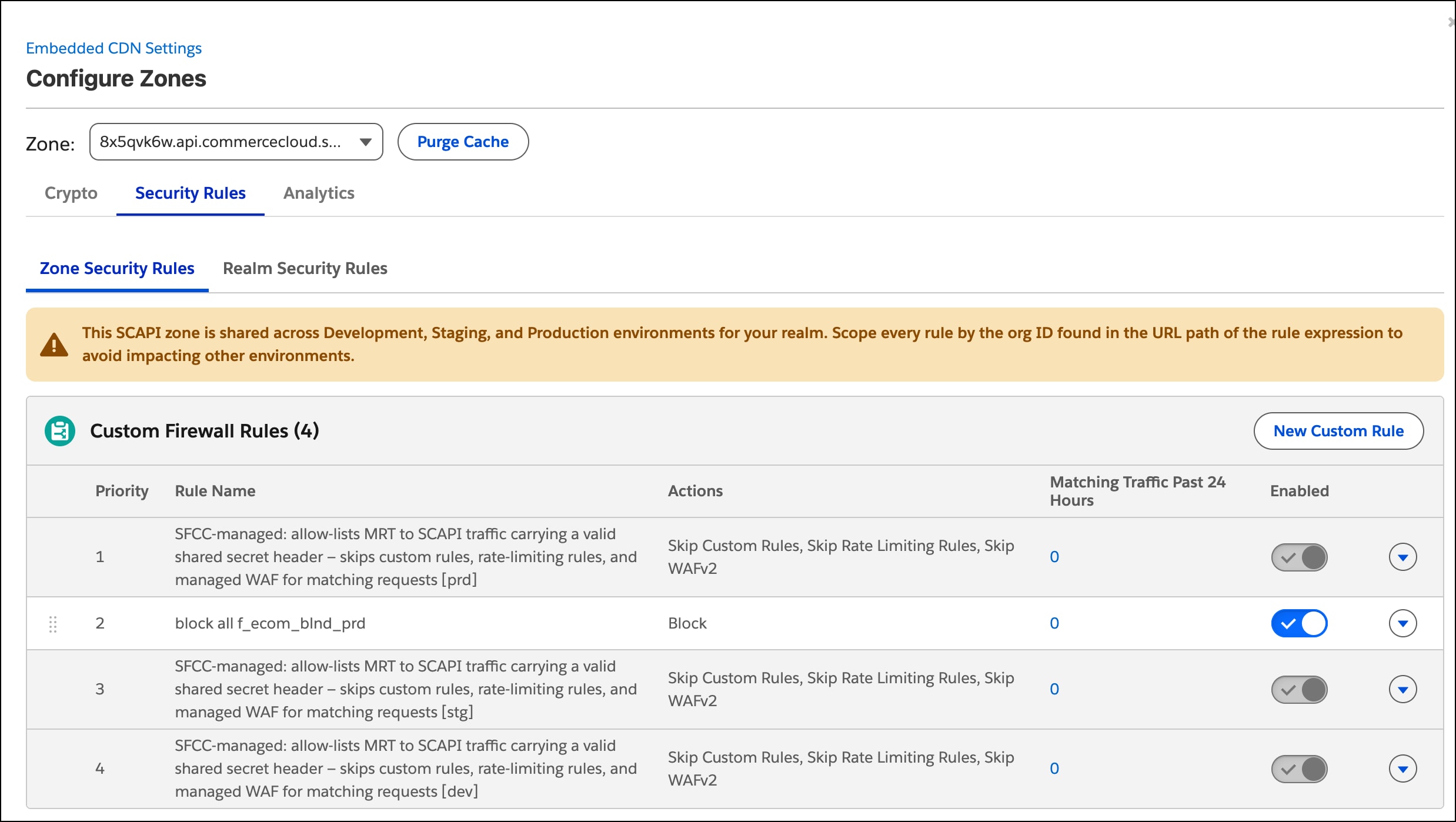
In Business Manager on your Production instance, go to Administration > Sites > Embedded CDN Settings, select the SCAPI zone, and click the Security Rules tab. Because the SCAPI zone is shared, you manage rules for all three instances from this one tab. A new Salesforce-managed custom firewall rule appears for each instance where you enabled the switch. Each rule scopes itself to its instance by matching an org-specific segment in the request URL path (for example, f_ecom_blnd_prd for Production, f_ecom_blnd_stg for Staging, f_ecom_blnd_dev for Development), so it only ever allows that instance’s MRT traffic. These rules are locked. View them, but don’t edit or delete them.
The SCAPI zone is shared across your Development, Staging, and Production instances, but each instance’s allow rule and secret are scoped separately by that org-specific path segment. Enabling the feature switch in Production doesn’t protect Development or Staging — enable it separately in each instance you want covered, and scope any block rule you add the same way.
Important
Block Direct SCAPI Traffic
After an instance’s SIH allow rule is in place, add your own custom firewall rule to block direct Shopper API requests for that instance. The rule lives on the SCAPI zone’s Security Rules tab. That tab is available when SCAPI Zone Visibility is enabled in Business Manager, which is on by default starting with B2C Commerce 26.10. See SCAPI Zone Support for B2C Commerce.
Scope the block rule to the same org-specific path segment as that instance’s allow rule, and to Shopper API and SLAS paths. A rule meant for Production then doesn’t also match Staging or Development traffic, and Admin API calls stay outside the rule. The Salesforce allow rule stays scoped to the org segment. It lets Managed Runtime traffic through. Admin traffic doesn’t need that header when the block rule doesn’t match it. Repeat this section for each instance you want to block.
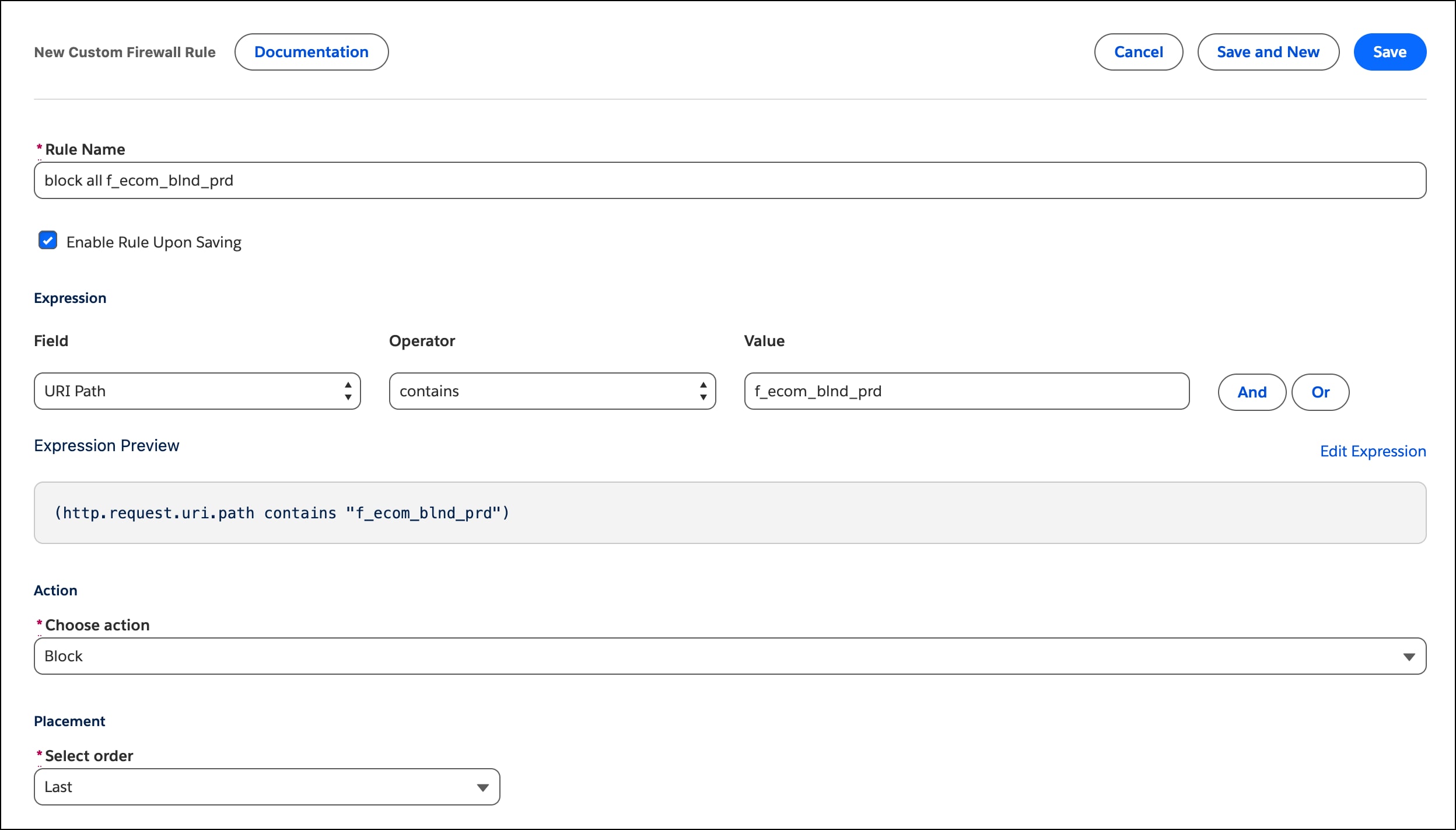
On the Security Rules tab for the SCAPI zone (managed from your Production instance), create a new custom firewall rule with URI Path contains <org-specific segment> and URI Path contains /shopper. Use the same org segment shown in that instance’s Salesforce-managed allow rule (for example, f_ecom_blnd_prd for Production). /shopper matches Shopper API names such as shopper-products and the SLAS path /shopper/auth. It doesn’t match Admin API paths, so Account Manager calls from the B2C CLI, CI, and other admin integrations keep working. A custom Shopper API uses /custom/<api>/... and does not contain /shopper. To block direct access to one custom endpoint, use the org segment and URI Path contains /custom/<api> instead of /shopper. See Create a Custom Firewall Rule for an eCDN Zone.
Start with the log action. Leave the rule in log for at least one full business cycle, about 1 to 7 days, and include scheduled jobs and peak hours in that window. See eCDN Custom Rules for rule expression syntax and available actions.
Review the matches in Security Analytics on the SCAPI zone, or in Log Center, by path, user agent, and ASN. See Analyze HTTP and Security Traffic for an eCDN Zone. Look for legitimate Shopper API callers that reach SCAPI without going through MRT. Common ones include:
Native mobile apps that call SLAS and the Shopper APIs directly
Synthetic monitoring of Shopper APIs
QA automation against Shopper APIs
Admin API callers, such as OMS, ERP, and PIM integrations and the B2C CLI, authenticate with Account Manager. They fall outside a rule scoped to /shopper, so you don’t route them through MRT or exclude them from this rule.
For each legitimate Shopper caller, route the traffic through MRT or add a narrow exclusion. Limit an exclusion to a specific path plus a known signal, such as a client ID or a short list of fixed IPs. Excluding a whole IP range or network weakens the rule, the same way a broad IP exemption weakens WAF and rate-limit rules. Skip the block rule only when you can’t route the caller through MRT and can’t write a narrow exclusion.
When the logged matches are traffic you intend to stop, switch the action to block. Use block. Shopper API callers are API clients and can’t complete a Managed Challenge. Don’t switch from log to block during a flash sale, a holiday code freeze, or another peak window. See Bot Mitigation Best Practices for Flash Sales and Traffic Management for Flash Sales. Then drag the rule into place directly after that instance’s Salesforce-managed allow rule using the reorder handle. Rules evaluate in order, so legitimate MRT traffic for that instance is already skipped by the allow rule before your block rule runs.
Add a separate rule, scoped to its own org-specific segment and to /shopper, for each additional instance you want to block. Rule order matters only relative to the allow rule it pairs with — for example, this Production block rule can sit directly after the Production allow rule, ahead of the Staging and Development allow rules:
Roll Back
If the block rule stops legitimate traffic, switch that rule back to log, or disable it, before you change the Managed Runtime SCAPI Request Identification feature switch. After you enforce the rule, alert on a spike in SCAPI-zone blocks or HTTP 403 responses. Anomaly Detection in Log Center is one way to raise that alert.
Considerations
SIH closes MRT bypass, not every SCAPI attack vector. SIH verifies that a request came from MRT. Keep the rate limiting, WAF rules, and bot controls you already run on traffic that does pass through MRT. Continue to follow Bot Management best practices for that traffic.
Composable and hybrid storefronts are both covered. SIH is applied at the MRT platform level to every proxied request to SCAPI, not only requests from a specific framework version.
Salesforce and you split this control. Salesforce provides the SIH secret, rotates it, and owns the allow rule. You own the block rule, its exclusions, monitoring, and the rate-limit, WAF, and bot controls already in place.
Turning off the feature switch leaves that instance’s allow rule in place. You can’t delete the allow rule. If you turn off Managed Runtime SCAPI Request Identification for an instance while its block rule is still enforced, direct SCAPI traffic that the allow rule used to pass now hits your block rule. Change that block rule from block to log, or disable it before you turn off the feature switch. See Roll Back.


 j
j