Point of Sale supports common POS workflows with APIs, SPIs, and webhooks. It provides a set of APIs for merchants to provide, update, or read data in the Point of Sale system. Backend systems hook into these APIs to complete POS integration. Point of Sale SPIs provide extensibility and the opportunity to use external systems for POS workflows.
Creates a partial cycle count for a particular group of products included in a category, brand, or other product attribute specified in the request.
Notification
Send notifications directly to specific app users.
API
Description
POST/merchant/{version}/notifications
Schedules immediate notifications of certain events (for example, an order ships or a cart is abandoned) to send to one or more specified target devices. App users of target devices can be referenced in the API via installation ID or email address, which maps to an installation ID in Point of Sale if captured when the user logged in to the app.
Product Management
Create, update, and delete products in Point of Sale.
API
Description
PUT/merchant/{version}/products
Updates products.
POST/merchant/{version}/products
Creates products.
DELETE/merchant/{version}/products
Deletes products.
Promotion Management
Create, update, retrieve, and delete promotions in Point of Sale.
API
Description
GET/merchant/{version}/promotions
Retrieves all promotions.
PUT/merchant/{version}/promotions
Updates promotions.
POST/merchant/{version}/promotions
Creates promotions.
GET/merchant/{version}/promotions/download/report
Downloads a report of all CMS-created promotions (inactive and active).
Creates/sends new valid SUPCs in a promotion to Point of Sale.
Store Associate Management
Create, search, update, and deactivate store associates from Point of Sale.
API
Description
GET/merchant/{version}/associates
Retrieves active/inactive store associates based on query parameters storeId and associateId.
PUT/merchant/{version}/associates
Updates a store associate in Point of Sale.
POST/merchant/{version}/associates
Creates a store associate in Point of Sale.
DELETE/merchant/{version}/associates
Deactivates the store associate specified by the associateId query parameter. This method sets the active field on the associate to false.
GET/merchant/{version}/associates/{associateId}
Retrieves store associate details by associateId.
Store Product Management
Manage store inventory.
API
Description
PUT/merchant/{version}/storeproducts
Updates store product details by updating item’s list price, sale price, quantity and promo banner text.
GET/merchant/{version}/storeproducts/inventory
Returns store inventory details for queried store and product ID(s). This endpoint accepts multiple product or store IDs in a single call. - productIds: (required): Comma-separated list of up to 20 product IDs. - storeIds: Comma-separated list of up to 1,000 store IDs. If empty or null, defaults to all stores.
PUT/merchant/{version}/storeproducts/inventory
Updates store or E-comm inventory of products.
POST/merchant/{version}/storeproducts/inventory
Creates store or E-comm inventory of products. Note: This endpoint performs an incremental inventory upload to Point of Sale. For a full inventory, use a feed instead. For more information, see Store Inventory & Pricing Feed in Salesforce Help.
Provides the URL for a CSV file containing store inventory.
Order Management
Create, search, retrieve, and repost orders from Point of Sale.
API
Description
POST/merchant/{version}/sa/orders
Creates order data based on customer order data in payload.
POST/merchant/{version}/sa/orders/repost
Reposts orders to an external system as specified by a list of order IDs.
POST/merchant/{version}/sa/orders/search
Searches and retrieves orders based on input parameters.
GET/merchant/{version}/sa/orders/{id}
Retrieves order data based on order ID.
Service Provider Interface (SPI)
SPIs are outbound API calls made from Point of Sale that expect a response from the customer system and alter the behavior of the transaction journey for an associate. On the merchant side, a web server listens to this API request and handles the call. In response, Point of Sale expects a full JSON response that updates cart or customer data (for example, Clienteling API and promotion calculation).
Environments
To implement the Point of Sale SPI, provide both a staging (sandbox) environment for testing and a production environment.
Requests to the SPI APIs take these forms.
api_version is appended to the path for each request, and is based on the version of the Point of Sale SPI APIs that are implemented. api_version must be consistent across all API requests made to a particular SPI implementation. For example, you can make all requests with api_version 1.0 or 1.1, but not a mix of 1.0 and 1.1.
Note
Authentication
To implement the Point of Sale SPI, provide an authentication mechanism for accessing the SPI APIs with an API key. Point of Sale provides API keys (one for staging and one for production) to validate, and all SPI API requests contain an api_key request parameter.
If an invalid API key is supplied, the API responds with a 401 Unauthorized response containing an empty response body.
Sample Request with Authentication
1GET /customer/1234?api_key={API_KEY}
Sample Authentication Failure Response
1HTTP/1.1 401 Unauthorized2{}
Configuration and Setup
In CMS, go to Store Management | Integrations | Custom Connectors.
Click Create.
For Connector Type, select SPI.
For Endpoint Name, select an endpoint. For example, CREATE_CUSTOMER.
Set the API Endpoint to an external endpoint for the SPI. For example, https://sample/external/endpoint/to/create/customer.
Select or enter the integration type. For example, HTTP_POST.
Set the header for the API in JSON Headers. Headers can be Content-Type or Authorization attributes (clientId or password). For example:
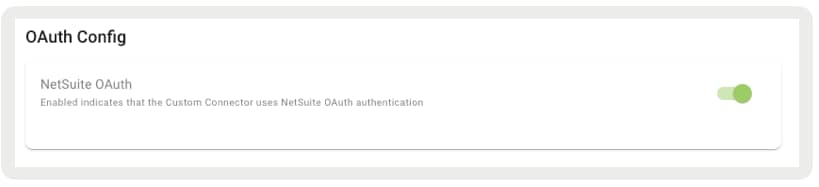
Point of Sale Custom Connection supports NetSuite OAuth authentication, ensuring secure access and synchronization of customer data while reducing the risk of authentication errors. This setup is configured directly in CMS.
Before proceeding, make sure that an ERP configuration is set up in CMS. Without this configuration, the SPI fails to process and results in an error within CMS.
Important
In CMS, go to Store Management | Integrations | Custom Connectors.
Edit an existing configuration or create a new one.
Turn on NetSuite OAuth for the OAuth Config. This automatically retrieves the necessary OAuth credentials from the ERP configuration.
Save your changes.
Define Custom Attributes
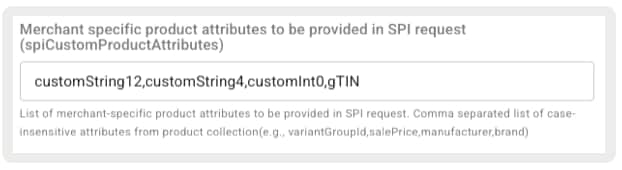
Define custom attributes to pass in a product’s SPI response. For example, when integrating with the Delivery Group SPI, define custom attributes in the spiCustomProductAttributes setting, and these attributes are included in the SPI response.
In CMS, go to Store Management | Store Settings | Product.
Go to Merchant-specific product attributes to be provided in SPI request (spiCustomProductAttributes) and enter a comma-separated list of case-insensitive attributes from the product collection (for example, variantGroupId, salePrice, manufacturer, brand).
Headers Sent by Point of Sale
Point of Sale automatically injects these headers when the populateNewCustomAPIHeaders toggle is enabled.
Toggle location (CMS): Store Management | Store Settings | Search Settings | Advanced | Populate New Custom API Headers
When enabled, every request to the SPI provider includes these headers:
Header
Description
x-merchant-id
Merchant identifier (tenant)
x-locale
Locale code (for example, en_US, en_GB)
x-store-id
Store identifier where the search is performed
x-register-id
Register identifier
x-associate-id
Associate performing the search
These headers are available only when the populateNewCustomAPIHeaders store setting is enabled. Without this setting, no contextual headers are sent.
Important
Point of Sale SPI Summary
These tables list Point of Sale SPIs and their usage descriptions.
Clienteling
Create, search, update, and retrieve details of a specific customer from an external system rather than from the Point of Sale system of record.
SPI
Details
POST/merchant/spi/sample/endpoint/sa/customers
Creates a customer based on customer data entered in the POS
Used for retrieving inventory count of products online or in-store from an external system rather than from the Point of Sale system of record, and for reverting reserved inventory
Reverts reserved inventory for the specified products in the provided cart. Implement this endpoint to ensure reserved inventory is properly reverted in scenarios such as a payment failure during checkout.
Checks the external system for the availability of given products by checking their inventory count (online only, not applicable for in-store). The merchant receives the product ID or GTIN in the response.
Checks the external system for the availability of a given product. The response appears on the existing inventory overview widget, showing availability for all stores or a text indicating availability when a ZIP code is included in the request.
Retrieves the available rewards for a customer that can be applied as a tender. Reward lookup is based on the Customer Account (CustomerId, Card Acquisition Token, and so on).
Used to retrieve, search, and export orders from an external system rather than from the Point of Sale system of record
Order SPIs
Starting in June 2024, Point of Sale updated the order SPIs. The JSON schema uses the transaction data model for exporting and importing store transactions, including sales, returns, and exchanges. For details, see Point of Sale API Specifications.
Fetches a specified order from an external system during BORIS flow with SPI as the order master for all orders. The merchant’s system is expected to handle the return processing.
Important: If enabling delivery grouping with this SPI, you’ll need to send “DeliveryGroup” list in the SPI response. Learn More
Fetches a specified order from an external system during BORIS flow with SPI as the order master for all orders. The merchant’s system is expected to handle the return processing.
Important: If enabling delivery grouping with this SPI, you’ll need to send “DeliveryGroup” list in the SPI response.
Fetches a specified order from an external system during BORIS flow with Point of Sale as the order master for in-store placed orders. The merchant’s system is expected to handle the return processing.
Posts the sale transaction to the merchant’s external system (for example, BORIS). This will also pull online orders if this endpoint is connected to a system that has online orders. The aim of this SPI is to provide an interface where merchants can choose what orders to send back.
Endpoint Name: RETURN Integration Type: HTTP_POST
Other
Used to verify employee status, retrieve delivery/pickup dates, validate cart, etc.
Used to perform visual product search by sending an image to an external recognition provider and optionally refining results with filters, sorting, and pagination
Uploads a captured image to an external provider for image recognition. Returns a searchId and a ranked list of matching product IDs. Optionally returns filters, sort options, and pagination.
Merchant-provided SPI that takes in cart items that are marked for shipping/delivery, customerId, address, etc. as input and provides applicable shipping options
Endpoint Name: Dependent on the implementation and should be provided by the merchant Integration Type: HTTP_POST
Taxes
Used to calculate taxes, retrieve tax exemptions, and download tax rates
For product details, there are two fields: orderProductList and productList. orderProductList contains a list of products sold, while productList is a subset (if there have been any returns or exchanges) that contains products sold with returned products and quantities removed or adjusted. For example, productList gives you the remaining products in the order that aren’t returned. If mapping to an ERP system, use orderProductList and returnProductList instead of productList to simplify the ingestion logic.
For fulfillment details, there are two fields: omniFulfillmentType and fulfillmentType. If mapping to an ERP system for cash/carry/charge, use fulfillmentType and fulfillmentSubType instead of omniFulfillmentType.
Webhooks
Webhooks are outbound API calls made from Point of Sale to an external system when specified events are triggered on POS.
Configuration and Setup
In CMS, go to Store Management | Integrations | Custom Connectors.
Click Create in the upper right.
For Connector Type, select Webhook.
For Endpoint Name, select an endpoint (for example, CREATE_CUSTOMER).
For API Endpoint, provide an external endpoint for the webhook (for example, https://sample/external/endpoint/to/create/customer).
For Integration Type, select or enter the type of integration (for example, HTTP_POST).
For JSON Headers, provide the header for the API. Headers can be Content-Type or Authorization attributes (clientId or password). For example:
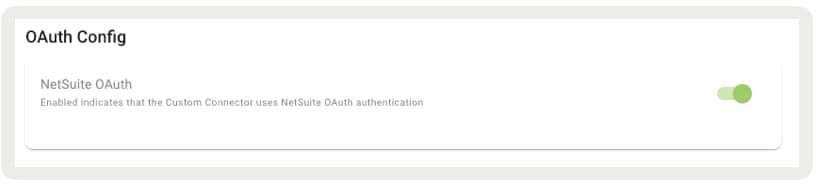
Point of Sale Custom Connection supports NetSuite OAuth authentication, ensuring secure access and synchronization of customer data while reducing the risk of authentication errors. Configure this setup directly in CMS.
Before proceeding, make sure that an ERP configuration is set up in CMS. Without this configuration, the SPI fails to process and results in an error within CMS.
Important
In CMS, go to Store Management | Integrations | Custom Connectors.
Edit an existing configuration or create a new one.
For OAuth Config, enable NetSuite OAuth. This automatically retrieves the necessary OAuth credentials from the ERP configuration.
Save your changes.
Reposting Webhooks
You can manually repost failed webhook events in Point of Sale.
In CMS, go to Store Management | Reporting and Analytics | Repost Failed Webhook Events.
Search for the failed webhook event by configuring the search query parameters.
Click View Details to view the details of the payload inside the selected webhook event.
Click Repost to manually trigger a webhook event repost.
Point of Sale Webhook Summary
This table lists all available Point of Sale webhooks and their usage descriptions.
E-Receipt
Used for sending order details for email purposes
Webhook
Details
Receive eReceipt
Instead of using Point of Sale email service, merchants can use their own email service by providing an endpoint to receive order details.
Used for sending inventory data to an external system
Webhook
Details
Send inventory Transfer data
Endpoint Name: Select one of the following values: • INVENTORY_EXPORT_ASN • INVENTORY_EXPORT_STS • INVENTORY_EXPORT_RTV • INVENTORY_EXPORT_CTS • INVENTORY_EXPORT_BLD
Events: Select the subscribed event’s data to be sent out, available events: • ASN_RECEIVED_EVENT • ASN_PARTIALLY_RECEIVED_EVENT • ASN_RECEIVE_COMPLETED_EVENT
Events: Select the subscribed event’s data to be sent out, available events: • CYC_COUNT_CREATED_EVENT • CYC_COUNT_STARTED_EVENT • CYC_COUNT_COMPLETED_EVENT • CYC_COUNT_CANCELED_EVENT
Integration Type: HTTP_POST
Send purchase order data
Endpoint Name: INVENTORY_EXPORT_PO
Events: Select the subscribed event’s data to be sent out, available events: • PO_TRANSFER_STARTED_EVENT • PO_TRANSFER_COMPLETED_EVENT • PO_TRANSFER_ERRORED_EVENT
Integration Type: HTTP_POST
Send sales data
Indicates that an item (or items) has been sold. When this event is triggered, the expectation is that the inventory for the specified item(s) should decrease.
Indicates that an item (or items) has been returned or exchanged. When this event is triggered, the inventory for the specific item(s) should increase or adjust in some manner if it’s an exchange.
Posts the sale transaction to the merchant’s external system (for example, BORIS). This also pulls online orders if this endpoint is connected to a system that has online orders. This SPI provides an interface where merchants can choose what orders to send back.
Learn More: Return Export Documentation
Endpoint Name: RETURN Integration Type: HTTP_POST
Others
Used for sending non-categorized data (for example, void carts) to an external system
Webhook
Details
Void Cart
Provides real-time details when a cart is voided, which can be used to store and refer to in Loss Prevention audits.
Provides real-time details of register crashes, covering: relevant app, device, and store information such as version numbers, OS, device model, store and register IDs, installation ID, environment, and region.
Provides real-time details of register vitals, covering: network connectivity, associate sign-in/out, peripheral device status and connectivity, order syncs, and offline data feed syncs.
Provides real-time monitoring of integration health, covering: SPI and webhook errors (HTTP 4xx/5xx), latency threshold breaches, and overall performance issues.
Endpoint Name: EXPORT_MONITORING_EVENTS Integration Type: HTTP_POST or HTTP_PUT
Frequently Asked Questions (FAQs)
The API spec schema indicates that dates are represented with an integer data type. What is the expected date format we should use when passing dates to the API? Additionally, can you provide a sample date along with its transformed value as an example?
Dates are expected in epoch times, represented as integers (measured in milliseconds). Epoch time is the number of milliseconds that have elapsed since January 1, 1970, 00:00:00 UTC. See example:
Example Date: 2023-01-15 08:30:00
Epoch Time (in milliseconds): 1642246200000
See example with currentLoyaltyProfile.currentTier.expiryDate:
Can Multi-Region Feeds Be Managed Through the Product API?
The platform supports Multi-Region Feeds, allowing the primary region to run the product feed while enabling other countries to inherit the product metadata, with specific pricing and sizing data provided for each country. However, this capability doesn’t extend directly through the Product API.
For Multi-Region Pricing Updates: There’s no dedicated pricing API. For multi-region operations, pricing updates must be conducted through the CMS feed mechanism, allowing for regional-level adjustments.
For Single-Region Pricing Updates: In a single-region setup, the Product API can update pricing information. However, for multi-region scenarios, the Product API lacks a region field in its specifications (as observed in this guide).
Workaround for Pricing Updates: Given the absence of a pricing API, pricing information must be included within POST and PUT calls when managing product data. If operating with a single instance per region, the Product API can facilitate pricing updates effectively.
Do you offer GraphQL for precise querying?
GraphQL isn’t available externally. It’s used exclusively for the POS app and CMS, and isn’t accessible to customers via the API specification.
How can I search by credit card number using the search order SPI?
To search by credit card number using the search order SPI, map the card number to the appropriate fields in the payload. Include the card number under the payment card section. HotWax then reads this information, searches for orders, and returns the results.
Does Point of Sale support query parameters for all SPIs?
No, Point of Sale doesn’t support dynamically populating query parameters. However, you can set up endpoints with static query parameters.
When Point of Sale calls an endpoint, it uses the provided URL exactly as configured. This means that merchants can receive the configured locale (for example, cb-en-us) and store type (for example, stores) as part of the URL. No special handling or logic is applied to these static query parameters — the URL is called as-is.
If merchants are comfortable with the static nature of the query parameters, they can configure them accordingly. This allows them to add conditional processing on their side. Additionally, merchants can use static query parameters to receive authentication codes.
For all SPIs, when error fields are returned with a 200 HTTP response code, should non-nullable fields still be included in the response? For example, in the customer detail API response, the loyaltyProfile field is not nullable and the profile field, while nullable, is required. Please confirm the expected behavior.
Non-nullable fields or any fields not needed in the response should be left out of the response entirely. Instead of inserting a null value for any field not being passed, exclude the field from the response.
In scenarios where a resource is not found and you’d normally return a 404 status, should you return a 200 with error fields populated instead? For instance, if an associate tries to look up a return item based on a registry ID, and the registry ID is invalid, should you return a 200 with an error message instead of a 404?
If returning a 200 status code in a scenario with an empty result string and an error message, Point of Sale displays no results and the error message. If returning a 400 status code, a generic error message is displayed in the app, and the specific error message is captured in the logs.
What is the expected response payload for the order webhook when the status code indicates success? What HTTP status code should I return, and what values should be included in the response fields as indicated in the Swagger documentation?
The current schema doesn’t indicate any required fields. As of now, only a status code response is expected.
If the Address SPI is set up, does the POS always trigger the endpoint and disregard the data in the customer SPI addressList object?
The POS uses the POST address SPI (CREATE_CUSTOMER_ADDRESS) to add an address from the cart’s Select Shipping Address screen. Once the address is added, the POS relies on the addressList provided by CREATE_CUSTOMER_ADDRESS for the checkout process.
What triggers an Order to flow into the Repost Failed Webhook Report?
An order is categorized as a failure and appears in the Repost Failed Webhook report if specific criteria are met during the order export process:
HTTP Response Status Code: The order export fails if the HTTP response status code is in the 4xx or 5xx range, indicating a client or server error.
HTTP Response Payload: Even with a successful HTTP status code in the 2xx range, the order export is still considered a failure if the response payload includes either or both of these attributes:
errorMessage
errorCode
Example: If the HTTP status code is 200, but the payload contains an error message like the following, the order is marked as a failure:
Is the eReceipt webhook queued in offline mode so that it can be sent once the POS returns to online mode?
The eReceipt webhook is triggered when the app calls the eReceipt API. No emails are sent when an order is synced. However, if automatic receipt emails are configured in the store settings, eReceipts are sent for all orders, even in offline mode. Currently, no customer has automatic receipt emails enabled.
What happens if automatic eReceipts are enabled in offline mode?
If automatic eReceipt emails are configured, the system generates and sends eReceipts during offline sync for every transaction. In this case, remove the email CTA from the order confirmation layout.
Which settings should be enabled to ensure eReceipts are sent automatically in both online and offline modes?
Enable these settings in CMS:
sendOrderConfirmationEmailAutomatically
sendRefundEmailAutomatically
HideReceiptEmailShare
There’s no option to send an email only when requested by the customer in offline mode once these settings are enabled.


 j
j