A phased headless rollout is a technique for delivering a single shopping experience using multiple storefront technologies like Storefront Reference Architecture (SFRA) and Composable Storefront.
Applies to: Hybrid storefronts whose headless runtime is hosted on Managed Runtime (MRT)—both Storefront Next and PWA Kit (Composable Storefront). For a custom headless storefront hosted on a different origin, use your CDN’s origin-routing equivalent with the same path split. The local-development hybrid proxy is a PWA Kit feature.
Note
You can use the B2C Commerce CLI to simplify the complex JSON payloads required for eCDN zone and rule management. First, see B2C CLI, MCP and Tooling SDK to install the tool and authenticate.
Once configured, use the CLI to manage eCDN, for example:
1# List eCDN zones for your organization2b2c ecdn zones list
For a complete list of eCDN CLI commands, see eCDN Commands.
Note
Traffic Routing for Hybrid Apps with and without eCDN
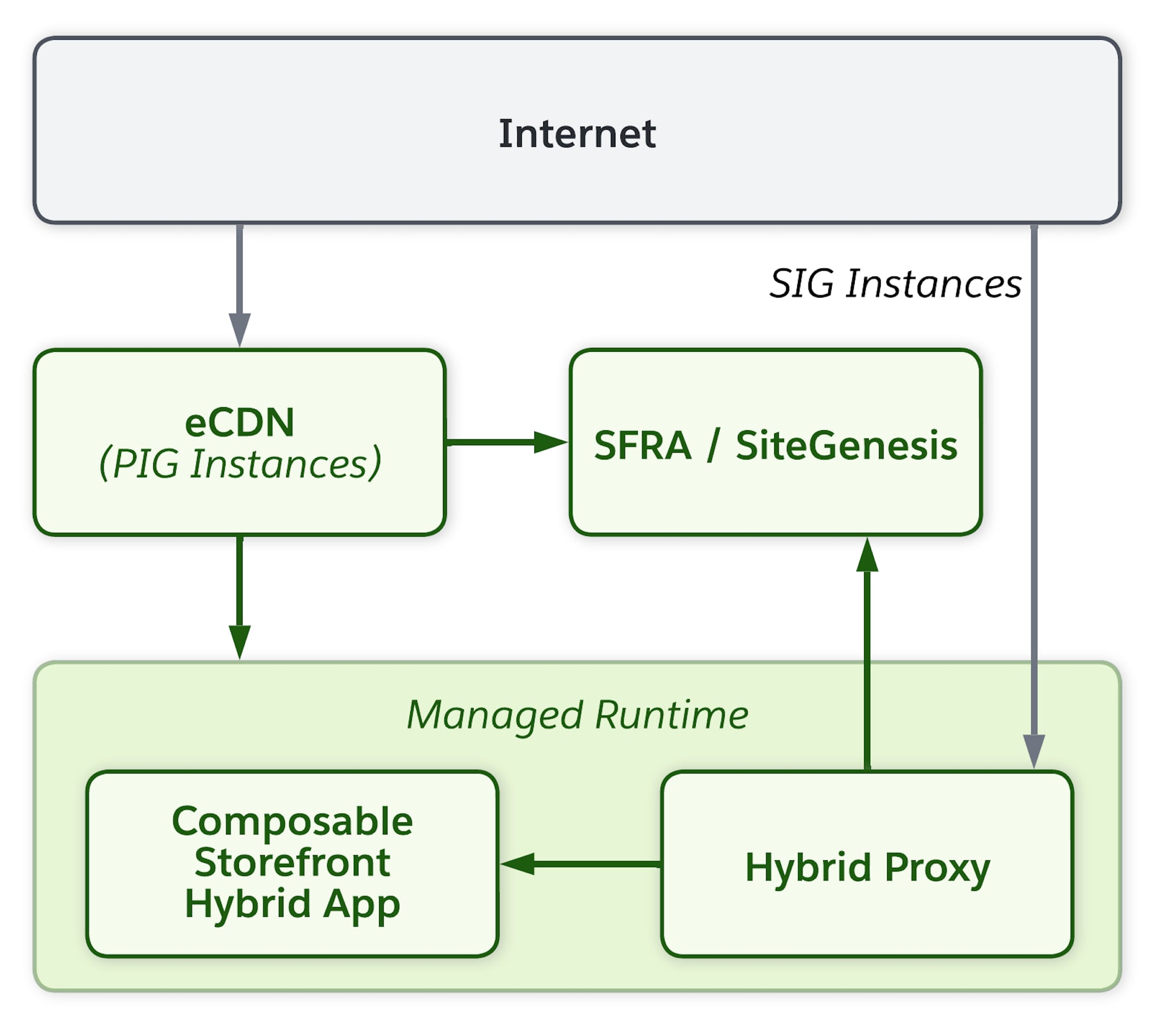
An embedded CDN (eCDN) is available for Primary Instance Group (PIG) environments, such as production or staging, and for on-demand sandbox (ODS) instances. eCDN can route traffic to both SFRA and Managed Runtime (MRT) at the same time, allowing you to gradually roll out a Composable Storefront. Local development servers don’t have an eCDN; in that case, use the hybrid proxy to route traffic to SFRA.
Traffic Routing for Local Development without eCDN
For local development servers, which don’t have an eCDN, develop and test hybrid shopper apps that use PWA Kit and SFRA or SiteGenesis by enabling the hybrid proxy feature in the pwa-kit-runtime package in PWA Kit v3.14.0 and later. On ODS instances, use eCDN instead of the hybrid proxy.
For PIG instances, an eCDN zone can route traffic to both SFRA and MRT at the same time, allowing you to gradually roll out a Composable Storefront.
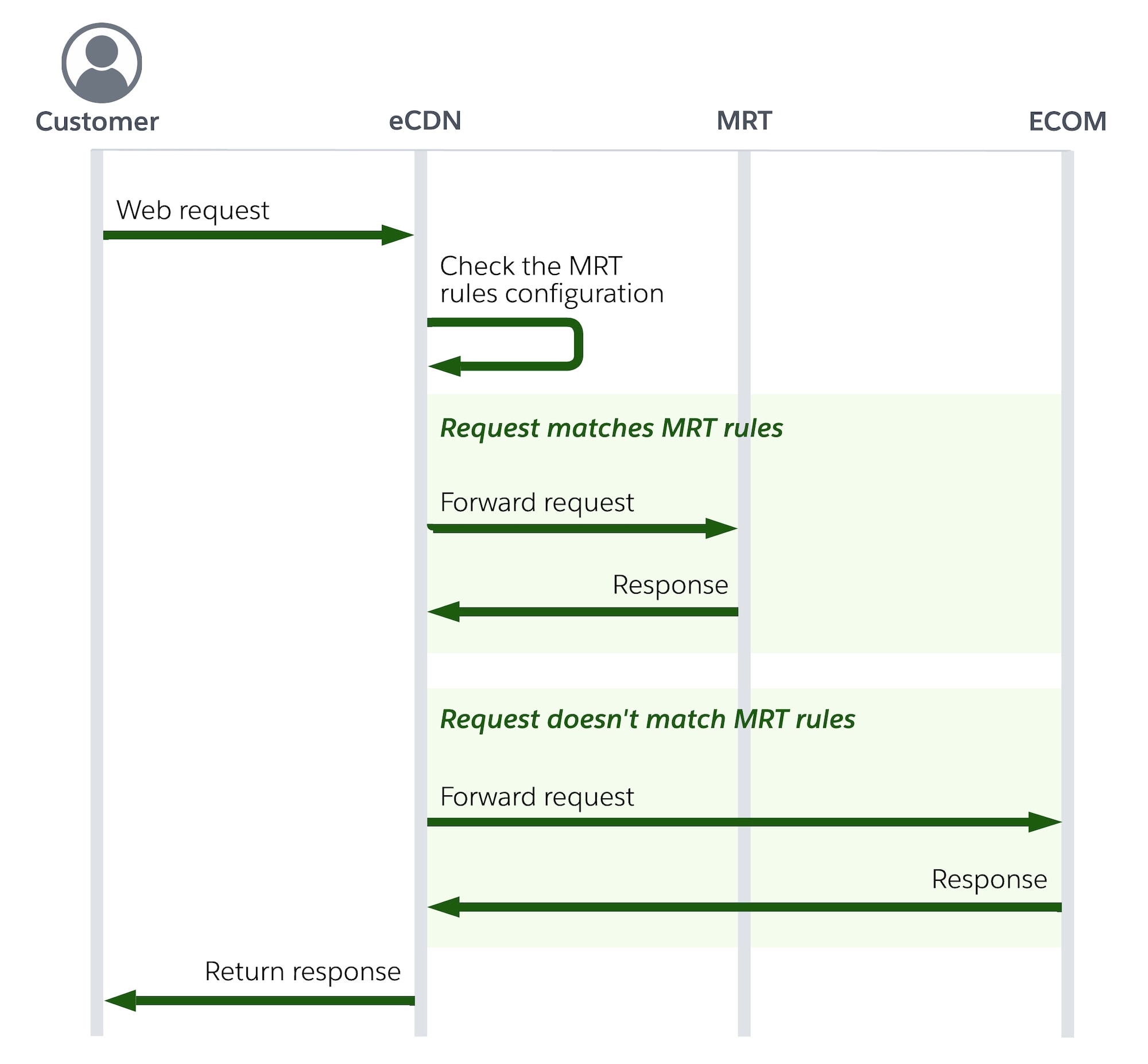
This diagram shows the sequence of requests and responses when an eCDN routes an incoming page request for a hybrid app for a PIG instance. If the request matches MRT rules, it is forwarded to MRT. Otherwise, if the request doesn’t match MRT rules, it is sent to the B2C Commerce instance, and then a response is returned.
You can configure hybrid routing rules in two ways. We recommend using the Business Manager eCDN UI for most implementations. Use the CDN Zones API when you need to automate or script rule management.
Configure Routing Rules in the Business Manager UI
The embedded CDN (eCDN) UI in Business Manager is the recommended way to add and manage hybrid routing rules. It lets you configure rules without writing API payloads.
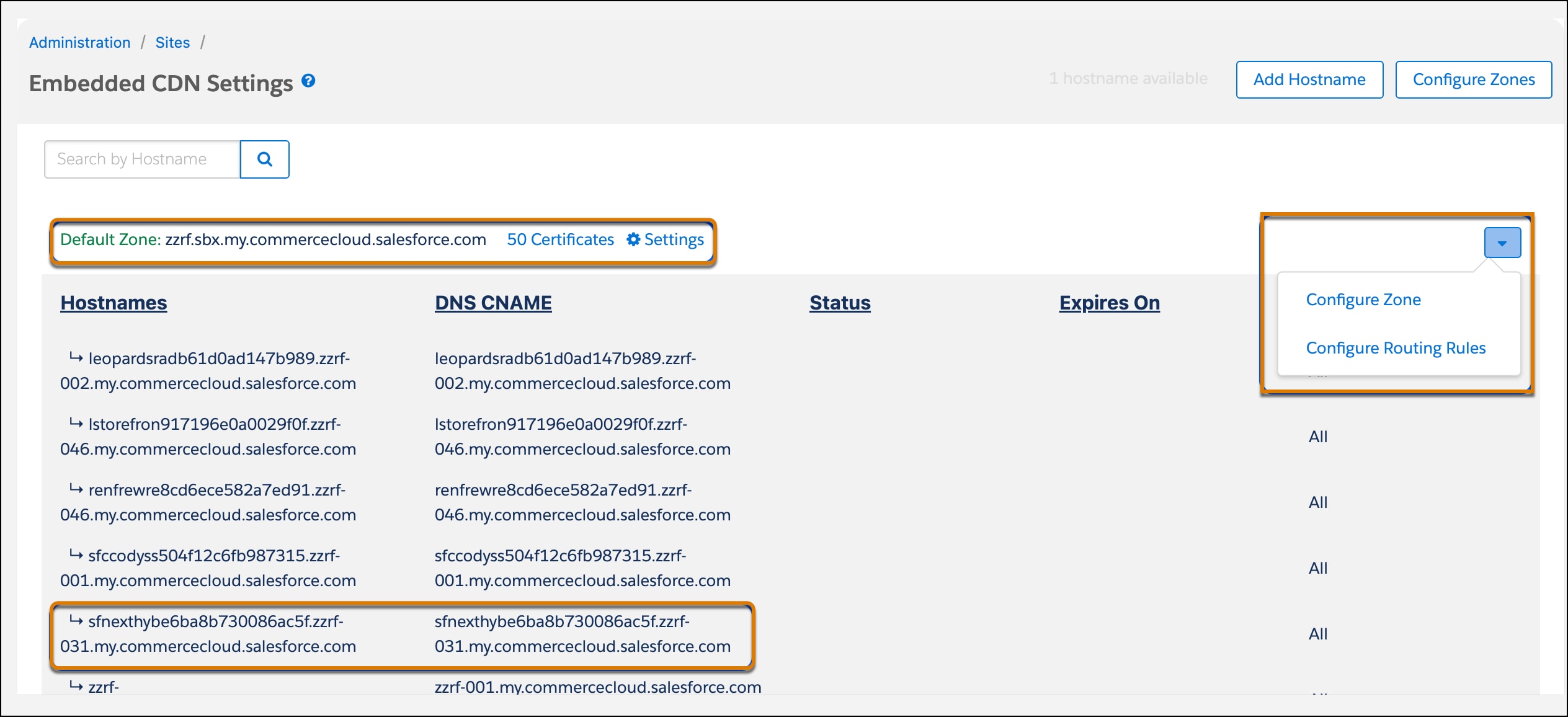
In Business Manager, go to Administration > Sites > Embedded CDN Settings.
Locate the zone that contains your storefront hostname (typically the default zone).
Click the caret on the right side of the zone title, then select Configure Routing Rules.
Locate the routing rule for your hostname and click Edit.
Confirm that the Hostnames and MRT Origin fields are prefilled and match your setup. Find your MRT Origin (the Managed Runtime environment domain) in Environment Settings in Runtime Admin.
In Rule expression, enter the Cloudflare expression that matches the routes you want to serve from Managed Runtime.
Click Save.
For architecture-specific, copy-ready rule expressions, see:
The eCDN UI is available for Primary Instance Group (PIG) and on-demand sandbox (ODS) instances. For local development, use the hybrid proxy instead of eCDN routing rules.
Note
Configure Routing Rules with the CDN Zones API
If you need to automate or script routing-rule management, use the Commerce API CDN Zones API to route traffic to Managed Runtime.
Before running the commands in this section, replace any placeholders with actual values. Placeholders are formatted like this: $PLACEHOLDER. Throughout this section, we use an example storefront with the production URL https://www.example.com.
Let’s examine the data provided in the request body.
The value of mrtHostname is the domain of the Managed Runtime environment for traffic routing. It must refer to a Managed Runtime environment hosted on the mobify-storefront.com or exp-delivery.com domain. If the provided value is used by an existing rule, the request fails.
Managed Runtime is the only supported routing destination.
Note
The value of expressions is an array of Cloudflare rule expressions that controls which requests are routed to Managed Runtime. For most implementations, a single routing expression is sufficient.
In addition to the provided expressions, the following default routing rules are used:
To add more routing rules to an existing Managed Runtime environment, use updateMrtRuleset and provide the mrtHostname and additional routing expressions:
To update existing rules to route to a different Managed Runtime environment, use updateMrtRuleset and provide the oldMrtHostname and the (new) mrtHostname that you want to route to:


 j
j