1- : Name of the multivalue field to be converted to a string.
delimiter
Optional. The characters used to delimit values in the converted string. Maximum length is 2 characters.
Returns an alphabetically sorted, delimited string representation of a multivalue field. The default delimiter is a comma followed by a space (,).
You can’t use MV_TO_STRING() in a WHERE or GROUP BY clause. Use it in the SELECT statement only. If you run MV_TO_STRING() on single-value dimensions or on unindexed multivalue dimensions, the function returns a single value.
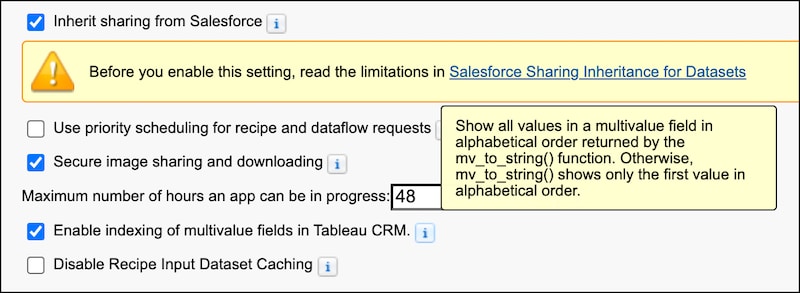
To enable multivalue fields, you must select the Enable indexing of multivalue fields in CRM Analytics preference in Setup. If you run MV_TO_STRING() without the preference selected, the function returns the first value in the first field only.
From Settings, in the Quick Find box, enter Analytics, and then select Settings from the list of Analytics options.
In Settings, select Enable indexing of multivalue fields in CRM Analytics.
Note
Simple Example
This query converts the multivalue field flight_attendants to a string and returns values that contain the name “maria.”
1SELECT MV_TO_STRING(flight_attendants) as Flight_Attendants2FROM "FlightsWithNullDim"3WHERE "flight_attendants" IN ('maria')
Flight_Attendants
kate, maria, mark, martin, sara
maria, sarah
kate, maria, mark, martin, sara
maria, sarah
kate, maria, mark, martin, sara
maria, sarah
Example with Custom Delimeter
This query returns all values of the flight_classes field and delimits them with “;;”.
1SELECT MV_TO_STRING(flight_classes, ';;') as Flight_Classes2FROM "FlightsWithNullDim"3LIMIT 10;
Flight_Classes
business;;economy
business;;economy;;first
business;;economy
business;;economy
business;;economy
business;;economy;;first
business;;economy
business;;economy
business;;economy
business;;economy;;first
Example with Grouping
The custom delimeter example returns two result values: business;;economy and business;;economy;;first. Let’s group by the flight_classes field and display the counts for each of these values. Since MV_TO_STRING() throws an error if included in a GROUP BY statement, we can nest the SELECT statement containing MV_TO_STRING() as a subquery and group the results in the outer query.
1SELECT Flight_Classes, count() as cnt2FROM (3 SELECT MV_TO_STRING(flight_classes, ';;') as Flight_Classes4 FROM "FlightsWithNullDim"5)6GROUP BY Flight_Classes;


 j
j