


 j
jAccess Models API with Apex
Access Models API with REST
LWC & Flow Examples
Rate Limits
Model API Names
Generation Feedback
Language & Locales
Data Masking
Toxicity Scoring
AI Models
Prompt Builder
Prompt Template Batch Processing
The Models REST API is a REST API that connects your application to large language models (LLMs). Start by creating a Salesforce app and generating a JSON Web Token (JWT) that you can use to access this API.
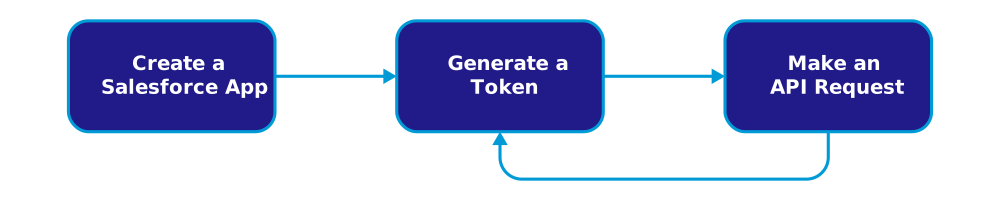
All Models API requests are subject to Salesforce’s usage and billing rates for Einstein Requests. See Agentforce and Generative AI Usage and Billing and the Rate Card for Einstein Requests.
Note
The quickest way to get started with the Models REST API is with our Postman collection.
This video shows you how to set up your org to use the REST API. It contains a simplified version of the steps below.
To securely communicate with Salesforce using the Models REST API, you must create an External Client App.
Create an external client app with OAuth and JWT enabled. Use these instructions to get set up: Create an External Client App.
When creating the app, include these settings.
Use these OAuth scopes.
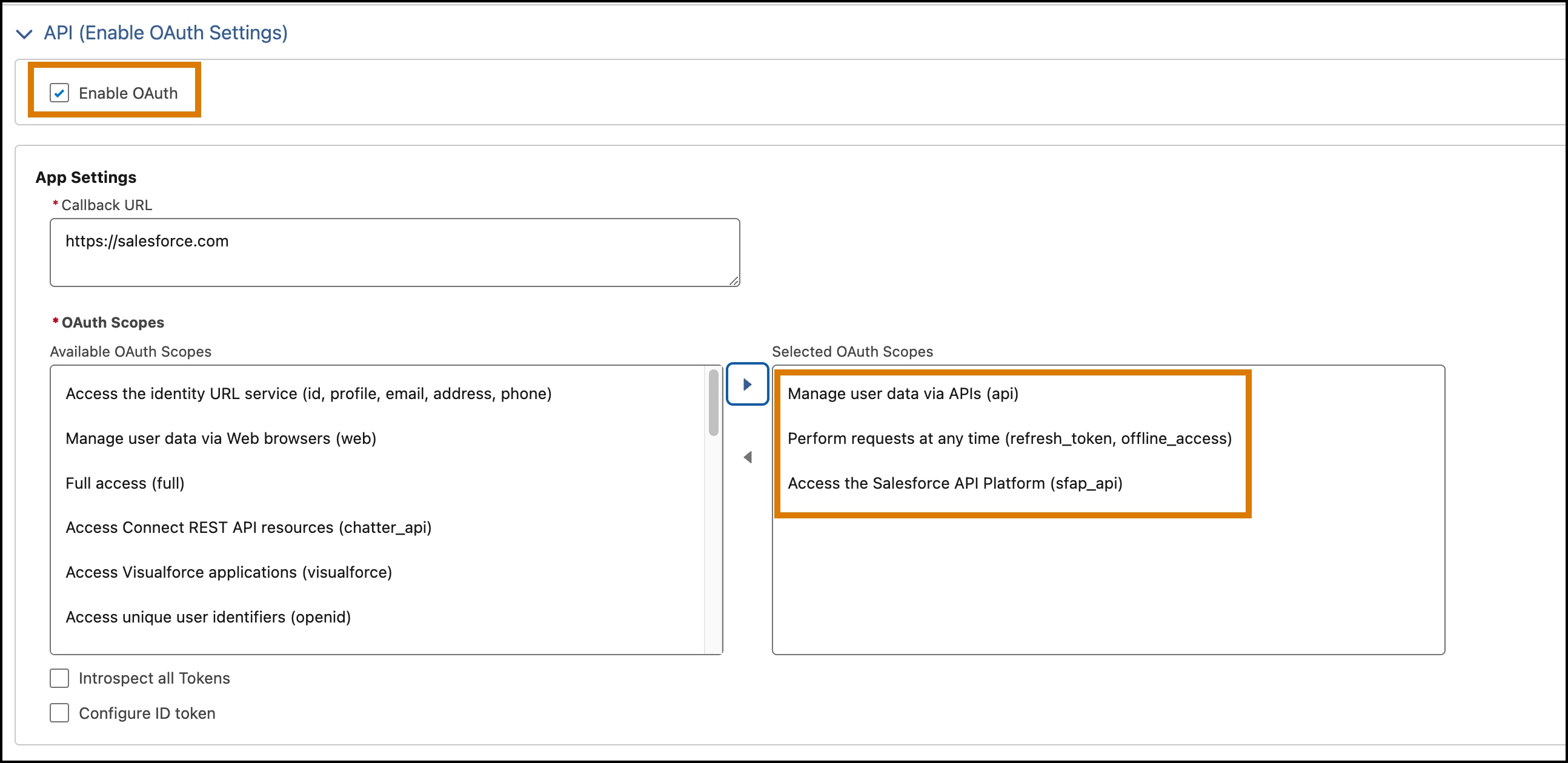
Select these additional OAuth settings.
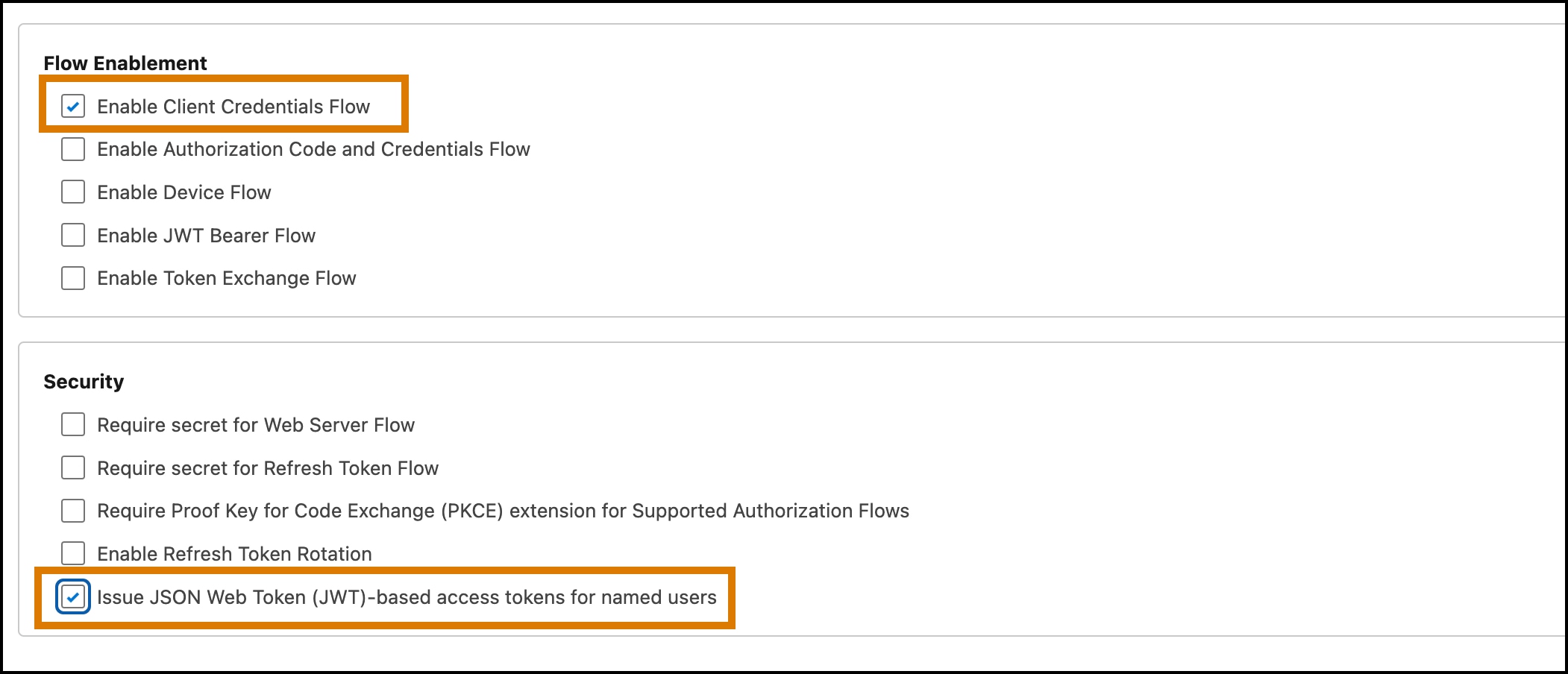
After creating the app, ensure that the API caller has the correct client credentials and that the client can issue JWT-based access tokens.
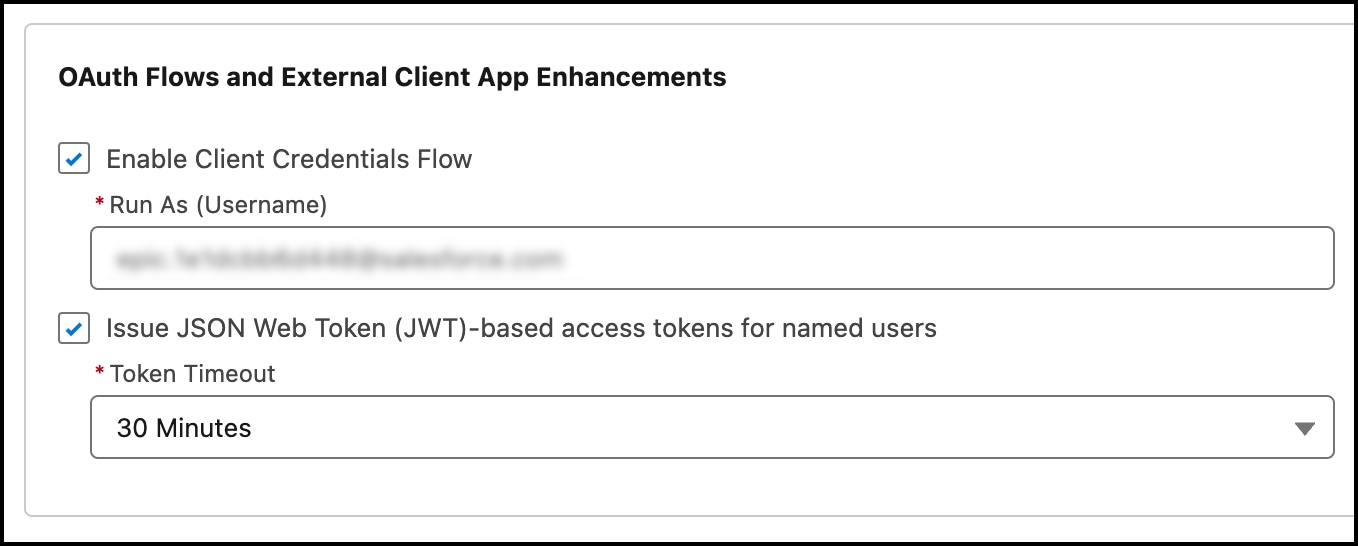
A JSON Web Token (JWT) is required for authorization.
From Setup, in the Quick Find box, enter External Client Apps, and then select External Client Apps Manager.
Select your app, and click the Settings tab.
Expand the OAuth Settings section.
Click the Consumer Key and Secret button, and copy your key and secret. You need these values to mint this token.
Store your consumer secret in a secure location.
Important
From Setup, in the Quick Find box, enter My Domain, and then select My Domain.
Copy the value shown in the Current My Domain URL field.
Request a JWT from Salesforce using a POST request, specifying the values for your domain, consumer key, and consumer secret. For example:
1curl -X POST https://{my_domain}/services/oauth2/token -d "grant_type=client_credentials&client_id={consumer_key}&client_secret={consumer_secret}"1{"access_token":"eyJhbGciOiJIUzI1NiIsInR5cCI6IkpXVCJ9.eyJzdWIiOiIxMjM0NTY3ODkwIiwibmFtZSI6IlNBTVBMRSBKV1QgRk9SIERFTU8gUFVSUE9TRVMiLCJpYXQiOjE1MTYyMzkwMjJ9.XYwlhE_q0-yVwswgaXuOx2nbXRFpEbagcScXnjWt2yo","signature":"uSs/SAlD/i+pL93EdLVUUY4F8uqfHHtteFii2E3zkhc=","token_format":"jwt","scope":"sfap_api einstein_gpt_api api","instance_url":"https://sample-company.my.salesforce.com","id":"https://login.pc-rnd.salesforce.com/id/XYZ/ABC","token_type":"Bearer","issued_at":"1713195676742","api_instance_url":"https://api.salesforce.com"}If you receive an invalid_grant error with the description, request not supported on this domain, verify that the domain is the domain specified when you view My Domain in Setup.
Tip
Use the access_token value in this response for the Authorization header in your API requests. For example:
1Authorization: Bearer {access_token}When you have a valid token, you can call any of the Models REST API endpoints.
The Models REST API provides four different endpoints for four different capabilities.
| Capability | Endpoint Path | Description |
|---|---|---|
| Generate Chat | /models/{modelName}/chat-generations | Generate a response based on a list of messages representing a chat conversation. |
| Generate Embeddings | /models/{modelName}/embeddings | Create an embedding vector representing the input text. |
| Generate Text | /models/{modelName}/generations | Generate a response based on the prompt provided. |
| Submit Feedback | /feedback | Submit feedback for generated text. |
Choose a model to use when you call the generations or embeddings endpoints. Each endpoint, other than the feedback endpoint, requires the API name of the model as part of the path. For instance, if you want to use the OpenAI GPT-4o mini model for a generation request, specify the API name sfdc_ai__DefaultOpenAIGPT4OmniMini by making a request to this endpoint.
1https://api.salesforce.com/einstein/platform/v1/models/sfdc_ai__DefaultOpenAIGPT4OmniMini/generationsThe Models API supports models from various Salesforce-enabled providers. See Supported Models.
These headers are relevant for API requests.
| Header | Description | Example |
|---|---|---|
Authorization | Required. Authorization method for this request. This header must contain your JWT. | Bearer {token} |
Content-Type | Required. Specify the application/json content type. | application/json |
x-sfdc-app-context | Required. This value is reserved for future use. For now, specify EinsteinGPT. | EinsteinGPT |
x-client-feature-id | Required. This value is reserved for future use. For now, specify ai-platform-models-connected-app. | ai-platform-models-connected-app |
Make a POST request to one of the Models REST API endpoints. This example demonstrates a call to the generations endpoint.
1curl --location 'https://api.salesforce.com/einstein/platform/v1/models/sfdc_ai__DefaultOpenAIGPT4OmniMini/generations' \
2--header 'Authorization: Bearer ••••••' \
3--header 'Content-Type: application/json' \
4--header 'x-sfdc-app-context: EinsteinGPT' \
5--header 'x-client-feature-id: ai-platform-models-connected-app' \
6--data '{
7    "prompt": "James Lee is a financial advisor, living in San Diego. His phone number is 867-5309. Generate a story about his work and life."
8}'
If you receive a 401 or 404 response code, verify that your Salesforce app includes all the required scopes and settings. See Create a Salesforce App. Also, verify that you’re using the complete access_token value that you generated earlier. See Generate a JWT.
Tip
And here’s a sample response.
1{
2  "id": "chatcmpl-9AMuFltdq7M5ntZVvQcAkgyWhfoas",
3  "generation": {
4    "id": "333127bd-2d5d-41e8-9781-59a1a18ed69f",
5    "generatedText": "Once upon a time in sunny San Diego, there lived a diligent and experienced financial advisor named James Lee. With a passion for numbers and a knack for helping others achieve their financial goals, James had built a reputation as a trusted advisor in the community.\n\nJames had always been fascinated by the world of finance. From a young age, he would spend hours poring over financial newspapers and studying the stock market. As he grew older, his passion only intensified, leading him to pursue a degree in finance from a prestigious university...",
6    "contentQuality": {
7      "scanToxicity": {
8        "isDetected": false,
9        "categories": [
10          {
11            "categoryName": "identity",
12            "score": 2.0e-5,
13          },
14          {
15            "categoryName": "hate",
16            "score": 0.0,
17          },
18          {
19            "categoryName": "profanity",
20            "score": 3.0e-5,
21          },
22          {
23            "categoryName": "violence",
24            "score": 2.0e-5,
25          },
26          {
27            "categoryName": "sexual",
28            "score": 1.5e-4,
29          },
30          {
31            "categoryName": "physical",
32            "score": 0.0,
33          }
34        ]
35      }
36    },
37    "parameters": {
38      "finish_reason": "stop",
39      "index": 0,
40      "logprobs": null
41    }
42  },
43  "moreGenerations": null,
44  "prompt": null,
45  "parameters": {
46    "created": 1712258359,
47    "usage": {
48      "completion_tokens": 607,
49      "prompt_tokens": 39,
50      "total_tokens": 646
51    },
52    "model": "gpt-35-turbo",
53    "system_fingerprint": null,
54    "object": "chat.completion"
55  }
56}After you successfully call the API, refer to these topics to optimize your implementation.
j