For security, Lightning Locker restricts the use of global objects by hiding an object or by wrapping it in a secure version of the object. For example, the secure version of window is SecureWindow. Locker intercepts calls to window and uses SecureWindow instead.
To see which APIs are supported by the SecureWindow, SecureDocument, and SecureElement wrappers, use the Locker API Viewer tool.
Types of Secure Wrappers
SecureWindow
Available: Lightning Web Components and Aura Components
Secure wrapper for the window object, which represents a window containing a DOM document.
If a Lightning web component and an Aura component belong to the same namespace, they share the same SecureWindow instance.
SecureDocument
Available: Lightning Web Components and Aura Components
Secure wrapper for the document object, which represents the root node of the HTML document or page. The document object is the entry point into the page’s content, which is the DOM tree.
If a Lightning web component and an Aura component belong to the same namespace, they share the same SecureDocument instance.
SecureObject
Available: Lightning Web Components and Aura Components
Secure wrapper for an object that is wrapped by Lightning Locker. When you see a SecureObject, it typically means that you don’t have access to the underlying object and its properties aren’t available.
SecureElement
Available: Lightning Web Components and Aura Components
Secure wrapper for the element object, which represents various HTML elements.
If a Lightning web component and an Aura component belong to the same namespace, they share the same SecureElement instance.
Lightning web components additionally use the SecureLightningElement wrapper.
SecureLightningElement
Available: Lightning Web Components
Secure wrapper for the LightningElement base class. Lightning web components extend the LightningElement base class, and at runtime Locker switches the class with SecureLightningElement. When you create a Lightning web component, do not extend SecureLightningElement directly.
Lightning Web Security doesn’t use wrappers. It uses API distortions in JavaScript sandboxes to selectively modify APIs that enable non-secure behaviors.
Note
Aura Component Example
Let’s look at a sample Aura component that demonstrates some of the secure wrappers.
1<!--c:secureWrappers-->2<aura:component >3 <div id="myDiv" aura:id="div1">4 <p>See how Lightning Locker uses secure wrappers</p>5 </div>6 <lightning:button name="myButton" label="Peek in DOM"7 aura:id="button1" onclick="{!c.peekInDom}"/>8</aura:component>
The c:secureWrappers component creates a <div> HTML element and a lightning:button component.
Here’s the client-side controller that peeks around in the DOM.
1/* secureWrappersController.js */2({3 peekInDom: function(cmp, event, helper){4 console.log("div1: ", cmp.find("div1").getElement());5 console.log("button1: ", cmp.find("button1"));6 console.log("button name: ", event.getSource().get("v.name"));7 // add debugger statement for inspection8 // always remove this from production code9 debugger;10},11});
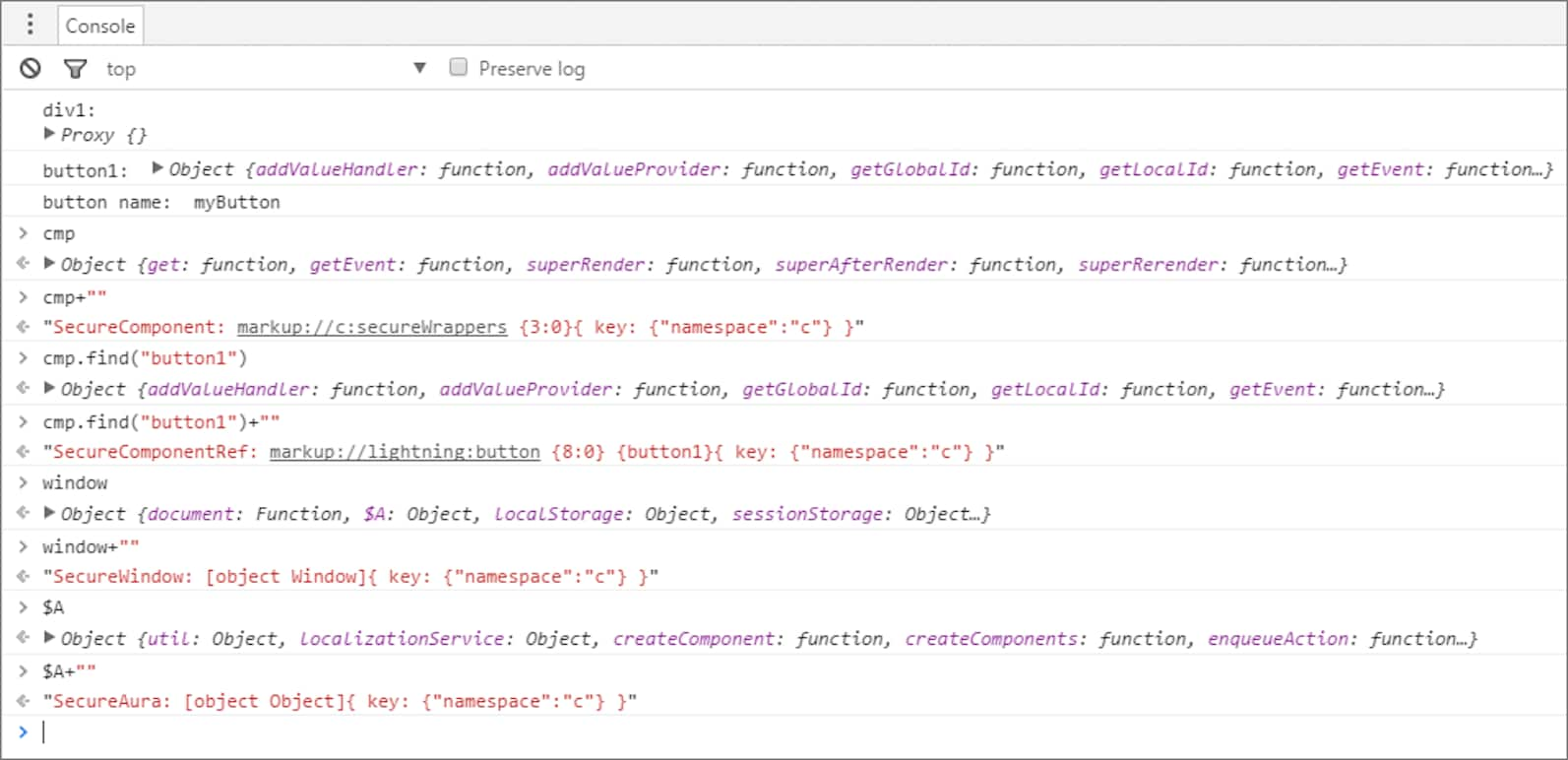
We use console.log() to look at the <div> element and the button. The <div> SecureElement is wrapped in a Proxy object as a performance optimization so that its data can be lazily filtered when it’s accessed.
We put a debugger statement in the code so that we could inspect the elements in the browser console.
Type these expressions into the browser console and look at the results.
cmp+"" returns a SecureComponent object for cmp, which represents the c:secureWrappers component.
cmp.find("button1")+"" returns a SecureComponentRef, which represents the external API for a component in a different namespace. In this example, the component is lightning:button.


 j
j