If you’ve built AI agents that rely on external tools for fetching documentation pages, querying internal APIs, or searching repositories, you’ve likely stared at your token counts in disbelief. Watch your terminal long enough during a complex task, and you’ll inevitably hit that dreaded moment: Claude Code’s auto-compact triggers much earlier than expected, or your Cursor context window fills up, causing the agent to lose its “memory” right when you need it most.
Data from documentation, web searches, and CRMs necessary to ground agent responses can easily consume tens of thousands of tokens. This influx of data clogs valuable space across a multi-turn conversation, even if all of that data is not entirely relevant to your immediate task. Managing this “context tax” is one of the hardest parts of engineering production-grade agents..
MCP+ is a server-, agent-, and task-agnostic post-processing layer that wraps around your MCP clients to eliminate tool-driven context bloat. By intercepting tool outputs and extracting only the critical information that your agent actually needs, it slashes inference costs by up to 75% with zero modifications to your existing codebase.
In this post, we’ll dive into how MCP+ works, walk through a concrete example, and show you how to get set up.
What is MCP+?
Built by Salesforce AI Research and open-sourced under Apache 2.0, MCP+ is an optimization layer for your AI workflows that is completely server, agent, and task-agnostic. Instead of flooding your agent’s context window with thousands of tokens of raw tool output, MCP+ transparently intercepts tool outputs and offloads the heavy lifting of data-sifting to high-speed, cost-effective models (like GPT-5-mini or Gemini 2.5 Flash). This helps you extract the precise data your agent needs before it ever touches your agent’s context — all configured via a simple, one-time CLI setup with zero code changes.
MCP+ doesn’t make tool calls entirely for free. Instead, it trades a massive wall of expensive, frontier-model tokens for a tiny sliver of cheaper, lightweight model tokens.
Empirical research shows that this approach cuts token usage without significantly degrading performance. In rigorous benchmarks against token-heavy payloads in the developer ecosystem, like data from Playwright (raw HTML DOM), Yahoo Finance (structured JSON), and Google Search (Serper API payloads), MCP+ maintained comparable reasoning performance across Claude 4.0 Sonnet, GPT-5, and Gemini 3 Pro Preview models, while reducing token usage by up to 75%.
How does MCP+ know what to extract?
The core breakthrough of MCP+ relies on a single, elegant concept: the expected_info argument.
When you run mcp-build-plus as part of its setup, it reads your existing MCP configuration file and generates a -plus version of each server. Your primary agent can now connect to this virtual proxy instead of the original server — using the same tools and the same schemas.
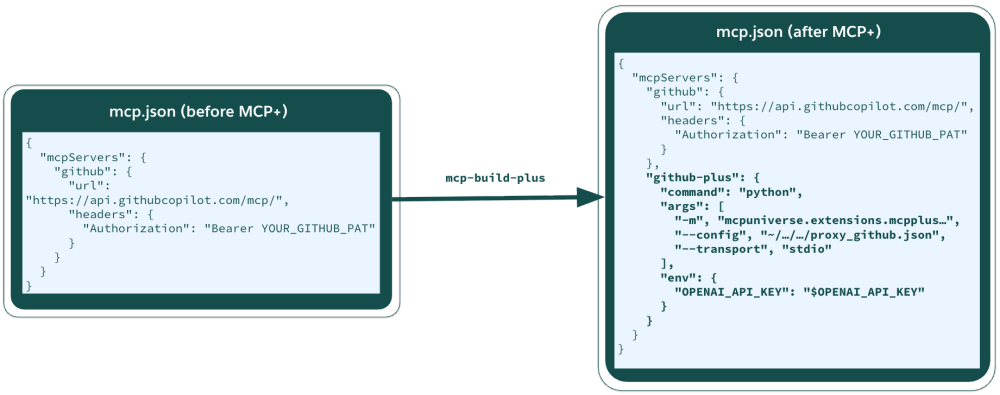
In the example above, the proxy_github.json generated keeps the details of the upstream MCP server to use and holds additional attributes needed.
Instead of requiring manual prompt engineering or workflow changes, MCP+ dynamically injects an expected_info parameter directly into each tool’s existing JSON input schema. When your primary agent reads its available tool definitions, it simply sees this as just another standard parameter.
Before MCP+:
1// Tool Call: system_logs__fetch_log_tail
2{
3 "path": "/var/log/nginx/access.log",
4  "line_count": 5000,
5}
After MCP+:
1// Tool Call: system_logs__fetch_log_tail
2{
3 "path": "/var/log/nginx/access.log",
4  "line_count": 5000,
5  "expected_info": "Look for the HTTP status code and error message associated with the failed checkout request"
6}
Because LLM agents are natively trained to follow schemas, your primary agent naturally and automatically populates this field based on its current task. Once your agent fills in expected_info, MCP+ uses it to guide what comes back. When a tool response exceeds the configured token threshold, MCP+ intercepts the raw output and routes it — along with the expected_info — to a configurable lightweight LLM. That model extracts the relevant details using two independent methods: a natural language summarisation and generated Python code that parses the raw data programmatically. Your agent receives both results in a focused, concise response instead of the full payload.
Let’s take a look at the mechanics of how this works.
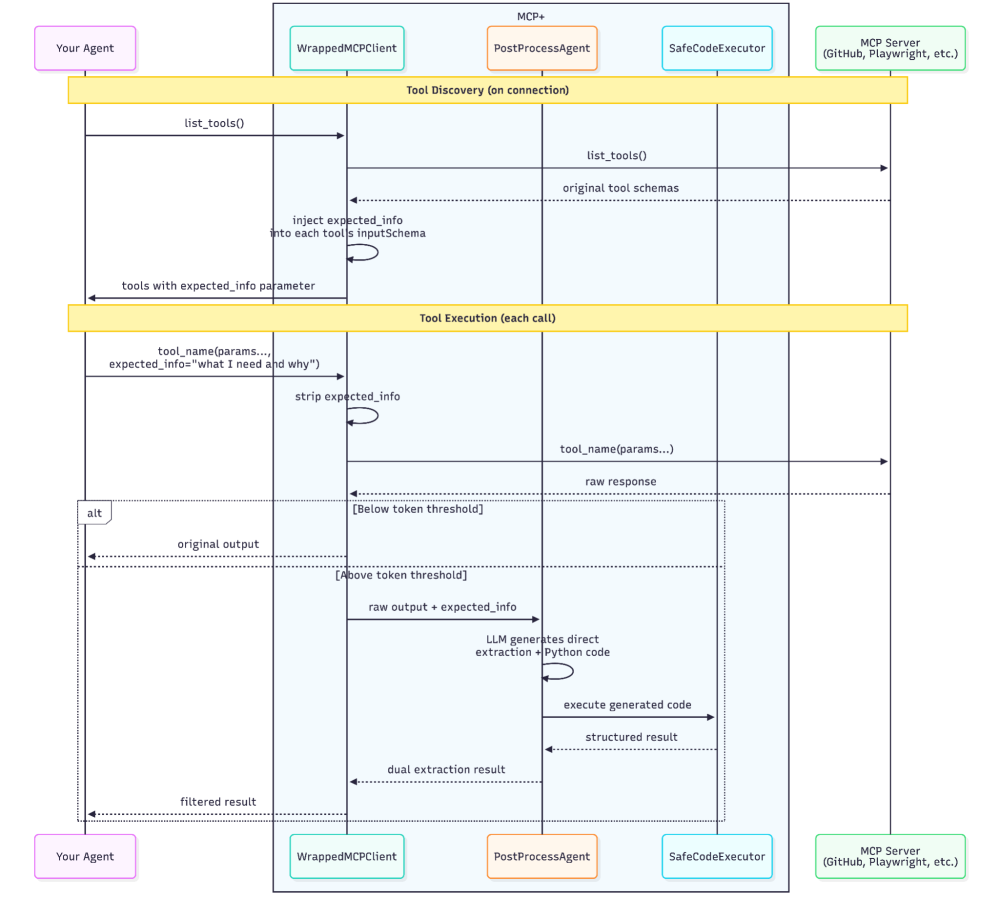
MCP+ sits between your agent and the original MCP server as a transparent interception layer. The sequence diagram shows two phases:
- Tool Discovery: This happens once when your agent connects. The MCP+ wrapped client fetches the real tool schemas from the upstream server, injects an
expected_infoparameter into each one, and exposes them dynamically.. Your agent (Cursor, Claude Code) sees these modified schemas and naturally fills in theexpected_infobased on its current task. - Tool Execution happens on every call:
- Your agent calls a tool with its normal parameters plus
expected_info. TheWrappedMCPClientstripsexpected_infoand forwards a clean request to the upstream MCP server. - The raw response comes back. MCP+ checks the token count against a configurable threshold.
- Below threshold: The response passes through unchanged. Minimal added latency.
- Above threshold: The response is routed to the
PostProcessAgent, this uses a lightweight model that produces both a direct text extraction and generated Python filtering code.
- The
SafeCodeExecutorruns the generated code in a sandbox against the raw output. - The results: both direct extraction and code-based extraction are returned to the agent.
- Your agent calls a tool with its normal parameters plus
If post-processing fails for any reason, MCP+ falls back to the original output.
Dual post-processing strategy
Rather than relying on a single extraction method, the PostProcessAgent produces two independent results:
- Direct extraction: The lightweight LLM reads the raw output alongside the
expected_infotarget to pull out the relevant text fragments. This is ideal for unstructured data, like conversational logs or documentation pages, but is occasionally lossy on structured data. - Code generation: The same LLM generates Python code that programmatically filters, parses, or transforms the raw output. This handles structured formats (JSON arrays, HTML tables, nested XML) with precision that natural language extraction can miss.
This dual approach, semantic extraction and programmatic code execution, blends the best of both worlds. If either fails, MCP+ retries automatically (up to a configurable limit). Only when both methods are exhausted does the original unfiltered output pass through. Your agent never receives less information than it would without MCP+.
The SafeCodeExecutor
The code-generation method means MCP+ is executing LLM-generated Python at runtime. This could come with some risk without some guardrails in place. The SafeCodeExecutor constrains what that code can do.
- Imports like
os.system,os.popen,subprocess,ctypes,pickle, andeval/execare blocked via string-matching before the code runs to defend against obviously dangerous operations. The code receives the raw output as adatavariable and writes its filtered result toresult. Ifresultis never set, the original data passes through unchanged.
- A 10-second execution timeout kills any long-running or recursive operations (not enforced on Windows systems). Scoped variables: the code runs in a namespace initialised with only
dataandresult.
The sandbox ensures that even if the lightweight model generates something unexpected, the code has limited access beyond the raw output string it was given.
Intelligent activation
Not every tool response needs filtering. MCP+ uses two guardrails to protect against unnecessary latency and hallucinated expansion:
- Token threshold gate: This acts as a redundancy guard to ensure that post-processing is only triggered when there is a meaningful return on investment. A configurable
token_threshold(default: 2,000 tokens) determines the minimum output size that triggers post-processing. Responses below this pass through to the agent untouched since there’s no value in routing a 200-token response through a lightweight model only to get back 180 tokens. It also avoids the risk of the post-processor misinterpreting a short, already-concise response and returning something less accurate than the original. - Output size ceiling: This guards against hallucination. The lightweight model can sometimes elaborate on source data, add explanation, or wrap extractions in verbose formatting — producing more tokens than the original. MCP+ enforces that each extracted output stays under 50% of the original token count. If both extraction methods exceed this, the original output is returned unchanged. Your agent never receives an inflated payload as a result of post-processing.
A concrete example of MCP+ in action
Say your agent is helping you triage issues on a GitHub repository, let’s say for lwc-recipes (which includes easy-to-digest code examples for Lightning Web Components).
You ask: “How many issues in the last year have had problems with deployment on trailheadapps / agent-script-recipes”.
The agent calls the GitHub MCP server’s search_issues tool with appropriate arguments.
1Arguments: {
2"query": "How many issues in the last year have had issues with deployment",
3"owner": "trailheadapps",
4"repo": "agent-script-recipes"},
5"expected_info": "The number of issues in the last year with deployment issues"
6}
The tool arguments do the heavy lifting, filtering to deployment-related issues across the repository. The agent used the tool call correctly: the GitHub MCP server successfully processes the request, returning a massive JSON payload containing six issues complete with full markdown bodies with steps to reproduce, empty template fields, reaction counts and avatar URLs. MCP+ optimizes this response on the fly, and because it knows that the agent only needs a count of deployment issues, it strips away the structural noise before the data ever hits your agent’s context window.
Without MCP+: 38,693 characters of raw JSON.
1{"total_count":6,"incomplete_results":false,"items":[{"id":4416618502,"number":98,
2  "state":"closed","state_reason":"completed","locked":false,"title":"Unable to deploy",
3  "body":"### Summary\n\nHello,\nI am trying to deploy the project on a new org without
4  success.\n\n\n\n\n\n### Salesforce Org Type\n\nDeveloper Edition Org\n\n### Steps To
5  Reproduce\n\n1. Connect Org\n2. Run deploy with : sf project deploy start -d force-app
6  \n\n### Current Behavior\n\nFailed deploy with a lot of error\nAll of the errors are
7  in the follwoing CSV file\n[errors.csv](https://github.com/user-attachments/files/
8  27572897/errors.csv)\n\n### Expected Behavior\n\n_No response_\n\n### Relevant Log  ─────────────┤\n│ AiAuthoringBundle │ ActionChaining/ActionChaining │ Not available
9  for deploy for this organization │ │\n│ AiAuthoringBundle │ ActionChaining/
10  ActionChaining │ Not available for deploy for this organization │ │\n...
11...continues for 38,693 characters with avatar URLs, event endpoints, subscription URLs, and five more issues.
With MCP+: The PostProcessAgent fires and both extraction methods return independently.
Direct extraction:
1Based on the search results, there are 6 total issues in the repository.
2Of these, 4 issues are related to deployment problems:
3
41. Issue #98 (Closed) - "Unable to deploy" - Created 2026-05-10, deployment
5   failures with AiAuthoringBundle and GenAiPromptTemplate components
62. Issue #83 (Open) - "Unable to test Custom Lightning Type Agent in Namespaced
7   Scratch Orgs" - Created 2026-04-29, compilation error when deploying to
8   namespaced scratch orgs
93. Issue #66 (Closed) - "Unable to Deploy the App to Org" - Created 2026-03-15,
10   deployment limit error
114. Issue #41 (Closed) - "The deployment of recipes fail in latest sandbox due to
12   missing default_agent_user" - Created 2026-01-09, deployment failure due to
13   missing default_agent_user configuration
14
15Additionally, Issue #58 (Open) and Issue #74 (Closed) are related to deployment/configuration concerns but are categorized as enhancements rather than pure deployment bugs.
Code-based extraction:
1{"total_issues": 6, "deployment_related_issues": 6, "issues": [
2    {"number": 98, "title": "Unable to deploy", "state": "closed", "created_at": "2026-05-10T19:37:14Z", "labels": ["bug"]},
3    {"number": 83, "title": "Unable to test Custom Lightning Type Agent in Namespaced Scratch Orgs", "state": "open", "created_at": "2026-04-29T12:43:58Z", "labels": ["bug"]},
4    {"number": 58, "title": "Add example of Service Agent and show a DX pipeline to handle the Agent user", "state": "open", "created_at": "2026-02-20T15:24:40Z", "labels": ["enhancement"]},
5    {"number": 66, "title": "Unable to Deploy the App to Org", "state": "closed", "created_at": "2026-03-15T12:01:48Z", "labels": ["bug"]},
6    {"number": 74, "title": "Replace list[object] variables with specific primitive list types", "state": "closed", "created_at": "2026-04-21T17:05:58Z", "labels": ["enhancement"]},
7    {"number": 41, "title": "The deployment of recipes fail in latest sandbox due to missing default_agent_user", "state": "closed", "created_at": "2026-01-09T23:20:27Z", "labels": ["bug"]}
8  ]}
The agent receives ~2,588 chars instead of 38,693, which is a 93% reduction. That’s with the API already doing its job: the right query, scoped to the right GitHub repository. MCP+ strips the structural noise, leaving just what’s needed: the number of deployment issues. Across a multi-turn session, where your agent makes ten or twenty tool calls, these reductions compound into meaningful token savings and a cleaner context window for reasoning.
When should you use MCP+?
MCP+ is highly effective in scenarios where your agent workflows encounter the following patterns:
- Tool outputs regularly exceed 2,000 tokens: Search APIs and data retrieval tools routinely return massive payloads where only a small fraction is relevant to the immediate task.
- Your agent only needs specific data points from verbose responses: For example, this could be pulling a single price, a specific error code, or a date out of an entire system log or documentation page.
- You are working heavily with structured data: Payloads formatted in JSON, HTML, XML, or tables are where the code-generation method shines, delivering deterministic extraction precision.
- Token costs or context window limits are a real constraint: MCP+ prioritizes keeping your primary agent’s context window clean for actual reasoning rather than hoarding raw tool payloads.
- Your agent makes multiple tool calls per session: Even a savings of just 10-15% per turn compounds across a ten- or twenty-turn conversation. Over hundreds of active sessions, that compounding effect completely transforms the long-term economics of your production architecture.
Conversely, MCP+ will deliver minimal value or introduce unnecessary overhead in workflows that match the following patterns:
- Tool outputs are already concise: If your tools return under 2,000 tokens, the post-processing overhead exceeds the savings.
- Your agent genuinely requires the full, unedited payload: If your primary agent’s explicit task is to perform an exhaustive, line-by-line analysis, a comprehensive summary, or a direct effort to compare and contrast details across a massive text block, filtering the data beforehand can be counterproductive.
- Sub-second latency is a hard requirement: Post-processing introduces at least one additional LLM round-trip into the tool lifecycle, and applications that require instantaneous, sub-second responses should opt to pass the raw payload directly to the agent.
Getting started with MCP+
MCP+ is open source under the MCP-Universe repository. Because its built-in threshold gating automatically manages when to optimize and when to step aside, you can seamlessly wrap your entire MCP client configuration without worrying about manual performance profiling. Install it today to keep your agent’s context window clean, predictable, and focused entirely on reasoning. You just need an API key from your chosen model.
MCP+ wraps both local stdio-based servers and remote HTTP/SSE servers. For stdio servers, it intercepts the stream between your agent and the upstream process. For remote servers, including hosted endpoints like GitHub’s https://api.githubcopilot.com/mcp/, you can provide the URL directly with optional auth headers, and MCP+ will abstract away the HTTP communication seamlessly.
Regardless of which server type you are running, deployment takes only a few minutes. To configure the proxy layer for your environment and start optimizing your live tool workflows, follow these steps:
Step 1: Install
1pip install mcpuniverseStep 2: Set your post-processing LLM key
1export OPENAI_API_KEY="sk-..."
2# or GEMINI_API_KEY, ANTHROPIC_API_KEY
Step 3: Build your MCP+ config
Point the CLI at your existing MCP configuration.
1mcp-build-plus --mcp-config path/to/your/mcp.jsonThat’s it. Your existing MCP servers are now wrapped — no application code changes required. Any agent that connects will see expected_info as a parameter on every tool, and large responses will be filtered automatically with MCP servers that you specify.
The CLI also accepts fine-tuning options, such as:
TABLE HERE
For example, here’s how to wrap only your Salesforce DX MCP server using Google’s Gemini Flash 2.5 as the post-processor with a 1,000-token threshold:
1mcp-build-plus --mcp-config mcp.json \
2  --llm-provider gemini \
3  --llm-model gemini-2.5-flash \
4  --token-threshold 1000 \
5  --servers salesforce-dx-mcp
The CLI creates a <server-name>-plus entry in your MCP config that runs a Python process via stdio. Your IDE connects to this virtual proxy, which mirrors all upstream tool schemas with expected_info injected and routes large responses through the post-processor. The original server entry remains untouched.
Programmatic usage of MCP+
The CLI handles most use cases, but if you need to integrate into an existing Python pipeline, you can also configure MCP+ programmatically. Here’s how to code the GitHub example above:
1from mcpuniverse.extensions.mcpplus.wrapper import MCPWrapperManager, WrapperConfig
2from mcpuniverse.llm import OpenAIModel
3
4wrapper_config = WrapperConfig(
5    enabled=True,
6    token_threshold=2000,
7    max_iterations=3
8)
9
10manager = MCPWrapperManager(
11    config={
12        "github": {
13            "stdio": {
14                "command": "./github-mcp-server",
15                "args": ["stdio"]
16            },
17            "env": {"GITHUB_PERSONAL_ACCESS_TOKEN": os.environ["GITHUB_TOKEN"]}
18        }
19    },
20    wrapper_config=wrapper_config
21 )
22
23llm = OpenAIModel(config={
24    "model_name": "gpt-5-mini",
25    "api_key": os.environ["OPENAI_API_KEY"]
26})
27manager.set_llm(llm)
28
29client = await manager.build_client("github")
30result = await client.execute_tool(
31    tool_name="search_issues",
32    arguments={
33        "query": "deploy",
34        "owner": "trailheadapps",
35        "repo": "agent-script-recipes",
36        "expected_info": "How many issues in the last year have had issues with deployment"
37    }
38)
Resources
- GitHub repository: MCP Universe
- Documentation: MCP+ home page
- Documentation: Token Counting
- Documentation: Context Windows
About the authors
Prathyusha Jwalapuram is an Applied Scientist with the Salesforce AI Research team specializing in code agents. Her work focuses on pushing the boundaries of agentic research and optimizing Apex code generation. She developed MCP+ to bridge the gap between powerful tool-calling protocols and the practical constraints of token costs and context window management in production environments.
Dave Norris is a Developer Advocate at Salesforce. He’s passionate about making technical subjects broadly accessible to a diverse audience. Dave has been with Salesforce for over a decade, has over 40 Salesforce and MuleSoft certifications, and became a Salesforce Certified Technical Architect in 2013.